Updated 19 October 2026. Every price below was read on the vendor’s own pricing page that day.
The best SEO automation tool is the one that takes a boring, repeated task off your plate and still lets you decide. “Automation” covers very different jobs: research, audits, content, fixes, rank tracking, workflows and reports. This guide sorts 12 tools into 7 categories, gives the real starting price of each, its pros and cons, shows how to get it running in 3 steps, and links to the official tutorial so you can start today.
Quick answer: which SEO automation tool for which job?
| Your job | Pick | Starts at |
|---|---|---|
| All-in-one research and tracking | Semrush, Ahrefs or SE Ranking | $29 to $139 a month |
| Find technical errors on a schedule | Screaming Frog or Sitebulb | Free, then $18 a month |
| Write and optimize content | Surfer or Clearscope | $49 to $129 a month |
| Apply fixes on your site for you | Hack The SEO (WordPress) or Alli AI (any CMS) | 249 € or $249 a month |
| Track rankings every day | AccuRanker | $224 a month |
| Connect tools together | Zapier | Free, then $19.99 a month |
| Automatic reports | Looker Studio | Free |
30-second quiz: which tool are you?
Answer each question, then open it to see where to go.
1. “I don’t know what to write about.”
You need a research suite: start with the Semrush, Ahrefs or SE Ranking section below.
2. “My site has errors, but I don’t know which ones.”
You need a crawler: Screaming Frog is free up to 500 URLs. Schedule it once a week and forget it.
3. “I know what’s broken, I just never find the time to fix it.”
You need a tool that applies the fix. On WordPress, that is the job of Hack The SEO. On another CMS, look at Alli AI.
4. “I publish a lot and want each article to rank.”
A content optimizer (Surfer or Clearscope) plus an internal linking tool.
5. “My boss or my client wants a report every Monday.”
Looker Studio connected to Search Console: free, and it updates on its own. See recipe 1 below.
What is an SEO automation tool?
An SEO automation tool does a task you would otherwise repeat by hand: collecting keywords, crawling your site, scoring a draft, fixing a title, checking positions, building a report. There are two levels:
- Tools that tell you. They find the problem and list it. You still do the work.
- Tools that do it. They apply the change on your site, ideally after you approve it, and let you undo it.

Most of the 12 tools below are in the first group. Only a few act on the site. Knowing which group you need saves you money.
How we chose and checked these tools
We build an SEO plugin, so we are not neutral, and we would rather say it. Here is what we did and what we did not do:
- We read each vendor’s pricing page and help pages on 19 October 2026. Prices change often: check the link before you buy.
- We use Hack The SEO every day on our own site. The other tools are described from their public pages and documentation, not from a long test by us. That is why there is no score out of 5 here.
- Each tool gets its pros and cons, ours included.
- Each “Eric’s take” is the opinion of Eric Ibanez, co-founder of Hack The SEO and co-author of the book “Le SEO pour booster sa croissance” (Dunod, 2025): who the tool suits, and who it doesn’t.
- We grouped tools by the job they automate, not by a score. There is no “number one” here, only the right tool for a job.
Category 1: all-in-one SEO suites
They automate research, rank tracking, site audits and alerts. They don’t change your site.
1. Semrush
- Best for: agencies and teams that want research, tracking and audits in one place.
- Price: from $139 a month, or $117.33 a month billed yearly.
- Get it running in 3 steps: create a project with your domain; turn on Site Audit with a weekly schedule; add your main keywords to Position Tracking with email alerts.
- Official tutorials: Semrush Academy and the Knowledge Base.
- Eric’s take: the Swiss army knife. For an agency, it pays for itself. For a single WordPress site, you will pay for many features you never open.
| Pros | Cons |
|---|---|
| Research, tracking and audits in one place | Expensive for a single site ($139 a month) |
| Weekly audits and email alerts run on their own | Doesn’t fix anything on your site |
| Free Academy to learn the tool | Many features a small site will never use |
2. Ahrefs
- Best for: backlink monitoring and content research.
- Price: Starter at $29 a month; full plans from $129 a month (Lite).
- Get it running in 3 steps: add your site to a project; schedule Site Audit; set alerts for new and lost backlinks and for your keywords.
- Official tutorials: How to use Ahrefs and Ahrefs Academy.
- Eric’s take: the reference for links. If your competitors win thanks to their backlinks, this is where to look first.
| Pros | Cons |
|---|---|
| Strong backlink data and alerts | Each extra user costs $40 to $80 a month |
| A $29 Starter plan to try it | Usage is capped by credits on the lower plans |
| Free Academy and tutorials | Doesn’t fix anything on your site |
3. SE Ranking
- Best for: freelancers and small agencies that need client reports at a lower price.
- Price: from €109 a month, or €87.20 a month billed yearly, with a 14-day free trial.
- Get it running in 3 steps: create a project; connect Search Console and Analytics; schedule a white-label report to your client.
- Official tutorials: SE Ranking Academy and the Help center.
- Eric’s take: very good value to start a consulting business, if you accept a little less depth.
| Pros | Cons |
|---|---|
| Lower price than the big suites, 14-day free trial | Broad rather than deep on each module |
| White-label reports for clients | Doesn’t fix anything on your site |
| SEO and AI visibility in the same plans | Extra seats are paid on top |
Category 2: technical crawlers
They crawl your site like Google does and list errors: broken links, redirects, missing titles, duplicate pages.
4. Screaming Frog SEO Spider
- Best for: deep technical audits on your own computer.
- Price: free up to 500 URLs; $279 a year per licence beyond that.
- Get it running in 3 steps: download and crawl your home page; open File, then Scheduling, then Add; choose a weekly interval and an automatic export to Google Sheets or Looker Studio.
- Official tutorials: User guide, including scheduling and tutorials.
- Eric’s take: the free version is enough for most small sites. Schedule it, and only read the errors that touch the pages that sell.
| Pros | Cons |
|---|---|
| Free up to 500 URLs | Technical: it takes time to learn |
| Scheduled crawls built in | Runs on your own computer |
| Very detailed data: redirects, canonicals, titles | Reports need some formatting |
5. Sitebulb
- Best for: visual audits with clear priorities, easy to show a client.
- Price: Lite from $18 a month, Pro from $42 a month; Sitebulb Cloud from $125 a month.
- Get it running in 3 steps: create a project; run your first audit; connect Search Console and read the “Hints” by priority.
- Official tutorials: Sitebulb documentation and product training.
- Eric’s take: easier to explain than Screaming Frog. If you must walk someone who doesn’t do SEO through an audit, it’s a good pick.
| Pros | Cons |
|---|---|
| Clear priorities (“Hints”) and visual reports | Lite is limited to 10,000 URLs per audit |
| Starts at $18 a month | Scheduled crawls at scale need Cloud ($125 a month) |
| MCP access to bring audits into Claude | Doesn’t fix anything on your site |
Category 3: content optimizers
They compare your draft to the pages that rank and tell you what is missing: topics, questions, length.
6. Surfer
- Best for: writers who want a live score while they write.
- Price: from $49 a month billed yearly (Discovery); main plans from $99 a month billed yearly.
- Get it running in 3 steps: type your target keyword; open the Content Editor; write until the score turns green, then check facts yourself.
- Official tutorials: Surfer Knowledge Base and Surfer Academy.
- Eric’s take: useful so you forget nothing, risky if you write for the score instead of your reader.
| Pros | Cons |
|---|---|
| Live score while you write | A green score is not a ranking |
| Entry plan from $49 a month billed yearly | No technical SEO |
| Free masterclasses in its Academy | Easy to write for the tool instead of the reader |
7. Clearscope
- Best for: content teams that also track content decay.
- Price: from $129 a month, 14-day free trial.
- Get it running in 3 steps: create a report for a keyword; write or paste your draft in the editor; add your pages to tracking to spot those that lose traffic.
- Official tutorials: Clearscope support.
- Eric’s take: mostly worth it for a blog that already has many articles to maintain.
| Pros | Cons |
|---|---|
| Spots articles that lose traffic | Starts at $129 a month |
| Simple editor, 14-day free trial | No technical SEO |
| No contract | Limited number of tracked pages on the entry plan |
Category 4: tools that apply the fixes
This is where automation goes one step further: the tool changes your pages. The key question here is control: who approves, and can you undo?
8. Hack The SEO (WordPress)
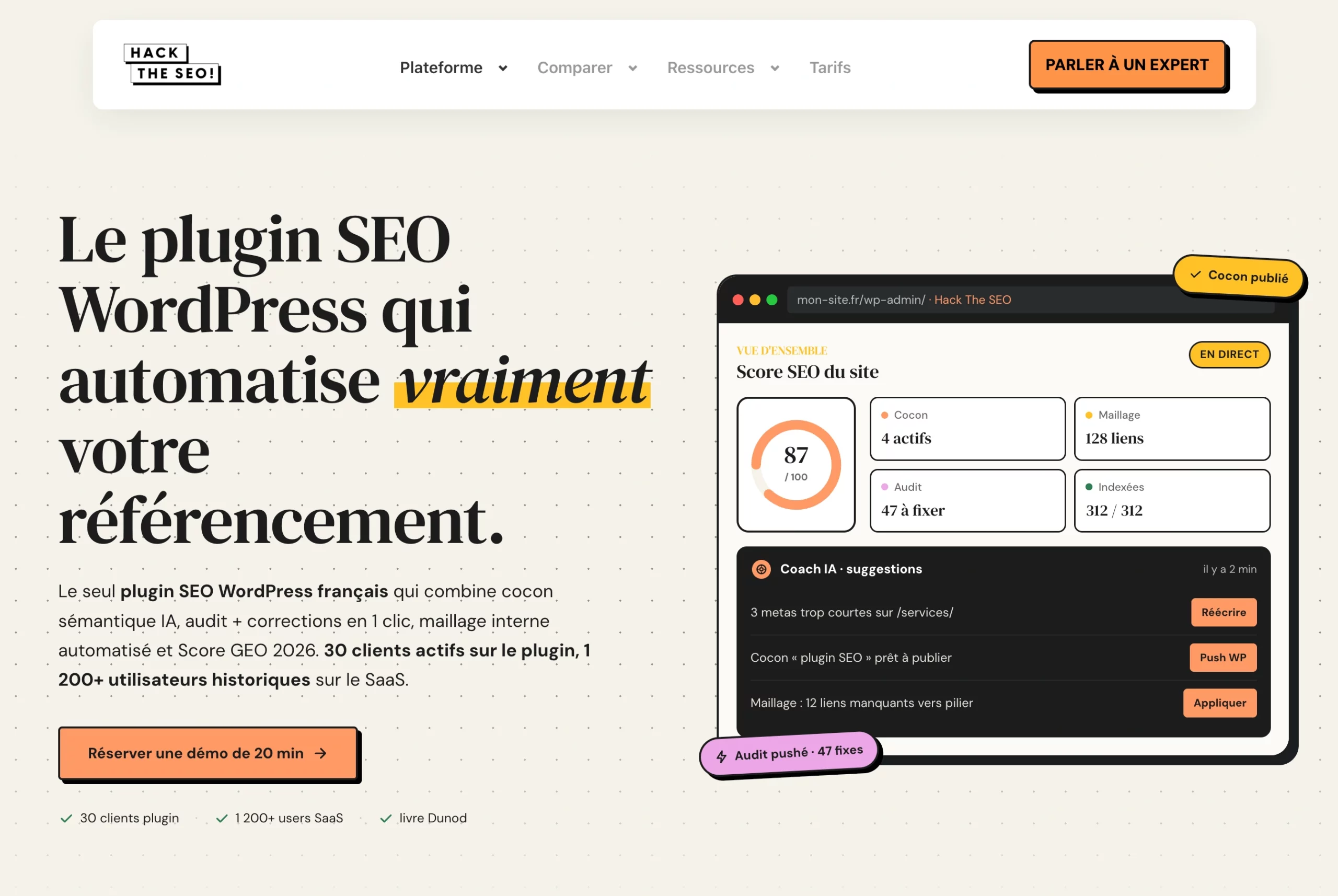
Best for: WordPress sites that want SEO and AI visibility to run on their own, without losing control. Disclosure: this is our plugin.
It finds the topics that bring traffic, writes the articles, links your pages together and fixes what blocks them. You choose how much you approve:
- Every action: you click yes on each change.
- Once a week: you approve the week’s plan in one click, then the plugin runs it: topics, articles, internal links, fixes.
- Autonomous mode: after your first 10 approved actions, it applies changes on its own, within the rules you set.

In every mode, each action is logged and can be undone for 30 days.
- Price: 249 € excl. VAT a month, no commitment. Want us to run it all for you? The SEO GEO Pilot starts at 490 € excl. VAT a month.
- Get it running in 3 steps: book a 20-minute video demo; install the plugin and connect Search Console; approve the first plan.
- Tutorials: WordPress SEO audit with Claude (MCP), step by step and how the one-click fixes work.
- Eric’s take: we built it because we were tired of error lists nobody fixes. Start by approving each action, then move to weekly approval once you trust it.
| Pros | Cons |
|---|---|
| Applies the fixes, not just a list | WordPress only |
| You choose your level of control, every action can be undone for 30 days | No self-serve signup: you start with a demo |
| The SEO GEO Pilot can run it all for you | More expensive than a free SEO plugin |
9. Alli AI
- Best for: agencies that want on-page changes on any CMS without a developer.
- Price: from $249 a month on yearly billing ($2,990 a year, 5 sites).
- Get it running in 3 steps: add its code snippet to your site; review the recommendations; approve the ones you want to go live.
- Official tutorials: Alli AI helpdesk.
- Eric’s take: a good option if you are not on WordPress. Check what happens to your pages the day you remove the script.
| Pros | Cons |
|---|---|
| Works on any CMS | From $249 a month, billed yearly |
| You approve changes before they go live | Changes run through a script on top of your site |
| 5 sites included in the first plan | Your changes depend on the script staying installed |
Category 5: rank tracking
10. AccuRanker
- Best for: agencies that need fresh positions every day on thousands of keywords.
- Price: from $224 a month (Professional, 2,000 keywords).
- Get it running in 3 steps: import your keywords; tag them by page or topic; schedule a weekly report.
- Official tutorials: AccuRanker help guides.
- Eric’s take: for a single site, free Search Console already gives you the essentials. AccuRanker pays off when you manage many clients.
| Pros | Cons |
|---|---|
| Fresh positions every day | Starts at $224 a month |
| Tags and filters to group keywords | Tracking only, no audit |
| Search Console and Analytics connected | Too much for a single small site |
Category 6: workflow automation
11. Zapier
- Best for: connecting your SEO tools to the rest of your stack without code.
- Price: free forever (100 tasks a month), Professional from $19.99 a month.
- Get it running in 3 steps: pick a trigger (for example, a new post published); pick an action (post it to Slack, add a row to a sheet); turn the Zap on.
- Official tutorials: Zapier quick-start guide.
- Eric’s take: perfect for the small chores around SEO: alert the team, archive a report, create a task.
| Pros | Cons |
|---|---|
| Free plan to start | Doesn’t do SEO by itself |
| No code needed | The free plan stops at 100 tasks a month |
| Connects your SEO tools to your other apps | Long chains of Zaps get hard to follow |
Category 7: automatic reporting
12. Looker Studio
- Best for: a free report that updates itself.
- Price: free.
- Get it running in 3 steps: create a report; add the Search Console connector; share it or schedule it by email.
- Official tutorial: Connect to Search Console.
- Eric’s take: if you have no tool yet, start here: 15 minutes, zero cost.
| Pros | Cons |
|---|---|
| Free | Shows data, doesn’t tell you what to do |
| Updates itself from Search Console | Building good charts takes some time |
| Sends the report by email on a schedule | No SEO advice built in |
Bonus: AI assistants and MCP
The big change of 2026: tools now plug into AI assistants like Claude and ChatGPT through MCP, a standard way to give an assistant access to a tool. On their own pages we saw MCP announced by Sitebulb, Surfer and AccuRanker. In practice, you can ask “which of my pages lost clicks this month?” and get the answer from your real data. Our step-by-step guide shows it on a WordPress site: WordPress SEO audit with Claude (MCP).
The 12 tools at a glance
| Tool | Category | Acts on your site? | Starting price (19/10/2026) | Watch out for |
|---|---|---|---|---|
| Semrush | Suite | No | $139/mo ($117.33 yearly) | Price for a single site |
| Ahrefs | Suite | No | $29/mo Starter, $129/mo Lite | Extra users and credits |
| SE Ranking | Suite | No | €109/mo (€87.20 yearly) | Less depth per module |
| Screaming Frog | Crawler | No | Free, then $279/year | Learning curve |
| Sitebulb | Crawler | No | $18/mo Lite | Scale needs Cloud |
| Surfer | Content | No | $49/mo yearly | Writing for the score |
| Clearscope | Content | No | $129/mo | Price of the entry plan |
| Hack The SEO | Fixes (WordPress) | Yes, with your approval | 249 €/mo excl. VAT | WordPress only, demo first |
| Alli AI | Fixes (any CMS) | Yes, with your approval | $249/mo yearly | Depends on its script |
| AccuRanker | Rank tracking | No | $224/mo | Tracking only |
| Zapier | Workflows | No | Free, then $19.99/mo | Task limits |
| Looker Studio | Reports | No | Free | No advice, only data |
3 automation recipes you can set up today
Recipe 1: a Monday report that builds itself (free, 15 minutes)
- In Looker Studio, create a blank report and add the Search Console connector.
- Add 3 charts: clicks over 28 days, top pages, top queries.
- Use “Schedule email delivery” to send it every Monday at 8 am.
Recipe 2: a weekly crawl that warns you (free up to 500 URLs, 10 minutes)
- In Screaming Frog, open File, then Scheduling, then Add.
- Enter your site, pick “weekly”, and choose the exports (broken links, missing titles).
- Send the exports to Google Sheets and check the sheet once a week.
Recipe 3: an SEO audit by chatting with Claude (WordPress, 20 minutes)
- Connect your WordPress site to Claude through an MCP server.
- Ask: “list my pages with impressions but no clicks in the last 28 days”.
- Pick 3 pages and ask for a new title for each, then approve the ones you like.
The full walkthrough, with screenshots, is in our Claude MCP audit guide.
What you should never automate
- Your positioning. Which topics are yours, and which are not.
- Facts and claims. Prices, numbers, results. An AI draft can invent them.
- Deleting or redirecting pages. Check 90 days of impressions first.
- Your brand voice. Readers notice generic text fast.
- The final yes. Even in autonomous mode, set the rules and read the log.
The rule we follow: the tool proposes, you set the rules, and every change can be undone.
What our own data says
On our own site, hacktheseo.com, AI robots made 8,767 visits in 28 days (30 August to 26 September 2026). Google, Bing and the other search engines made 3,939. Robots that feed AI answers now read the site more than twice as often as classic search engines. For automation, this means one thing: structure counts. Clear headings, direct answers and clean internal links help both Google and AI tools, and these are exactly the repeated tasks worth automating. A robot visit is not a citation, and no tool can promise one. If you want to go further, read how to rank in AI Overviews.
Frequently asked questions
What is the best automated SEO tool?
It depends on the job: a suite for research, a crawler for errors, a fix tool to apply changes. For a WordPress site that wants the work done, pick a tool that applies fixes with your approval and lets you undo them.
What are the top 5 tools for SEO?
A practical starter stack: Search Console (free), one research suite, one crawler, one tool that applies fixes, and Looker Studio for reports.
Can SEO be fully automated?
A large part can: audits, reports, links, many fixes, even weekly plans. Strategy, facts and the rules the tool follows should stay with a person.
Are free SEO automation tools enough?
For a small site, yes: Search Console, Screaming Frog (500 URLs), Looker Studio and Zapier’s free plan cover the basics. You pay when you want the tool to do the work.
Is SEO dead now with AI?
No. People still search, and AI assistants still read websites to answer. Clear, accurate and well-linked pages feed both.
How long before automation shows results?
Count several weeks. Google needs time to recrawl, and a fair measure needs at least 28 days of Search Console data.
Want to see SEO run on your own WordPress site, at the level of control you choose? Talk to an expert in a free 20-minute video demo. For a wider look at plugins, see our WordPress SEO plugin comparison and our WordPress SEO plugin.