
The free WordPress SEO plugin that shows you which AI bots read your pages.
GPTBot, ClaudeBot and PerplexityBot do not run JavaScript, so your analytics never sees them. Hack The SEO reads the request on your server and writes every visit into your own database. Then it scores each page on how quotable it is, finds the pages competing against each other, and handles the whole technical SEO layer. All of it free, no account, GPL.
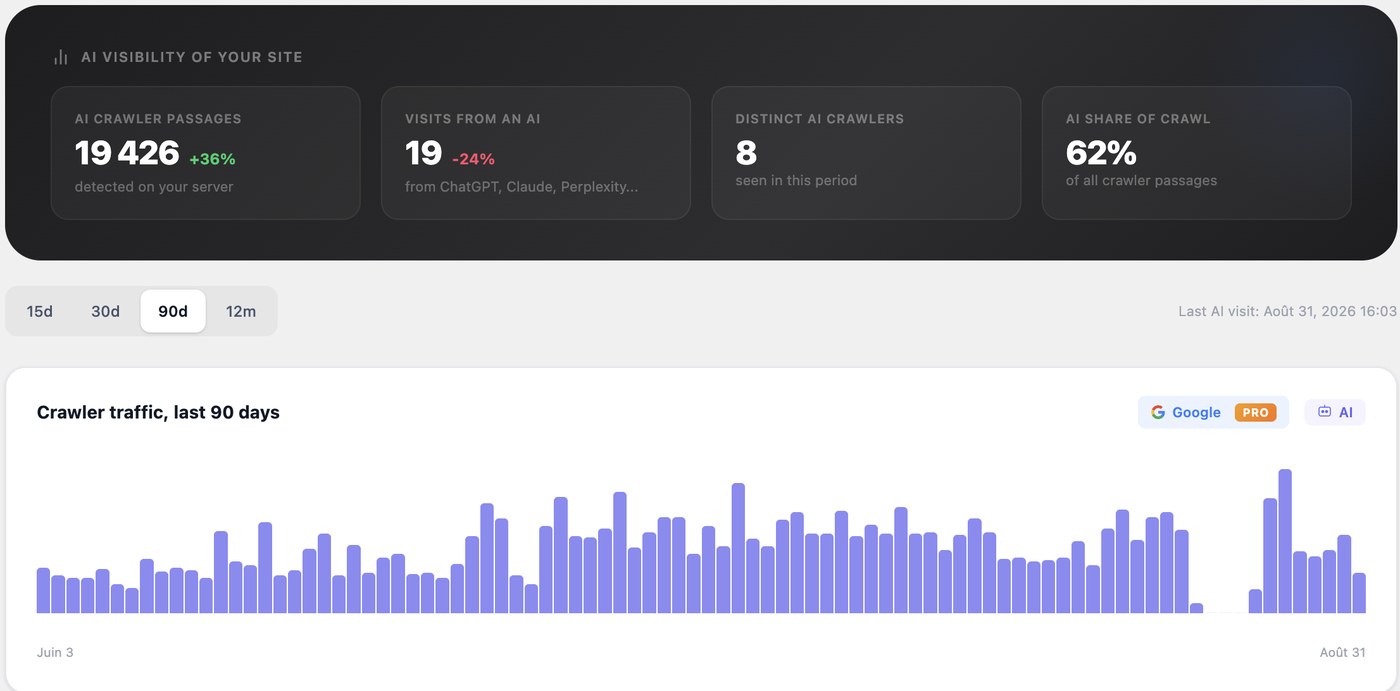
- 18AI user agents matched, server-side
- 60+JSON-LD schema types generated
- 12read-only MCP abilities for Claude
- 0accounts, keys or subscriptions
What the free WordPress SEO plugin actually does
Hack The SEO is a free WordPress SEO plugin published on the WordPress.org directory under the GPL. It does the whole technical SEO layer you expect from any plugin in this category, and it adds three things the four big free plugins do not give you at all: a server-side log of every AI crawler that reads your site, a GEO score per page, and a keyword cannibalization report. Everything described on this page works in the free version, permanently, without an account and without an API key.
It is built to be installed today, on the site you already have, next to the SEO plugin you already run. There is nothing to migrate, nothing to configure and nothing to cancel.
Why your analytics cannot see AI crawlers
GPTBot, ClaudeBot and PerplexityBot do not execute JavaScript. A JavaScript analytics tool is therefore structurally incapable of seeing them: the tag never fires, so the visit never exists as far as the report is concerned. Whatever your analytics tells you about GPTBot, it is guessing.
Hack The SEO reads the User-Agent on template_redirect, on your server, before any script would have run,
and writes the URL and the timestamp into a table in your own database. Eighteen user agents are matched, from
OpenAI, Anthropic, Perplexity, Apple, Google, Meta, Cohere and Common Crawl. Only agents these companies really send:
Google-Extended is a robots.txt token rather than a crawler, so counting it would count nothing.
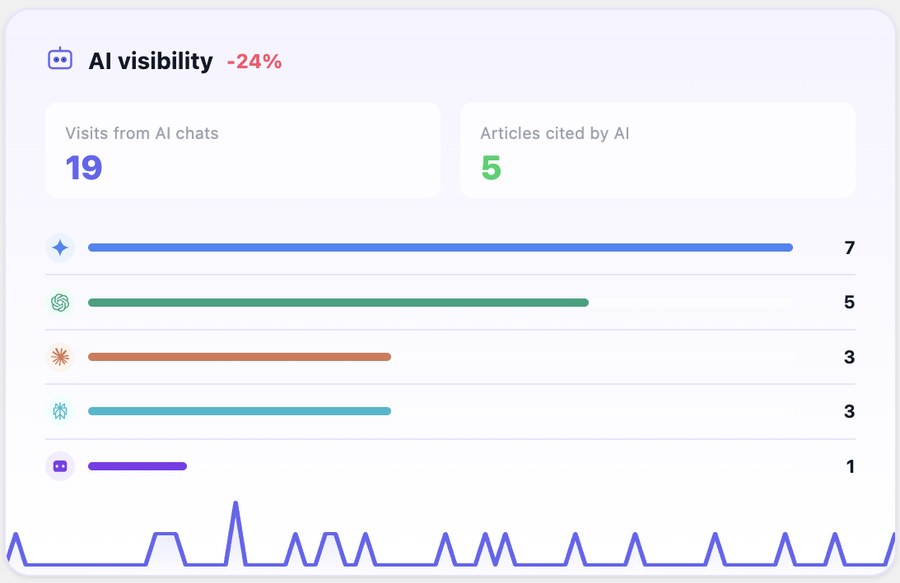
Human visits arriving from an AI chat are counted separately, through the referrer, so you see the crawler and the click it eventually sent.
Other plugins offer you a switch to block AI crawlers. This one tells you whether they came, on which URLs, and how often.
The GEO score: which of your pages are worth quoting
GEO, generative engine optimization, sometimes called AEO, is the work of making a page a generative engine can read, understand and quote. Classic SEO optimises for a ranked list of links; GEO optimises for being the source quoted inside the answer. Each of your pages is scored out of 100 on six questions:
- Does the page answer its question explicitly and early?
- Is that answer above the fold, or buried under four paragraphs of preamble?
- Are there stable facts that can be quoted and attributed?
- Is there a definition block a model can lift as it stands?
- Is the structure parseable by a machine?
- Is the page fresh enough to be worth citing?
The rules are plain PHP inside the plugin. You can open the file and read them. No model decides your score, no API key is involved, and nothing is sent anywhere to compute it. The failing criteria are named, page by page, so the score is a to-do list rather than a verdict. Full detail on the GEO score for WordPress.

Keyword cannibalization, detected for free
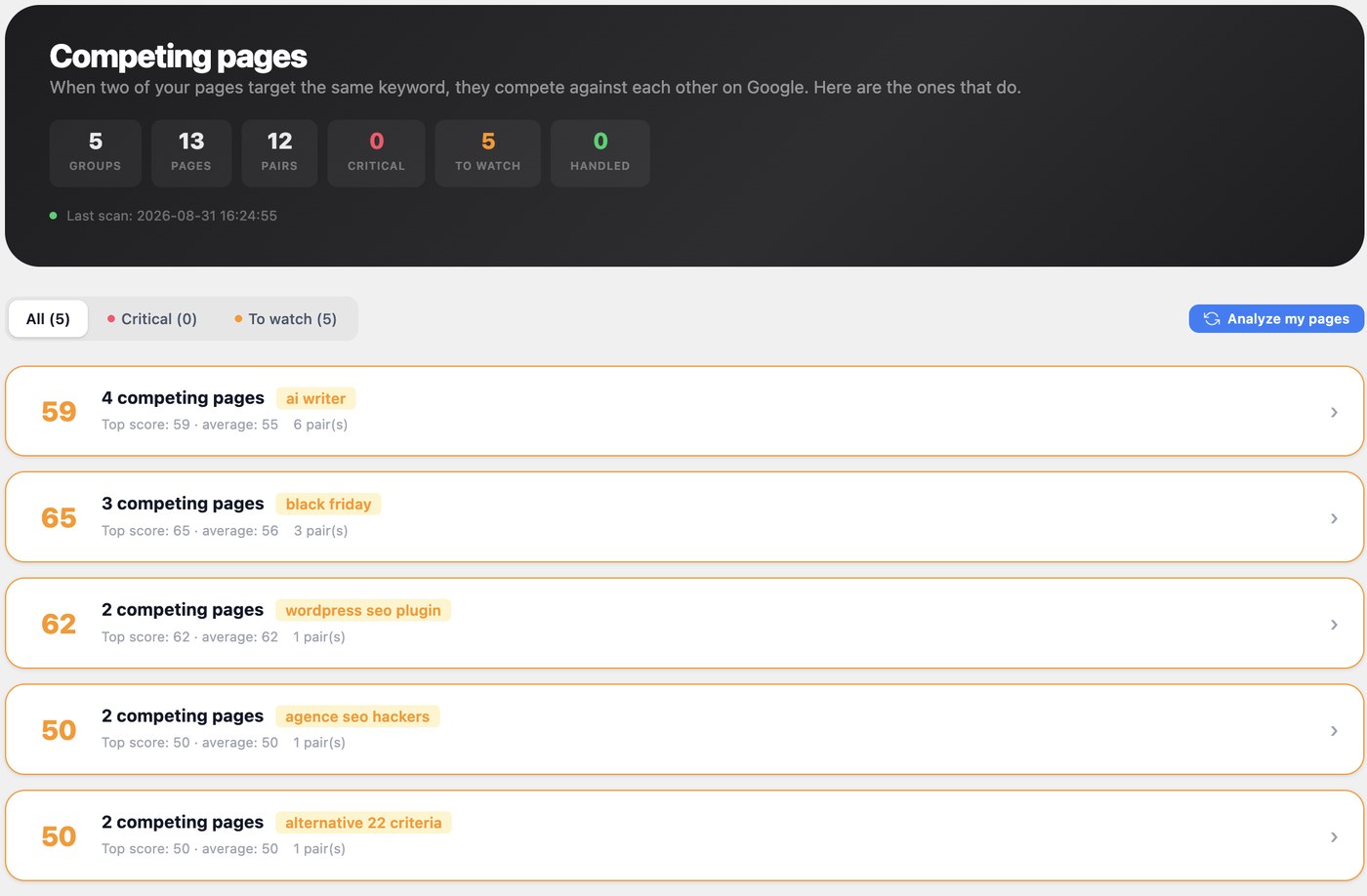
Keyword cannibalization is when two or more of your own pages target the same query, so search engines have to pick between them and both underperform. It is one of the most common reasons a site with plenty of content has no rankings, and it is almost always invisible from inside the editor.
The plugin compares focus keywords and title similarity to find competing pairs, measures how much their content actually diverges, and recommends what to do with each pair: merge them, differentiate them, redirect one into the other, or leave them alone because they genuinely serve different intents. All computed in PHP on your own server, with no embeddings and no external API. In the big four, this is a paid feature or absent entirely.
And the whole technical SEO layer, in the same free plugin
None of the above replaces the basics, so the basics are all there and none of them is held back for a paid tier:
- JSON-LD schema: 60+ types generated automatically from what is already on the page, configurable per page, so your pages are eligible for rich results.
- XML sitemaps: sitemap index, one sitemap per content type, image, video and news extensions, and an XSL stylesheet so a human can read it.
- Redirects and a 404 monitor: 301, 302, 307 and 410, regex rules for bulk migrations, CSV import and export, and one-click 404-to-redirect. Served in PHP, so your
.htaccessis never touched and the behaviour is identical on Apache, Nginx and LiteSpeed. - Meta titles and descriptions: templates, variables and a live SERP preview, plus Open Graph and Twitter Cards on every post, page and custom post type.
- On-page audit: 21 checks in the editor, with a Google score and an AI citability score side by side.
- Alt text auto-fill: images published without alt text get one, derived from the file name, the title or the focus keyword, and your own alt text is never overwritten.
- Orphan detection: pages with no inbound internal link are flagged, because a page nothing links to is a page nothing finds.
- llms.txt and Markdown pages:
/llms.txtgenerated from your real content rather than a static template, plus a Markdown version of every page at/your-page.md, the format an LLM parses most reliably and most cheaply. Neither is written to disk. - IndexNow: ping Bing, Yandex, Naver, Seznam and Yep the moment you publish. Off until you switch it on yourself.
- Canonicals, breadcrumbs, robots and noindex: per post, per type, per taxonomy.
- A weekly report by email: once a week your own site tells you how many AI crawlers came, on how many pages, how many visitors arrived from an AI chat, and which broken links appeared. Sent by WordPress, from your site, to you. Opt-in, with one-click unsubscribe.
- WooCommerce: Product, Offer and AggregateRating schema where the data genuinely exists, and shop-aware sitemaps.
What it will not do, and will not pretend to
It does not promise you a ranking or a position: nobody can, and anyone who does is selling something.
It does not write your content for you, suggest internal links, or track your rankings. It does not make you
"visible in ChatGPT" by dropping an llms.txt on your server, because that claim has no evidence behind it.
And it does not block AI crawlers. It measures them.
If what you are missing is cannibalization detection, a citability score or real AI-crawler measurement, computed locally with nothing sent to a third party, this is the free plugin that has it. If what you mostly want is AI-generated content, it is not, and the commercial version is a separate product with its own page.
Ten seconds, one command, no faith required.
Everything on this page is built the same way: if we claim it, you can check it.
- 1 Activate the plugin Install it from your WordPress admin and activate it. Nothing to configure, no account to create, no key to paste.
- 2 Send yourself a fake crawler Run one line in a terminal. You are asking your own site for a page, announcing yourself as GPTBot.
- 3 Refresh the AI visibility screen The row is there, with the page and the timestamp. That is the whole mechanism, and there is nothing else behind it.
Three measurements the big four do not have.
And because none of the three produces any front-end output, all three keep working even when another SEO plugin is in charge of your pages.
-
The AI crawler log
Eighteen user agents recorded server-side, with the URL and the timestamp, in your own database. GPTBot, ChatGPT-User, OAI-SearchBot, ClaudeBot, Claude-User, Claude-SearchBot, PerplexityBot, Perplexity-User, Applebot, CCBot, Bytespider and seven more.
No beacon, no tracking script -
The GEO score, per page
Out of 100, on six criteria, with the failing ones named. The rules are readable PHP in the plugin: no model decides your score and nothing leaves your server to compute it.
6 criteria · computed locallyHow the GEO score works → -
The cannibalization report
Which of your pages compete against each other, how far apart their content really is, and what to do with each pair: merge, differentiate, redirect, or leave alone.
No embeddings, no external APISee the cannibalization report →
Keep Yoast. Add the layer it does not have.
Nobody should have to rip out a working SEO plugin to find out whether ChatGPT reads their pages. So this one does not ask you to.
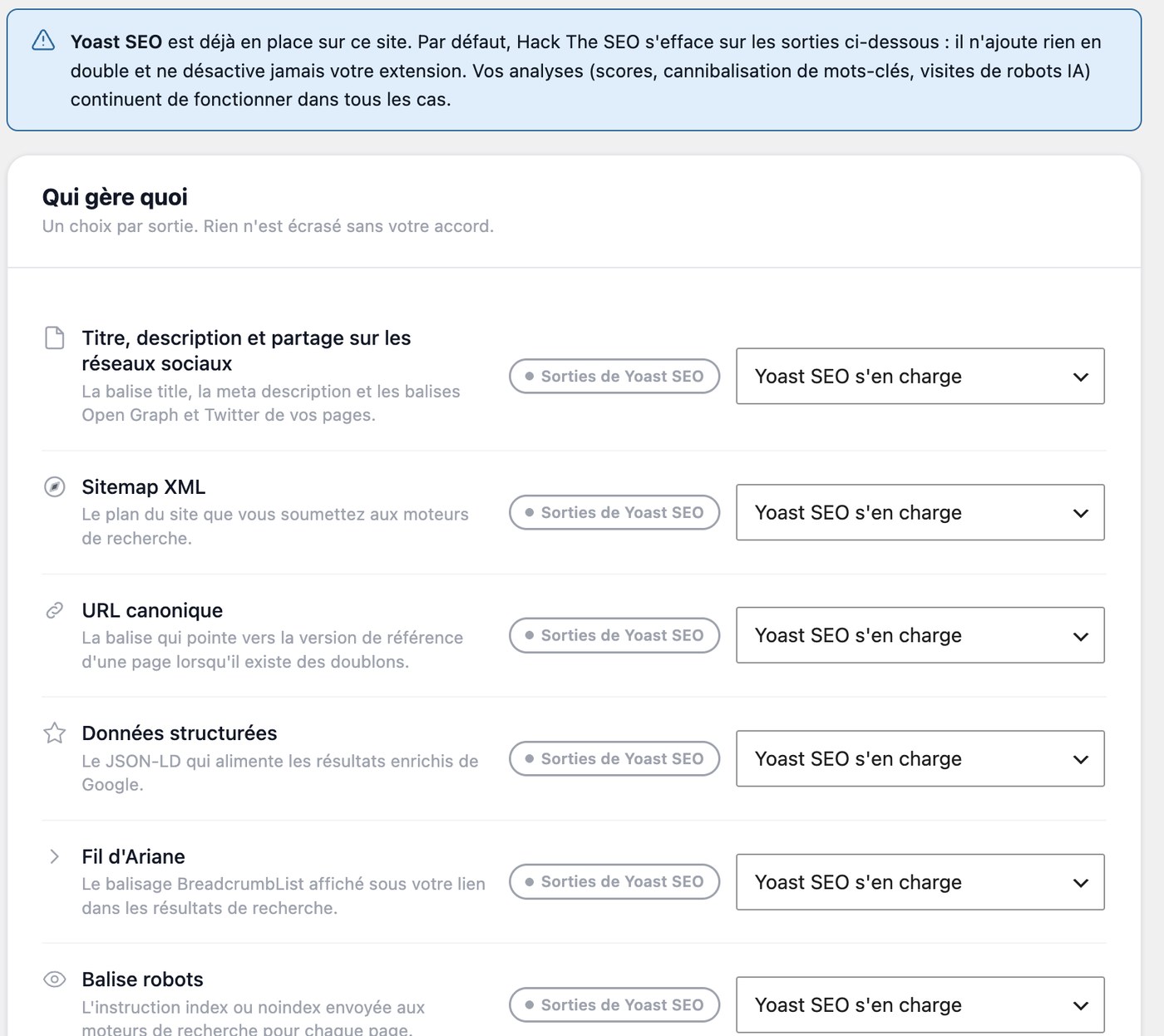
On activation it detects the plugin already in place and stops emitting whatever that plugin handles: meta tags, canonical, schema, sitemap, breadcrumbs, robots. No duplicate title tags, no duplicate schema, nothing to configure. It never deactivates your plugin and never touches its settings.
What you came for works from day one, because the crawler log, the GEO score and the cannibalization report produce no front-end output at all, so there is nothing to overlap. The Compatibility screen lets you take any module back, one by one, and your choice always wins.
Switch over, and bring your data with you.
Install Hack The SEO while your current plugin is still active, open the Migration screen, and run the import. It reads meta titles and descriptions, meta robots, canonical URLs, focus keywords, cornerstone flags, redirects and Open Graph fields.
It counts what it will import, per type, before writing anything, so you see the exact scope first. It never deletes the source data, which is what makes the move reversible: import first, deactivate second, in that order.
Read the migration guide →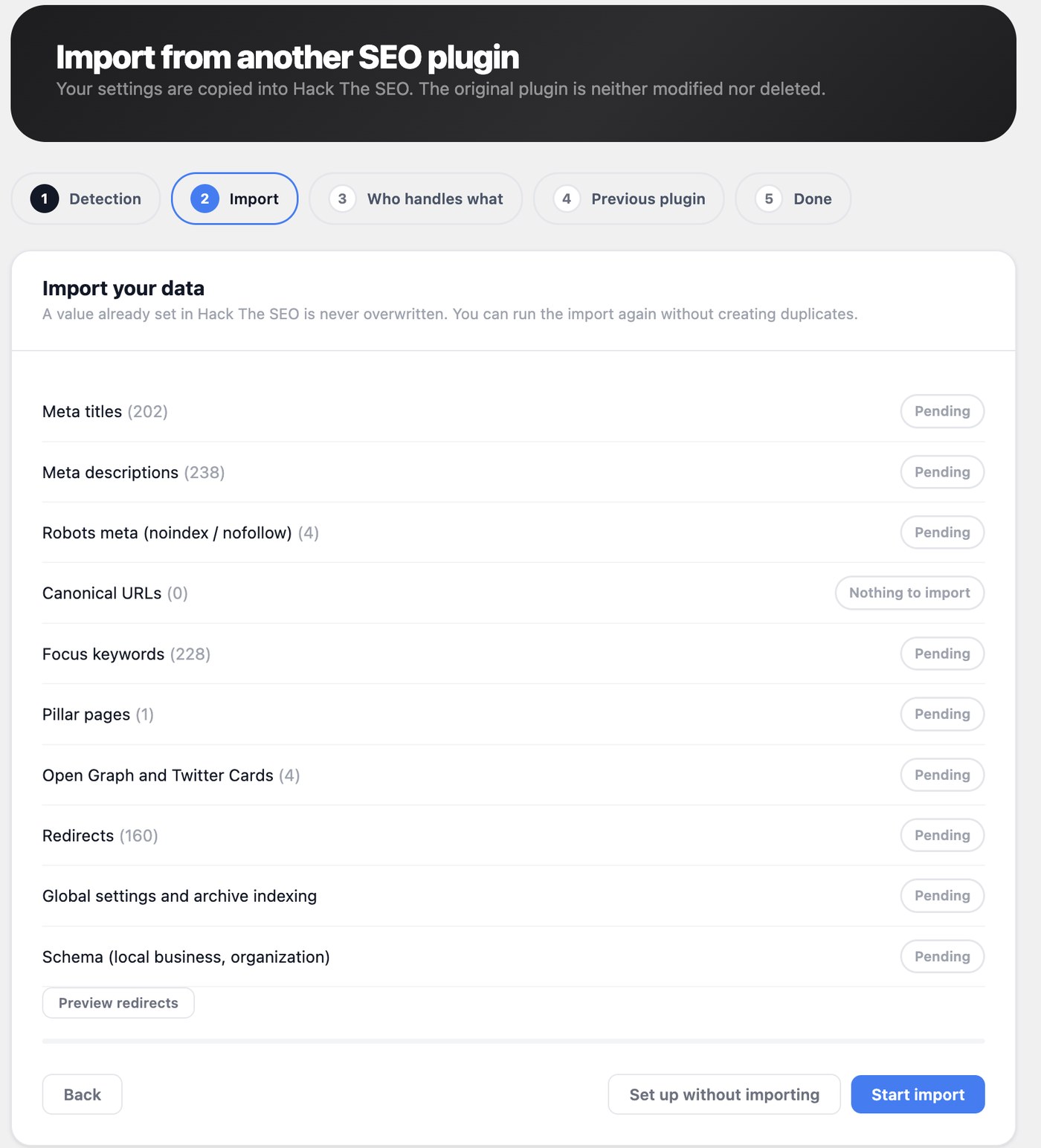
What you get free here, and what you do not get free elsewhere.
Compared on the free version of each plugin, as published on their own pages. "Paid" means the feature exists but sits behind their premium tier.
| Free version | Yoast | Rank Math | AIOSEO | SEOPress | Hack The SEO |
|---|---|---|---|---|---|
| Meta titles, descriptions, Open Graph | Yes | Yes | Yes | Yes | Yes |
| XML sitemap | Yes | Yes | Yes | Yes | Yes |
| JSON-LD schema | Yes | Yes | Yes | Yes | 60+ types |
| 301 redirects & 404 monitor | Paid | Yes | Paid | Yes | Yes |
| Server-side AI crawler log | No | No | No | No | 18 agents |
| GEO score per page | No | No | No | No | /100 |
| Keyword cannibalization report | No | No | No | No | Yes |
| llms.txt + Markdown version of every page | No | No | No | No | Yes |
| Read-only MCP server for AI clients | No | No | No | No | 12 abilities |
| Designed to run next to another SEO plugin | No | No | No | No | Yes |
Sources: each plugin's own WordPress.org page, checked September 2026. On requirements, Hack The SEO asks for WordPress 5.9 and PHP 7.4, against WordPress 6.9 for Yoast and 6.7 for Rank Math on the same pages, which matters when you maintain client sites you do not control. Tell us if something here is out of date and we will correct it.
Sixteen modules. No paid tier hiding behind them.
There is no upsell inside these screens: what is described here is what the free plugin does, permanently.
- AI crawler log 18 user agents from OpenAI, Anthropic, Perplexity, Apple, Google, Meta, Cohere and Common Crawl.
- GEO score per page Out of 100 on six criteria, with the failing ones named. Rules readable in the file.
- Cannibalization report Competing pairs, how far apart they really are, and a recommended action for each.
- JSON-LD schema 60+ types generated automatically, configurable per page, eligible for rich results.
- XML sitemaps Sitemap index, per-type sitemaps, image, video and news extensions, XSL stylesheet.
- Redirects & 404 monitor 301, 302, 307, 410, regex rules, CSV import/export, one-click 404-to-redirect.
- Meta titles & SERP preview Templates, variables, live preview, plus Open Graph and Twitter Cards everywhere.
- On-page audit 21 checks in the editor, a Google score and an AI citability score side by side.
- Alt text auto-fill Missing alt text filled from file name, title or focus keyword. Yours is never overwritten.
- Orphan detection Pages with no inbound internal link, flagged in the global score.
- llms.txt & .md pages Generated from your real content. Nothing written to disk, both served virtually.
- IndexNow Bing, Yandex, Naver, Seznam and Yep notified on publish. Off until you switch it on.
- Weekly report by email Your own site, to you, through WordPress. Opt-in, one-click unsubscribe, no third party.
- Canonicals, breadcrumbs, robots Per post, per type, per taxonomy. Breadcrumbs as a shortcode, a block or a PHP function.
- WooCommerce Product, Offer and AggregateRating schema where the data exists, shop-aware sitemaps.
- Migration wizard Imports meta, robots, canonicals, keywords, redirects and Open Graph. Dry run first.
Ask your site directly, from Claude.
The plugin ships an MCP server at /wp-json/htsfree/v1/mcp. Connect Claude Code
or Claude Desktop and ask, instead of clicking through screens. One button creates the WordPress application password
and prints the line to paste into your client. No account, no OAuth relay, no companion plugin, nothing installed
outside WordPress.
Twelve tools, and every one of them reads
- No write among them, and no setting that turns one on.
- It answers a signed-in WordPress user and nobody else. Every call checks a capability. Unpublished and password-protected content stays out, and no visitor IP, referrer or user agent is ever returned.
- The connection is inbound. Your client calls your site. No relay, no third party, nothing sent anywhere by the plugin.
- It needs WordPress 6.9, where the Abilities API entered core. Below that it does not register, and nothing else changes.
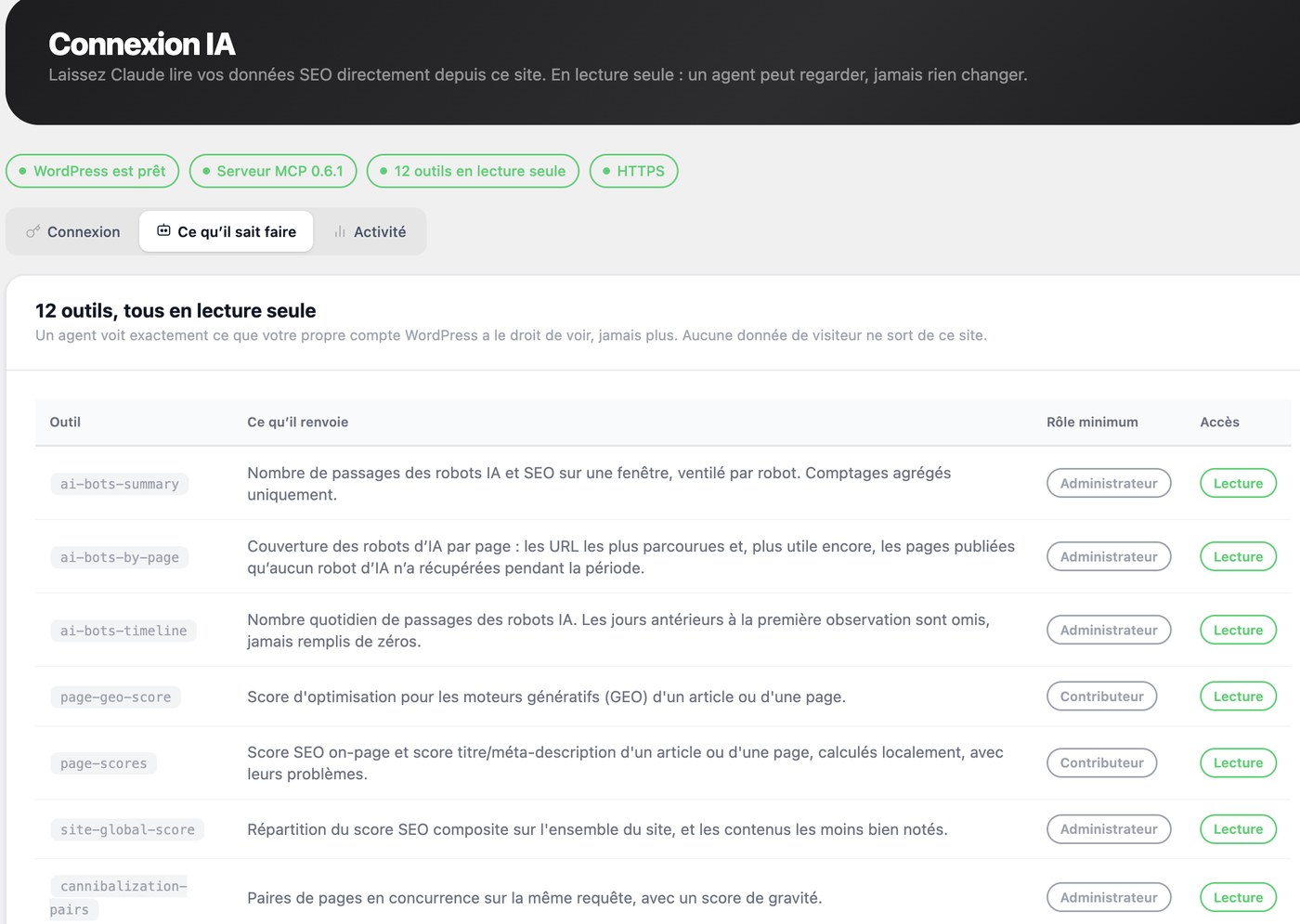
It reads: crawler activity three ways, a page's GEO, on-page and meta scores, the site-wide score distribution,
the competing-pages report, your redirect rules, your 404 log, your llms.txt,
the Markdown of any page, and the health check.
Zero outbound requests, and you can check.
Out of the box the plugin contacts nobody. There is exactly one feature that can ever reach a third party, and you have to switch it on yourself.
-
No account, no key, no telemetry
No sign-up, no API key to paste, no usage statistics, not even anonymised. No cookie is set and no third-party script is loaded. There is no feature that stops working because a server somewhere is down.
-
One exception, off by default
IndexNow, and only when you enable it. It then sends the URL you just published, your host name and your IndexNow key. Nothing else, ever. While it is off, which is how it ships, no hook is even registered.
-
Verify it in one command
Grep the plugin for
wp_remote_and read the nine call sites yourself: two are IndexNow, the seven others load a page of your own site to check that your sitemap answers and your schema is really in the HTML.
GDPR. The plugin sets no cookie, loads no third-party script and sends no personal data anywhere. The on-site content module counts views, reading time and scroll depth in your own database; visitor IP addresses are never stored, only hashed as a short-lived rate-limit key, and the module can be switched off. As always, GDPR compliance is a property of your whole site rather than of one plugin, but this one gives you nothing to declare. Read the privacy policy.
Two minutes, and nothing to undo afterwards.
Uninstalling deletes nothing by default: your redirects, your 404 log, your metadata and your settings stay in the database.
- 1 Install and activate Plugins > Add New, search for Hack The SEO, install, activate. Or upload the ZIP. No key, no account.
- 2 Open the checklist The "First steps" checklist adapts to what your site still needs, and disappears once you are done.
- 3 Already have an SEO plugin? Nothing to do: it was detected and the plugin stepped aside. The Compatibility screen shows who handles what.
-
4
Submit your sitemap
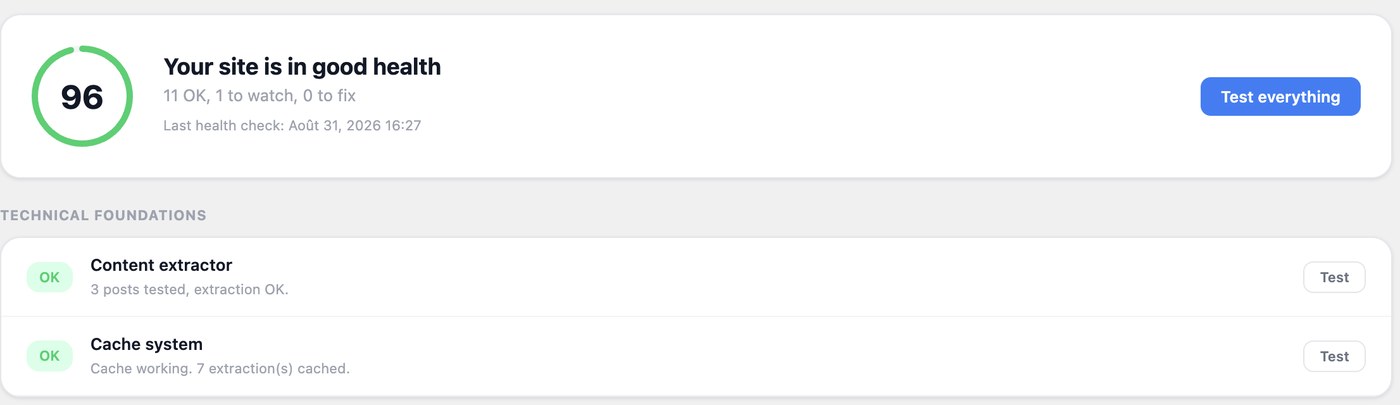
Check Health to confirm the sitemap and schema are served, then submit
/sitemap.xmlto Search Console.
Questions people actually ask before installing.
- Do I really need another SEO plugin?
Only if something is missing. If Yoast or Rank Math is doing the job and you have no idea whether ChatGPT reads your pages, install this one for that answer alone: the AI crawler log, the GEO score and the cannibalization report are things the big four do not give you. And you do not have to choose between them, see the next answer.
- Can I run it alongside Yoast, Rank Math, All in One SEO or SEOPress?
Yes, and that is the default behaviour. On activation the plugin detects the SEO plugin already in place and stops emitting whatever that plugin handles: meta tags, canonical, schema, sitemap, breadcrumbs, robots, and hreflang when a multilingual plugin owns it. No duplicate title tags, no duplicate canonicals, no duplicate schema. It never deactivates your plugin and never touches its settings. Meanwhile the three things the big four do not give you keep working, because they produce no front-end output and therefore cannot conflict.
- How do I see which AI crawlers visit my site?
Activate the plugin and open the AI visibility screen. Every request from GPTBot, ChatGPT-User, OAI-SearchBot, ClaudeBot, Claude-User, Claude-SearchBot, PerplexityBot, Perplexity-User, Applebot, CCBot and eight more is recorded server-side, with the URL and the timestamp, in your own database. To prove it to yourself in ten seconds, run
curl -A GPTBot https://your-site.tld/any-page/and refresh the screen. The row is there.- Is it really free, or is this a trial?
It is free, permanently, and it is not a trial. Everything described on this page works without an account, without a key and without an expiry date. A separate commercial product exists and is not required for anything here.
- Will it slow down my site?
No. Front-end output is meta tags, JSON-LD and, if you enable them, breadcrumbs, all built during the normal page render. The XML sitemap is cached on disk rather than rebuilt in PHP. Scores, cannibalization and health checks run in the admin or on cron, never on a visitor's request. Crawler detection is a User-Agent read on a hook that already runs. There is no external HTTP call in the front-end path, which is worth stating plainly: a plugin that calls a remote API while rendering your page is at the mercy of that API's latency. This one has nothing to call.
- Does this plugin send my data anywhere?
No. Out of the box it makes zero outbound requests. There is exactly one feature that can ever contact a third party, and you switch it on yourself: IndexNow. When enabled it sends the URL you just published, your host name and your IndexNow key, and nothing else. The weekly report is an email your own WordPress sends to you. Some features do load pages of your own site over HTTP to verify that your sitemap answers and your schema is really in the rendered HTML; those requests go to your domain.
- Does the MCP server send my data to OpenAI or Anthropic?
The plugin sends nothing and contacts no third party. Your AI client calls your site, not the other way round. What you then read inside your client goes wherever that client goes, exactly as if you had typed the same figures in by hand. On the plugin's side nothing changed: still the same nine outbound call sites as before the MCP server existed.
- How do I switch from Yoast SEO, Rank Math, All in One SEO or SEOPress?
You do not have to, since the plugin runs next to them. But if you want to, install Hack The SEO while the other plugin is still active, open the Migration screen, and run the import. It reads meta titles and descriptions, meta robots, canonical URLs, focus keywords, cornerstone flags, redirects and Open Graph fields. Then verify a few pages, then deactivate the other plugin: import first, deactivate second, in that order. The wizard never deletes the source data, so the move is reversible. Full migration guide.
- What is GEO, and how is it different from SEO?
GEO, generative engine optimization, sometimes called AEO, means making your content easy for generative engines to read, understand and cite. Classic SEO optimises for a ranked list of links; GEO optimises for being the source quoted inside an answer. In practice: answer the question explicitly and early, keep facts stable and attributable, structure the page so a machine can parse it, expose clean formats, then measure whether the crawlers actually come. More terms in the SEO and GEO glossary.
- Does it work with Elementor, Divi, Bricks, Oxygen or WPBakery?
Yes. The plugin detects the builder and reads the rendered content rather than the raw post content, so the scoring, the schema and the Markdown output all see the same text your visitors see. It also works with caching plugins and CDNs, and on multisite, where each site keeps its own settings, redirects, sitemap and data.
- Does the plugin write files on my server?
Almost nothing. One thing is written to disk: the generated XML sitemap, cached under
wp-content/uploads/so a cold request does not rebuild it in PHP. No redirect is ever written to your.htaccess.robots.txtis served virtually through WordPress core's own filter, andllms.txtis not written to disk either. Nothing is ever written outsidewp-content.- What happens to my data if I uninstall?
By default, nothing is deleted. Your redirects, your 404 log, your metadata and your settings stay in the database; only transients and scheduled tasks are cleaned. That is deliberate: someone who uninstalls and reinstalls should not lose the 301s holding their site together. If you genuinely want everything gone, enable the "delete my data on uninstall" option first.
- Does it guarantee I will rank better on Google?
No, and be suspicious of any plugin that says otherwise. Ranking depends on your content, your market and factors nobody controls. What this plugin does is make sure the technical layer is correct and give you honest measurements. That is a prerequisite, not a promise.
A paid version exists, and it is a separate product.
Hack The SEO also has a commercial version, which adds automated internal linking and semantic cocoons, AI-assisted content workflows and a hosted dashboard. It is a different plugin, not an upgrade button, and it is not required for anything described on this page.
The free version is not a trial and does not expire. It stores its data under the same keys as the commercial version, so if you ever move up, your metadata, redirects and scores are picked up exactly as they are.
Find out whether the AIs are reading you at all.
Install it on the site you already have, next to the plugin you already use. Two minutes, no account, and nothing to undo if you change your mind.
Install the free pluginWHO BUILDS IT
Hack The SEO is built in France by the authors of "Le SEO pour booster sa croissance" (Dunod, 2025). The free plugin is GPLv2, published on the WordPress.org directory, and developed in the open. Something missing or broken? The feedback form sits at the bottom of every plugin screen, and the support forum is public.