The Search Console that takes action.
Search Console says "here's your data." Hack The SEO says "here's the action, and here's proof it worked." Its pattern engine continuously learns from your past actions: what survives and performs on your site gets reapplied first.
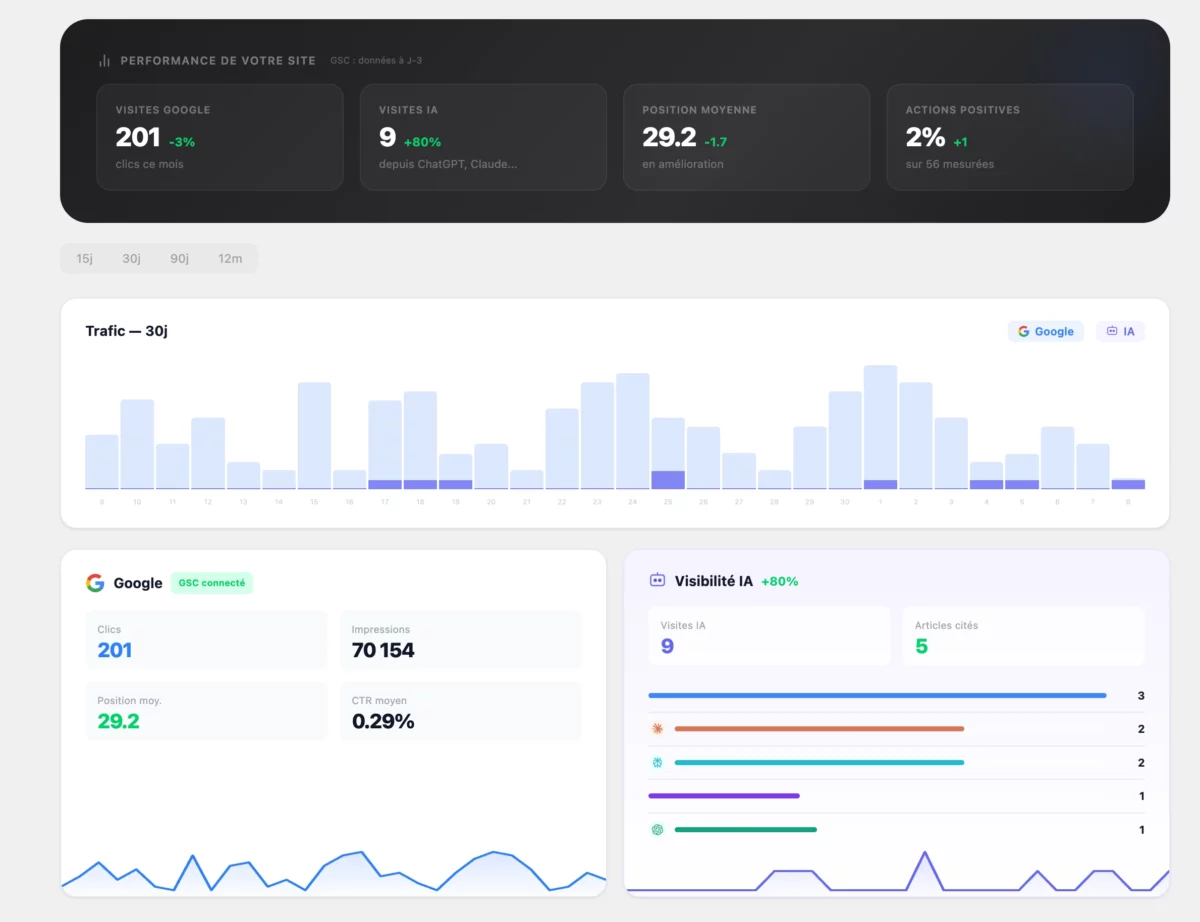
Search Console has the data. Not the action.
Everyone stares at Search Console charts. Almost no one measures whether their own optimizations actually worked. The result: hours spent reading graphs, with no certainty about what's worth doing again.
- Query tables you have to sort yourself, with no prioritization
- No measurement of the real impact of a past optimization
- Traffic drops discovered too late, by chance
- Nothing learns from what worked on your specific site
- Opportunities (positions 5-15, abnormal click-through rates) sorted and prioritized
- A measured before/after for every action, in the same dashboard
- Breakpoints and traffic drops flagged as soon as they appear
- A pattern engine that reapplies what has worked for you
From Google data to action, without switching tabs.
The Search Console module is part of the Hack The SEO WordPress plugin: once connected, it runs continuously in your admin.
Connect your Google account
Two clicks via OAuth: the plugin reads the queries, clicks, impressions, and positions tied to your Search Console property, directly inside your WordPress dashboard.
Get your opportunities, sorted
Queries in positions 5-15 within reach of page one, abnormally low CTR, pages losing ground: the sorting is done, and an action is suggested for each.
Measure the impact, let the engine learn
Every applied action is compared before and after. The pattern engine remembers what actually grew your clicks on your specific site, and reapplies it first.
Your opportunities, already sorted.
No need to scroll through dozens of rows in Search Console. The plugin identifies what deserves your attention, and suggests the matching action.
Keywords within reach of page one are surfaced first: that's where the least effort produces the most effect.
A decent position with too weak a click-through rate signals a title or meta description issue, which the plugin spots and fixes.
The sorting is done, the action is suggested: for example, strengthening the internal linking of a page that's losing ground.
Every action measured before/after.
No more "I think it worked." Every applied optimization is compared to what was happening before, in the same Search Console.
- A measured before/after for every action, not a general impression
- Breakpoint detection: the exact moment the trend changes
- Your action history stays available to browse, action by action
The module runs on the same Hack The SEO WordPress plugin, with no extra setup.
A pattern engine that learns.
The plugin watches which optimizations survive and perform on YOUR site, and reapplies them first. What doesn't work gets dropped.
Every applied action is tracked over time: does the effect last, or fade after a few days?
Patterns proven on your site are suggested first for the next similar opportunities.
A pattern with no measurable effect stops being recommended: the engine adjusts its priorities as actions accumulate.
Connected in 2 clicks, controlled by talking.
Official Google connection in 2 clicks, data read inside your WordPress admin. And through the MCP, you can ask about your opportunities in plain language.
- Google OAuth connection in 2 clicks, revocable at any time
- Data displayed directly inside your WordPress dashboard
- Through the Hack The SEO MCP, ask Claude: "what are my GSC opportunities?"
From connection to alert: all nine.
OAuth connection in 2 clicks
One Google account is enough: standard authorization, revocable at any time from settings.
Prioritized opportunities
The queries that deserve your attention first, sorted automatically.
Queries in positions 5-15
The most profitable dead zone to work on: already visible, not yet on page one.
Abnormal CTR detected
A decent position with too low a click-through rate signals a title or meta worth revisiting.
Before/after per action
Every optimization compared to the period before it, in the same dashboard.
Breakpoints
The exact moment a trend changes direction is isolated automatically (changepoints).
Patterns learned on your site
What survives and performs for you gets reapplied first; the rest gets dropped.
Clicks & impressions inside WordPress
Your Search Console numbers, readable without leaving your dashboard.
Traffic drop alerts
An abnormal drop in clicks on a tracked page surfaces as soon as it's detected.
The Search Console that acts, tailored to your profile.
SMBs & freelancers
Quick wins surfaced without needing data expertise: the opportunity is already identified, the action already suggested.
E-commerce
Product queries worth pushing to page one are spotted directly in the Search Console linked to your store.
Agencies
Client proof of impact, action by action, with reports that show what actually moved clicks.
Bloggers & publishers
Articles losing ground get detected early, before the traffic loss becomes hard to recover.
GSC opportunities turned into measured traffic.
Real numbers, measured in the same Search Console used to decide the actions.
"GSC opportunities guided the restructuring: +177% traffic in the first month, measured in the same Search Console."
"+216% keywords in the top 3 within 60 days, tracked query by query directly in Search Console."
"Every published page is tracked in GSC and via AI bots: it's our own opportunity dashboard that decides our priorities."
"Search Console is a goldmine that nobody digs into: everyone watches the charts, nobody measures their own actions. Connecting the data to the action is the whole point."
From Google data to action, no one else does this.
Some plugins display Search Console stats. None of them do these five specific things.
| Capability | Yoast | Rank Math | SEOPress | Hack The SEO |
|---|---|---|---|---|
| Prioritized opportunities (positions 5-15, abnormal CTR) | ✕ | ✕ | ✕ | ✔ |
| Before/after impact measured per action | ✕ | ✕ | ✕ | ✔ |
| Pattern engine: continuous learning | ✕ | ✕ | ✕ | ✔ |
| Traffic drop & breakpoint detection | ✕ | ✕ | ✕ | ✔ |
| From data to action in 1 click inside WordPress | ✕ | ✕ | ✕ | ✔ |
Frequently asked questions about the Search Console module.
Do I need a Search Console account?
How does the connection work?
What data is read?
What counts as an opportunity?
How is the impact of an action measured?
What is the pattern engine?
How is this different from Google's own dashboard?
Does it work right after installation?
Which plan includes this module?
See your GSC opportunities live on your own site.
20 minutes on a video call. We connect your Search Console, you see your sorted opportunities, and how the plugin measures the impact of every action.
Install for freeOn your site, not a generic demo · free 1.5-hour expert onboarding · traffic up in month one, or refunded