Internal linking for WordPress that places itself.
Other plugins list linking suggestions and stop there. Hack The SEO places the links inside the actual content, no matter your builder, and keeps every action reversible for 30 days. Internal linking stops being the task you keep putting off.
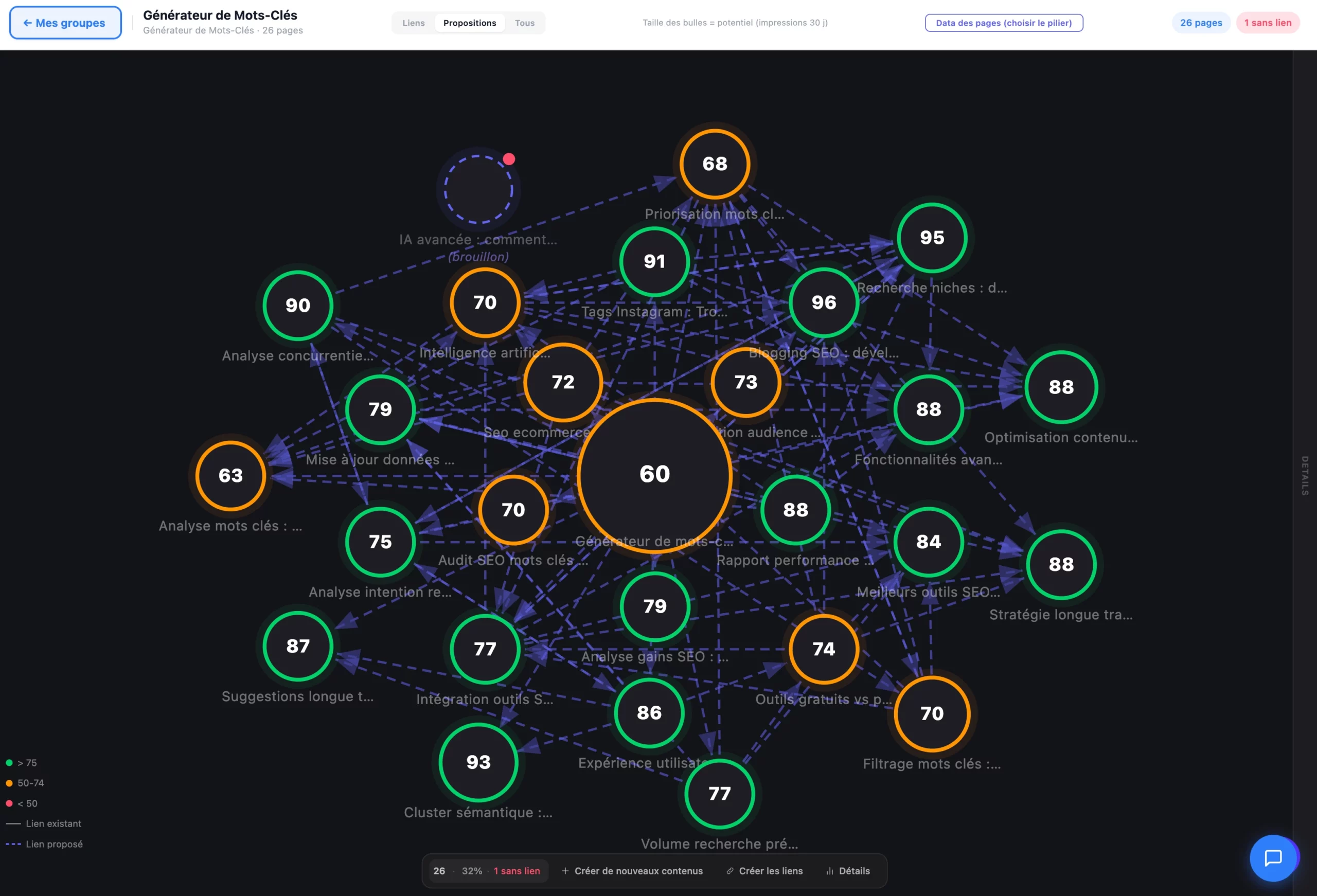
Everyone knows internal linking matters. No one does it.
Linking content by hand takes hours: finding the right page, choosing a natural anchor text, opening the editor, inserting the link in the right spot. The result on most sites: orphan pages, authority that never flows, and internal linking that never really moves forward.
- Link suggestions you copy in yourself, one by one
- No idea which anchor text or which paragraph to insert the link into
- Orphan pages never detected, never linked
- A link placed wrong? Back to the editor to remove it by hand
- Anchor text and insertion paragraph suggested automatically, through semantic analysis
- The link is placed inside the actual content in 1 click, no matter the builder
- Orphan pages are detected and linked as a priority
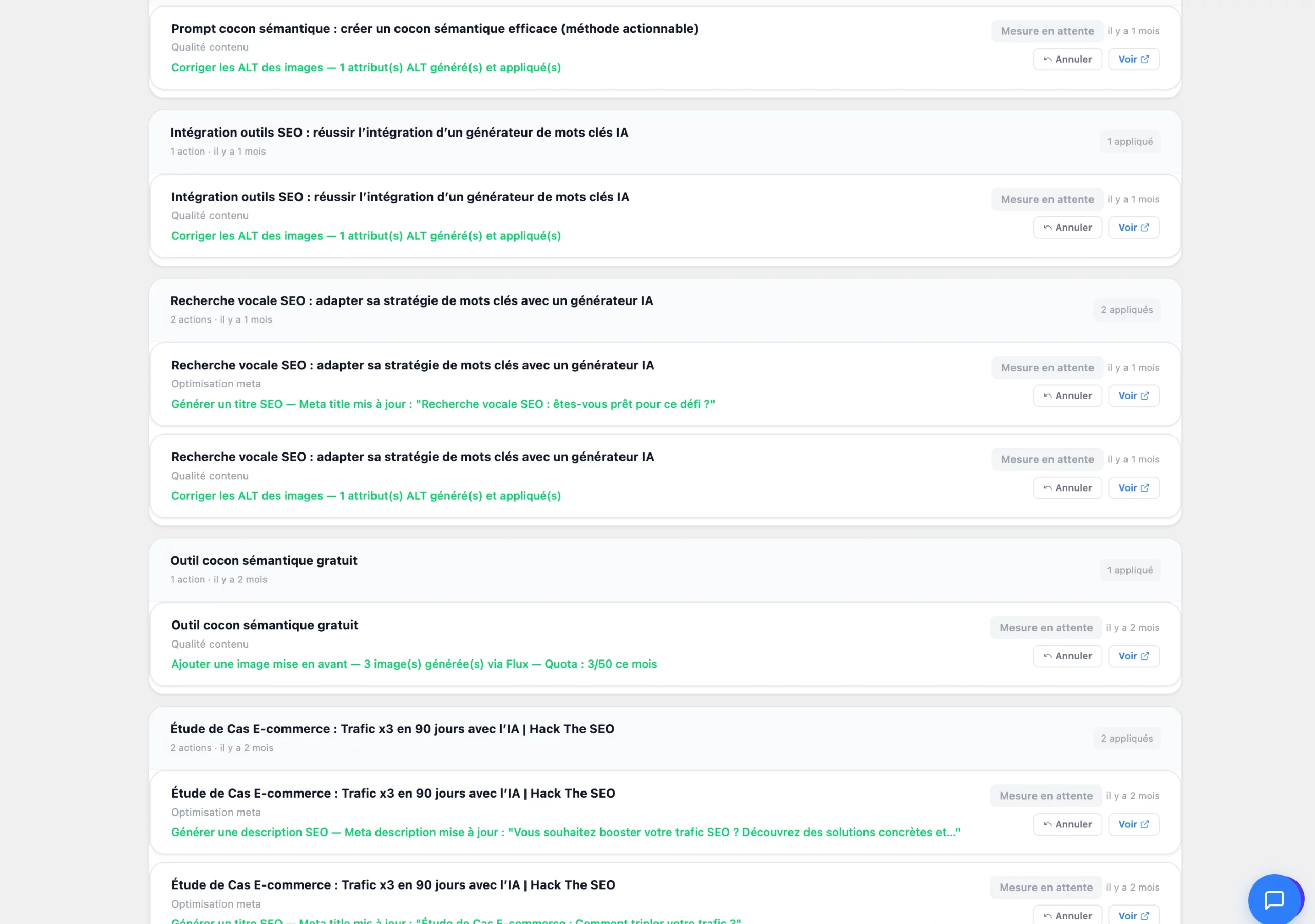
- Every link placed stays reversible, alone or in bulk, for 30 days
From content to a placed link, no copy-paste.
Internal linking is part of the Hack The SEO WordPress SEO plugin: it analyzes your existing content and suggests where and how to link it.
The engine analyzes your content
Every post and page is compared semantically against the rest of your site's content to find relevant links, not just shared keywords but shared meaning.
You get a complete suggestion
Natural anchor text, precise target paragraph, destination page: the suggestion arrives ready to approve, with the real context of the surrounding content.
The link is placed in the content, in 1 click
Not an export, not a list to copy: the link is inserted directly into the body of the text, in Gutenberg, Elementor, Divi, or Bricks. And it stays reversible for 30 days.
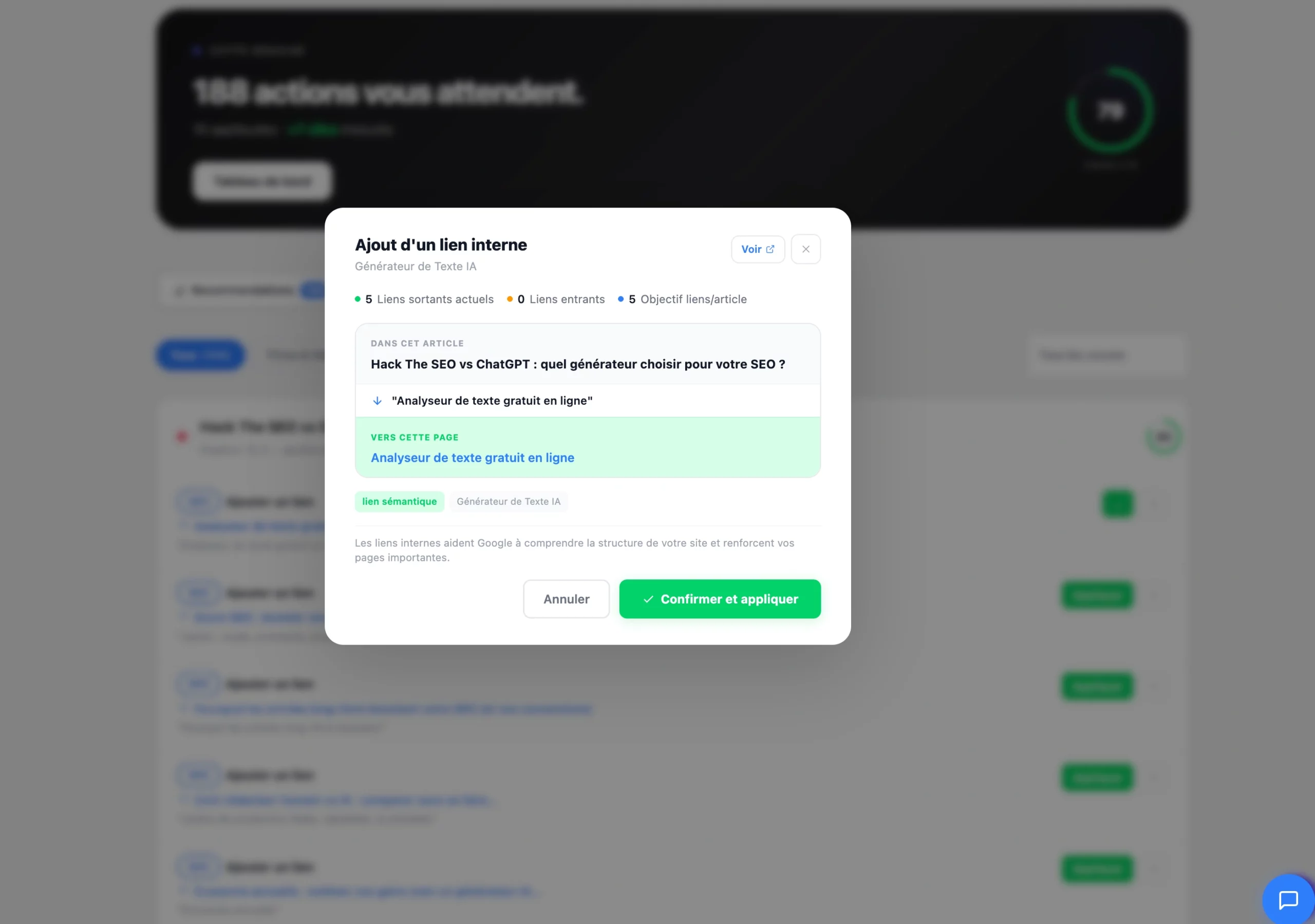
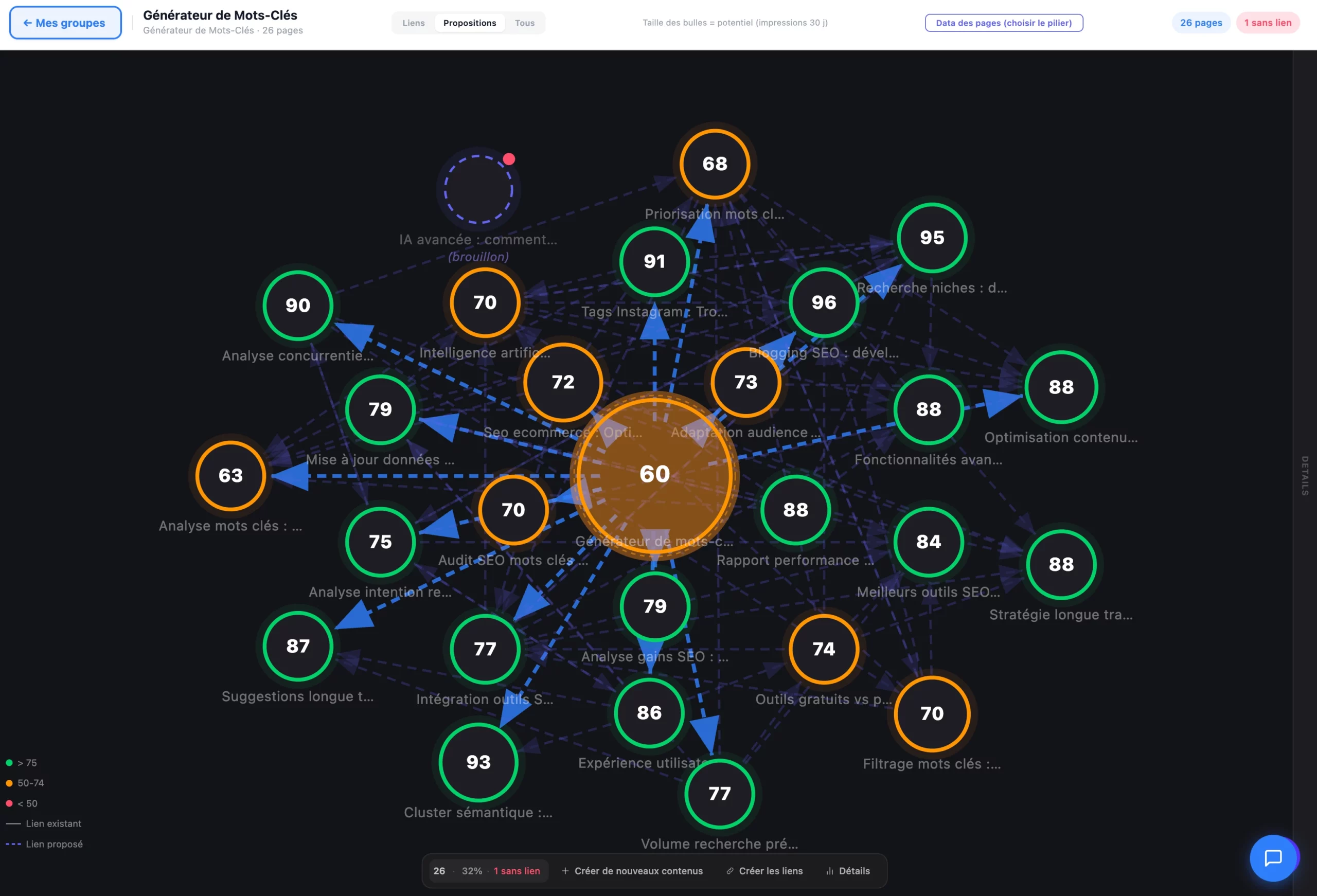
Suggestions that understand your content.
The engine doesn't look for identical words: it compares the meaning of your content, not just the words, to suggest links that actually have a reason to exist.
Every piece of content is represented by its meaning, not its keywords. Two pages on the same topic that share no vocabulary still get matched.
The suggested anchor text fits into the existing sentence, with no forced keyword and no "click here" that breaks the reading flow.
The engine points to the exact spot in the text where the link makes sense, with the real context around it, so you can approve it with full knowledge.
This semantic analysis is the same engine that builds the WordPress semantic cocoon: internal linking is its natural extension, page by page.
Placed in the real content, not in a widget.
A link tucked into a "related posts" box at the bottom of the page carries almost no SEO weight. Hack The SEO inserts the link where Google actually gives it weight: inside the body of the text.
- The link is inserted into the body of the text, where Google gives it weight, not in a side block
- Compatible with Gutenberg, Elementor, Divi, and Bricks, with no extra setup
- No theme changes needed: the plugin works directly on your existing content
A link budget against over-optimization.
Placing links automatically, sure, but not by turning your posts into link spaghetti. The engine respects a budget tailored to each page.
- The number of links suggested adapts to the length and role of the content, no fixed number for every page
- Anchor text varies from one suggestion to the next, to avoid repeating the exact same link text
- Orphan pages (never linked by anyone) are detected and pushed up as a priority to link
Poorly distributed linking also makes keyword cannibalization worse: the link budget avoids artificially pushing two pages toward the same query.
Undo everything in 1 click, for 30 days.
Automating link placement doesn't mean losing control. Every link placed by Hack The SEO stays tracked and reversible.
A link doesn't work for you? Undo it alone. Changed your mind on a batch of suggestions? Undo them in bulk, in one click.
Every link placement is logged: which page, which anchor text, when. You always know what the plugin did and can trace it back.
The 30-day reversibility window comfortably covers the time it takes to review and approve what's been placed in your content.
Suggest, place, protect, prove: complete internal linking.
Anchor text + paragraph suggestions
Every suggestion arrives with its natural anchor text and the precise paragraph to insert it into, thanks to semantic content analysis.
Placed in 1 click
The link is inserted directly into the published content, with no copy-paste and no manual trip back into the editor.
Works with every builder
Gutenberg, Elementor, Divi, Bricks: the link is placed in the real content, no matter which editor was used to build the page.
Orphan page detection
Pages never linked from any other content are spotted and pushed up as a priority to connect.
Link budget
The number of links suggested adapts to the length and role of the page, with varied anchor text to avoid over-optimization.
30-day rollback
Every link placed can be undone, alone or in bulk, for 30 days, backed by a full action log.
Verification of placed anchors
Once the link is placed, the plugin checks that the anchor text and destination still match the published content.
E-commerce links
Products and blog posts linked together: product pages gain editorial context, blog posts gain purchase intent.
Complete audit log
Every suggestion, every placement, every rollback stays logged, useful for understanding and for proving what was done.
Internal linking, based on your type of site.
SMBs & freelancers
You don't have the time or the budget for a dedicated linking agency. The plugin builds your site's internal authority on its own, page after page.
WooCommerce e-commerce
Link your products, categories, and blog posts together: product pages gain context, the blog gains purchase intent.
Agencies
Scale internal linking across every client site, without burning billable hours. Prove the work done with the before/after of the linking structure.
Bloggers & publishers
Your old orphan posts get a second life: linked to newer content, they reinforce the topical silos across the whole blog.
Automatic linking, tested on real sites.
Three different profiles, three measured results.
"130 pages linked automatically, without a single link breaking anything. Every suggestion was approved in one click, no need to touch anything by hand."
"Editorial restructuring and internal linking combined: +177% traffic in the first month. Linking redistributed authority to the pages that needed it most."
"30 posts linked in 60 days: Semrush traffic x3.3 and +216% keywords in the top 3. Linking got authority flowing between the blog and the product pages."
"An internal link placed in the right spot, in the right paragraph, is worth ten widget links. The linking engine industrializes exactly that, and rollback keeps it safe."
Suggestions, sure. Placement and rollback, no one else does this.
| Capability | Yoast | Rank Math | SEOPress | Hack The SEO |
|---|---|---|---|---|
| Suggestions with anchor text + insertion paragraph | ✕ | ✕ | ✕ | ✔ |
| Places links inside the content in 1 click | ✕ | ✕ | ✕ | ✔ |
| Detects AND fixes orphan pages | ✕ | ✕ | ✕ | ✔ |
| Anti-over-optimization link budget | ✕ | ✕ | ✕ | ✔ |
| 30-day rollback of placed links | ✕ | ✕ | ✕ | ✔ |
Frequently asked questions about internal linking.
What is internal linking?
Why does it matter so much for SEO?
Does it work with Elementor, Divi, Bricks?
How is the anchor text chosen?
Are placed links reversible?
Is there a risk of over-optimization?
How are orphan pages detected?
How many links per page?
Which plan includes internal linking?
See internal linking placed on your own content.
20 minutes on video call. We open three of your pages, you see the link suggestions, we place one right in front of you, and we show you the rollback.
Install for freeOn your site, not a generic demo · free 1.5-hour expert onboarding · traffic up in month one, or refunded