
Hack The SEO — the technical documentation
Hack The SEO is a WordPress plugin that does the SEO for you: it audits, fixes, writes, links and measures. This documentation explains what each module does and how to use it — for site owners who run their own site, and for SEO & GEO consultants who want to understand the levers.
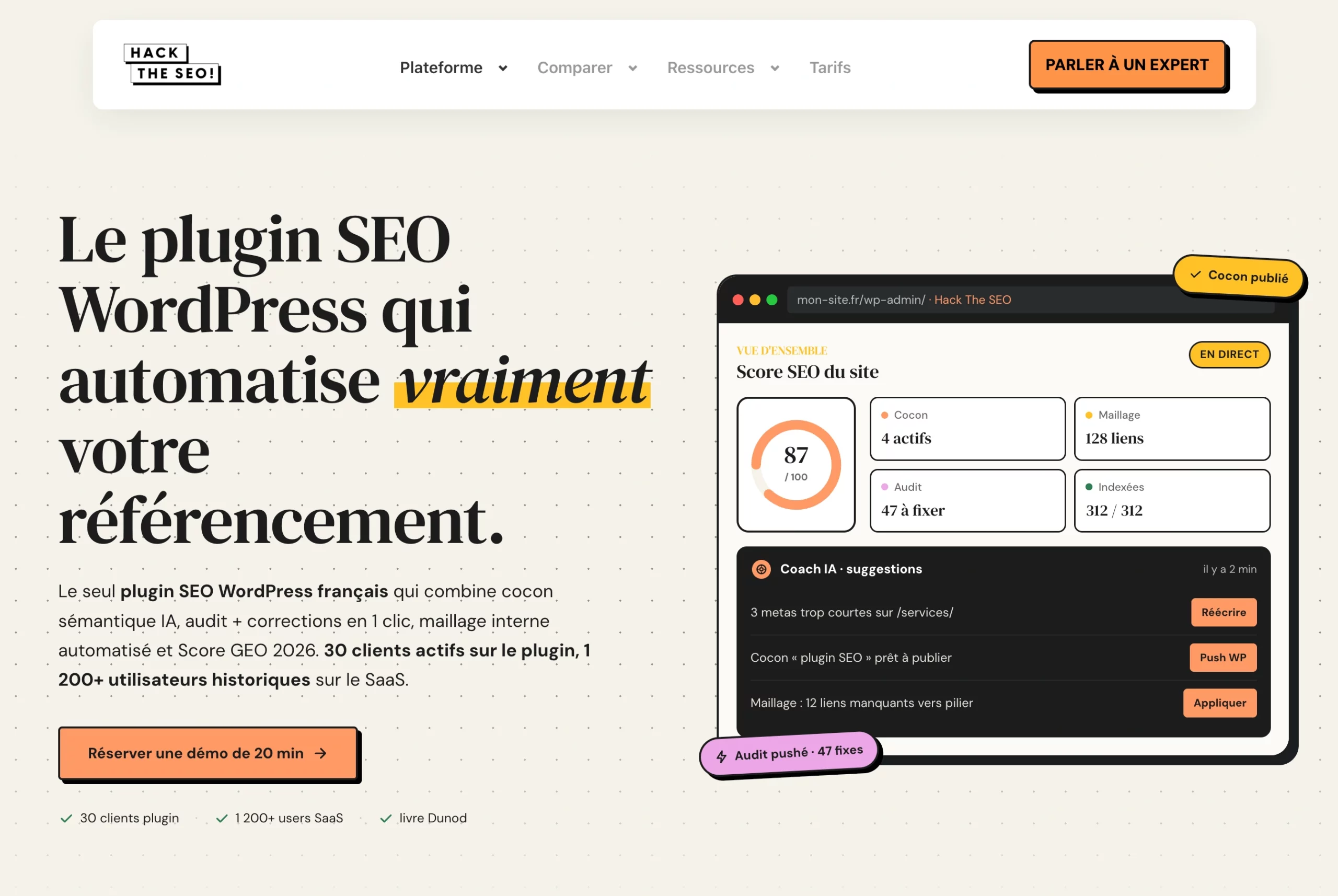
What is Hack The SEO?#
Hack The SEO improves your site's visibility on Google and on AI search engines (ChatGPT, Claude, Perplexity, Gemini). It has two complementary parts:
- A WordPress plugin installed on your site. It applies fixes and manages internal linking, cocoons, redirects, schema, GEO and the AI Coach — right inside your admin.
- A SaaS platform (
app.hacktheseo.com) that handles the heavy processing: traffic analysis, keyword research, semantic audits, topical maps and article generation — with the AI included.
What you can do
- Check your site's SEO health in seconds (a score out of 100).
- Automatically fix errors: titles, meta descriptions, ALT tags, schema.
- Generate semantic cocoons and AI-optimized long-form articles.
- Track positions, clicks and traffic from Google Search Console, without leaving WordPress.
- Measure and improve your visibility inside AI (GEO Score, llms.txt, bot tracking).
- Drive all of it in natural language through a connected AI agent (MCP).
Who is this documentation for?
Site owners
SMBs, freelancers, e-merchants. No technical skills required: every screen guides you step by step.
SEO consultants
Understand the scores, the semantic clustering, the link budget, and the exact levers behind each module.
GEO specialists
GEO Score, llms.txt / llms-full.txt, clean .md pages and AI crawler tracking — the full AI-visibility toolkit.
How the plugin and the platform work together#
The WordPress plugin is the "arm" that acts on your site. The platform is the "brain" that hosts the AI, connects Search Console and runs the heavy processing. The two are linked by a single API key.
The WordPress plugin
Installed on your site. It reads and writes your content, injects schema and meta tags, serves the sitemap / robots / llms.txt, manages cocoons, linking and redirects, and displays the Dashboard. Compatible with PHP 7.4 → 8.2, shared hosting included.
The SaaS platform
Hosts the AI, the Google Search Console connection and the decision engines. All AI is included: no OpenAI/Claude key to supply, no cloud bill to manage.
Where does what run?
| Processing | Plugin (local) | SaaS (HTS servers) |
|---|---|---|
| Meta tags, schema, sitemap, robots, breadcrumbs | ✔ 100% local | — |
| SEO score, GEO Score, cannibalization detection | ✔ local | — |
| AI bot & traffic tracking | ✔ stored in your database | — |
| Article writing, AI meta rewriting | — | ✔ AI included |
| Semantic analysis of content | ~ cached locally | ✔ computed on our servers |
| Google Search Console | — | ✔ connection handled on the SaaS |
The connection is made through an API key (Settings → Connections). A secure check validates your Free / Pro / Ultra plan, with a safety fallback if the servers are ever unavailable so your site keeps working.
Install and run your first scan#
From install to your first health score: about 5 minutes. The plugin is zero-config — it works from activation, and the API key only unlocks AI and automation.
Create your account
On hacktheseo.com, create an account (free trial available without a credit card depending on the plan). You get your API key in your dashboard.
Install the plugin
In WordPress: Plugins → Add New → Upload, then activate. Go to Hack The SEO → Dashboard.
Connect the API key and Google Search Console
Settings → Connections: paste the API key, then connect your Google Search Console (no token to manage — the connection is handled for you).
Let the first scan run
The health score and first recommendations appear in the Dashboard. Search Console data comes in within 24–48 h.
Free, Pro & Ultra: who gets what#
Three levels. The table below is the reference: the technical SEO foundation is free, Pro unlocks analysis, and Ultra unlocks automatic execution.
The full SEO foundation
All core SEO modules, the global score, llms.txt, migration, the Coach (5 questions/month), redirects + AI suggestions, cannibalization detection, content refresh.
Analyze & plan
Everything in Free, plus: cocoon analysis, cocoon plans, export, unlimited Coach + reports + memory + analytics, Inbox access, editorial planning.
Execute automatically
Everything in Pro, plus: cocoon writing, link application (AI linking), standalone articles, auto-write, Inbox actions, autonomous agent mode, weekly report, branded PDF, cannibalization merge, and conversational control via MCP.
Capability grid
| Capability | Free | Pro | Ultra |
|---|---|---|---|
| SEO modules (meta, schema, sitemap, robots, redirects, breadcrumbs) | ✔ | ✔ | ✔ |
| Global score & health check · llms.txt · migration wizard | ✔ | ✔ | ✔ |
| AI Coach | 5 questions / month | Unlimited | Unlimited |
| Cannibalization detection · AI 404 redirect suggestions | ✔ | ✔ | ✔ |
| Cocoon analysis · article plans · export | — | ✔ | ✔ |
| View the Inbox · Coach reports · editorial planning | — | ✔ | ✔ |
| Auto article writing · standalone articles (auto-write) | — | — | ✔ |
| AI linking: apply links · cocoon import | — | — | ✔ |
| Apply Inbox actions · autonomous agent mode | — | — | ✔ |
| Cannibalization merge · weekly report · branded PDF · audit trail | — | — | ✔ |
| Conversational control via MCP (pilot with Claude) | — | — | ✔ |
Dashboard (Cockpit): the health cockpit#
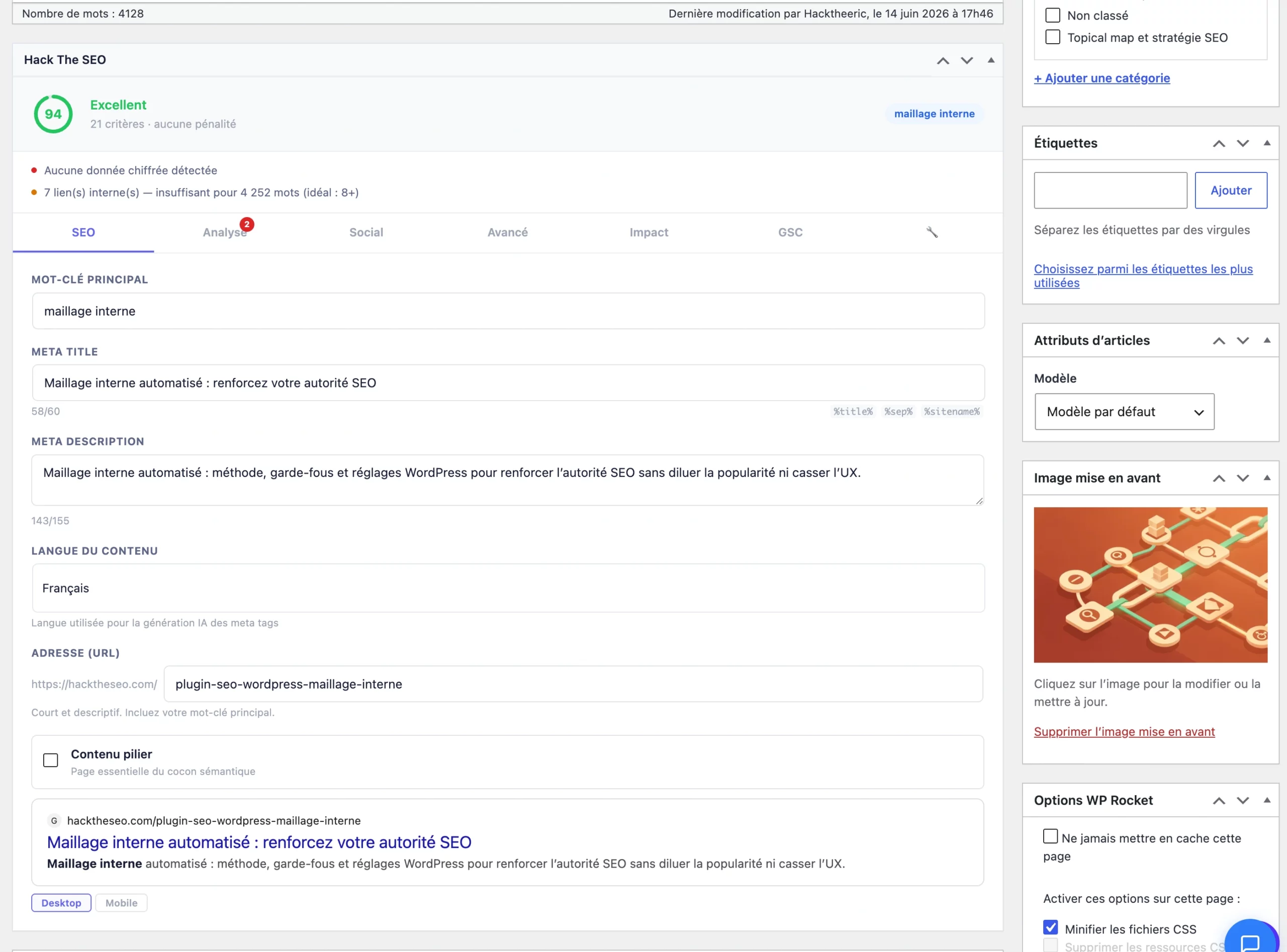
The Dashboard is the first page you see. It shows a health score out of 100, the most urgent problems, and gives access to the Inbox, the AI Coach and History.
Reading the health score
Below the score, alert cards show what's wrong, why it matters, and a link to fix it. The most urgent alerts come first. The Dashboard is organized into tabs: Dashboard (score + alerts), Inbox (agent recommendations), AI Coach (questions/answers on your data) and History (past actions + impact).
The plugin's three scores
| Score | Scope | What it measures |
|---|---|---|
| On-page score | One page / article | Real-time score in the editor: title, description, Hn structure, keywords, ALT, canonical, robots... (multi-criteria analysis). |
| Global score | The whole site | Aggregates the technical and editorial health of the site into a score out of 100 (shown in the Dashboard). |
| GEO Score | Article / category | "Citability" score by AI — a weighted set of criteria (see GEO Score). |
Schema JSON-LD (structured data)#
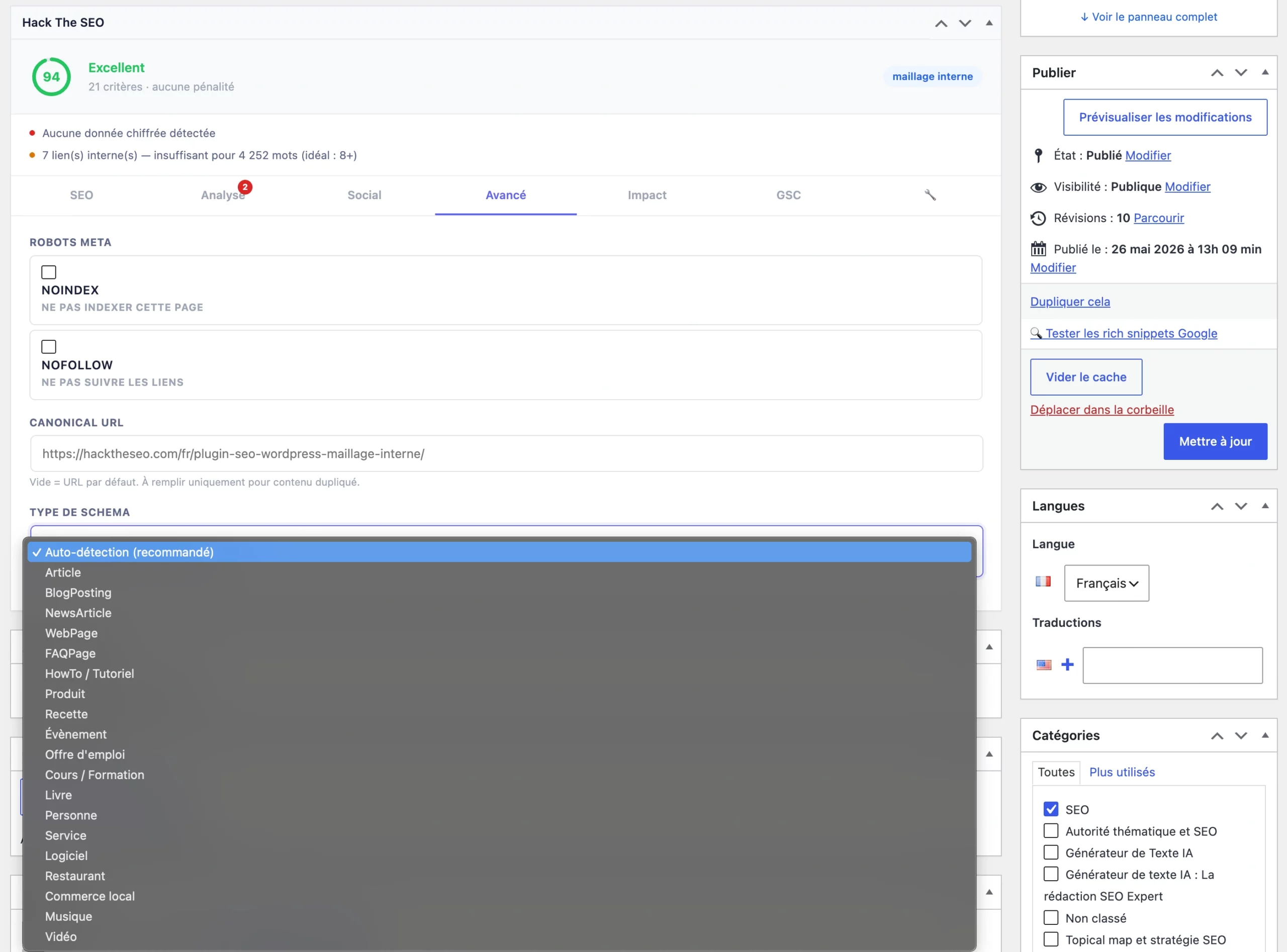
Hack The SEO automatically generates the structured data that lets Google show rich results (stars, expandable FAQ, breadcrumbs) — and helps AI understand your pages.
Schema is auto-detected based on content type: Article, FAQ, HowTo, Product, Recipe, Event, and so on. You don't code anything. Configuration (Organization, active types) is done in Settings → SEO Settings → Schema section, then JSON-LD is injected on every page.
Schema types emitted
The module covers 45+ Schema.org types (and their sub-objects), including:
search.google.com/test/rich-results. When driven through AI, the plugin can audit every schema on the site and add the missing ones automatically.E-E-A-T & Author schema
The plugin manages the Person schema for authors (bio, links, expertise) — an E-E-A-T signal read by Google as well as AI. It can audit and fix author attribution, and a real author (not "admin") counts toward the GEO Score.
XML Sitemap & robots.txt#
A dynamic sitemap that helps Google discover all your pages, and an optimized robots.txt — both handled automatically.
XML Sitemap
- Generated at
yoursite.com/sitemap.xml, updated on every publish/change. - Noindex pages are excluded automatically; the native WordPress sitemap is disabled to avoid duplicates.
- Choose which content types to include (posts, pages, products, categories) in Settings → SEO Settings → XML Sitemap.
- If Search Console is connected, the sitemap is submitted automatically to Google.
Robots.txt
An optimized robots.txt is served by default, editable in Settings → SEO Settings → Robots.txt (a Restore button reverts to the default).
Disallow: /. A physical robots.txt file on the server takes priority over the plugin's version — delete or rename it.301 redirects & 404 errors#
Manage redirects to avoid 404s and preserve SEO value when you delete or move a page.
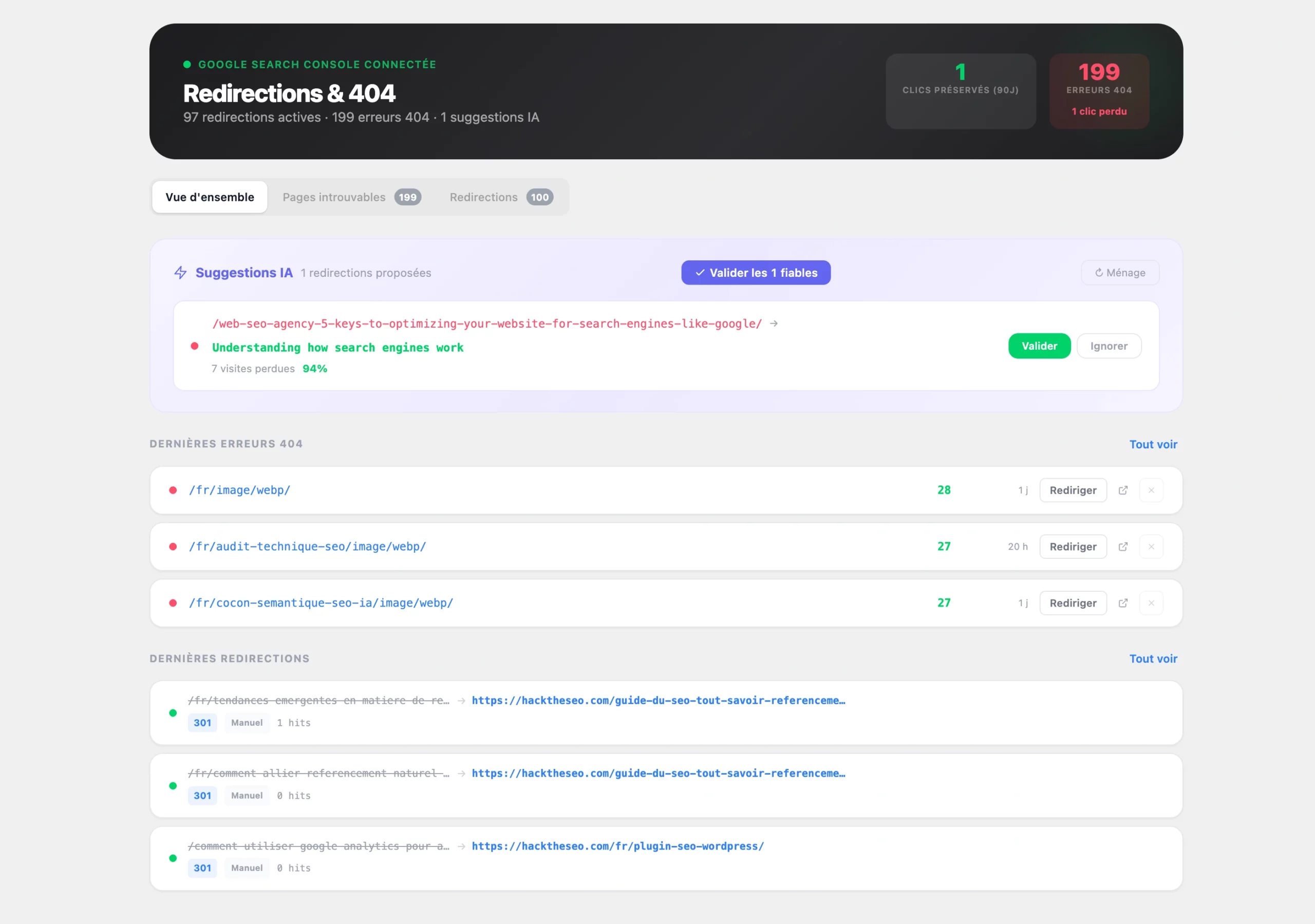
- Create: Hack The SEO → Redirects → Add. Source + destination URL, type 301 (permanent, recommended in 95% of cases), 302, 307 or 410. A Test button.
- Detected 404s: the dedicated tab lists errors with their hit count. For each 404, the plugin suggests the most relevant destination (AI suggestion, included from the Free tier).
- Bulk import: a two-column CSV (source, destination) via the Import button.
When driven through AI, the plugin can check redirect chains and loops, create a redirect for you, and repair broken internal links.
Canonical (canonical URL)#
The canonical tag tells Google which is the official version of content reachable via several URLs. Hack The SEO adds one automatically on every page.
- By default, each page points to itself (auto-canonical). URL parameters (utm, sort, filters) are handled automatically.
- To point one page to another: the Canonical URL field in the Hack The SEO block of the editor.
- Use cases: republished content (point to the original), two very similar pages (point the secondary to the main one).
Semantic cocoonsPro / Ultra#
A semantic cocoon is a group of articles about the same topic, linked together. Hack The SEO analyzes your site, automatically groups your content around a pillar page, and tells you what's missing — to prove to Google and AI that you're an authority on the topic.
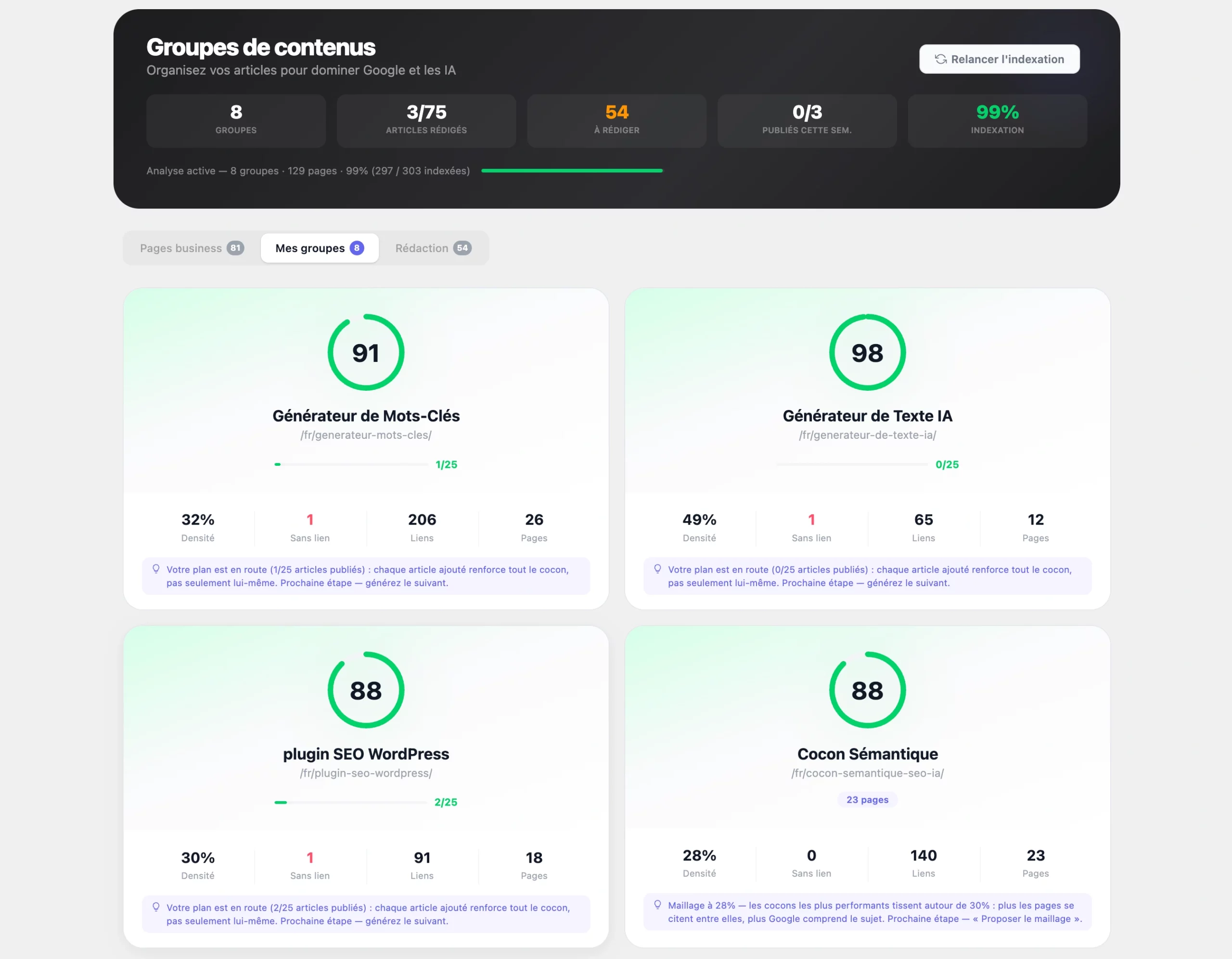
The anatomy of a cocoon
| Role | Definition |
|---|---|
| Pillar | The main page of the cocoon (your central topic). Only one per cocoon. |
| Child article | An article directly linked to the pillar (an inbound or outbound link with it). |
| Satellite article | An article in the cocoon, on the same topic, without a direct link to the pillar. |
| Orphan page | A page with no internal link at all — to fix as a priority. |
| "Unclassified" pool | Pages not attached to a cocoon (topic too far off), reusable later. |
Create a cocoon, step by step
It all happens in Hack The SEO → Content Groups, organized into three tabs: Business pages (choose the pillars), My groups (view and manage cocoons), Writing (missing articles).
Detect the business pages
Business pages tab → Detect. The plugin scans the site and proposes your important pages (the ones that should rank).
Choose the pillars
Check the pages that will be pillars (one per cocoon). Simple rule: N pillars checked = N cocoons.
Create the groups
The plugin sorts each article around the right pillar by semantic analysis. The rest goes into the "Pages to organize" pool.
Complete & link
Writing tab: generate the missing articles (Ultra), then create the internal links (Ultra).
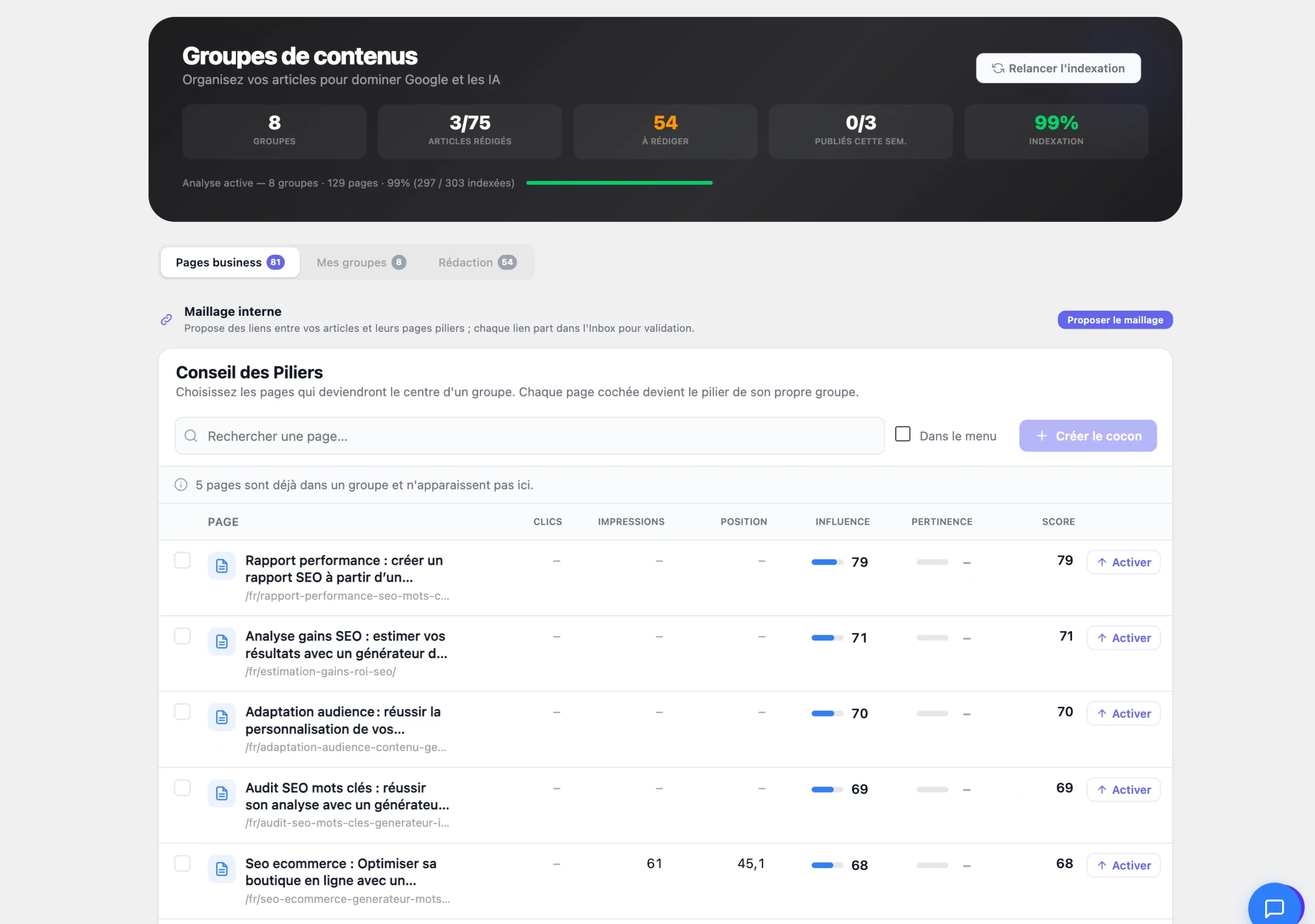
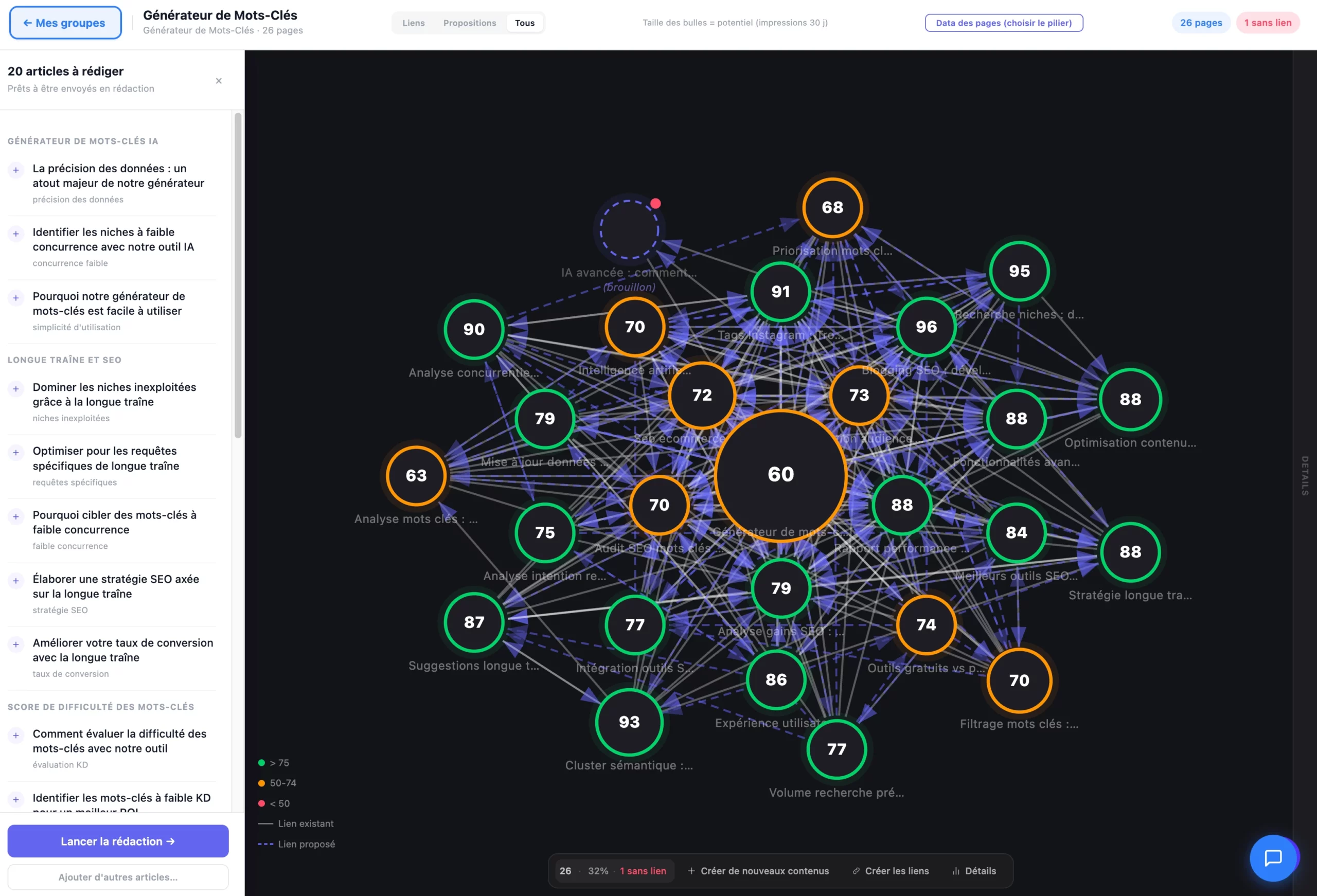
How the plugin classifies articles
The plugin compares the meaning of content, not just WordPress categories. Each article is turned into a numeric fingerprint of its meaning, then the plugin measures how close it is to the pillar. When an article is close enough, it joins the cocoon; when it's too far off, it goes to "Unclassified". That's what keeps an off-topic article from polluting a cocoon, even if it shares the same tags.
Settings & guidance
| Setting | Guidance |
|---|---|
| Site mode | Auto (Editorial / E-commerce, detected from WooCommerce) |
| Ideal cocoon size | 5 to 20 pages (above 30, consider splitting) |
| Article target (editorial) | A dozen or so pages around a pillar |
| Article target (e-commerce) | Fewer — a handful of supporting pages per category |
| Large sites | Supported — analysis is capped to stay fast on shared hosting |
Limits & requirements
- Plan: Pro minimum to analyze/plan; Ultra to write and link. On Free, the screen is a locked preview.
- Multilingual: never mix languages in a cocoon. The plugin analyzes one language at a time — otherwise, use Recreate groups.
- Shared hosting: background tasks recover automatically when you open the admin, so nothing stalls if your host throttles cron jobs.
- Store: a product is never a pillar — the pillar is the product category (see E-commerce).
Internal linkingUltra#
Internal linking analyzes all your internal links, detects orphan pages, and proposes precise links — with the source page, destination, anchor text, exact paragraph and a relevance score. Compatible with Elementor, Divi, Gutenberg.
Why it's crucial
Internal links have three roles: discovery (Google finds new pages by following links; an orphan may never get indexed), understanding (anchor text signals the destination's topic) and authority distribution (each page passes on part of its authority). In practice: a well-linked 200-page site outperforms a poorly linked 500-page site.
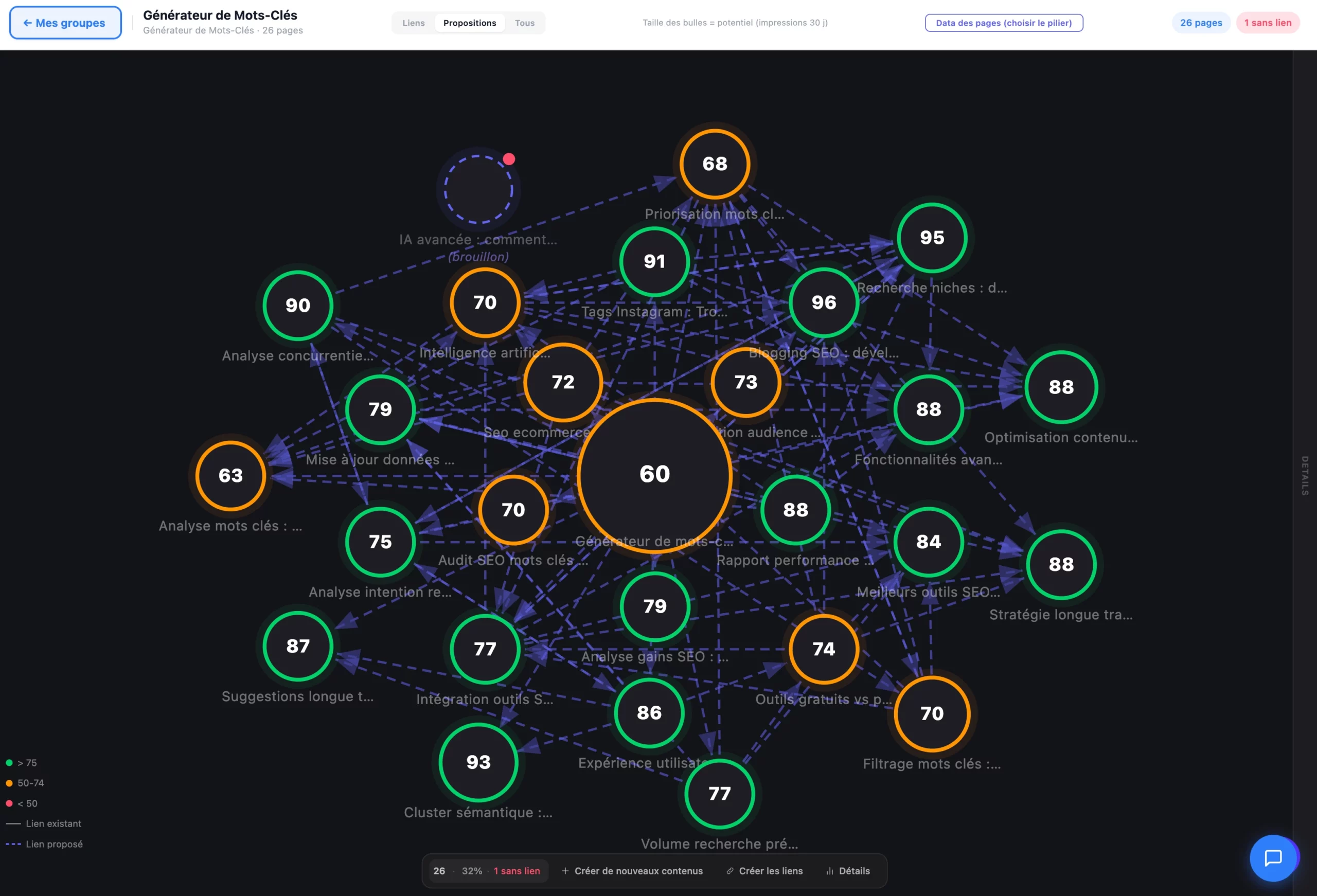
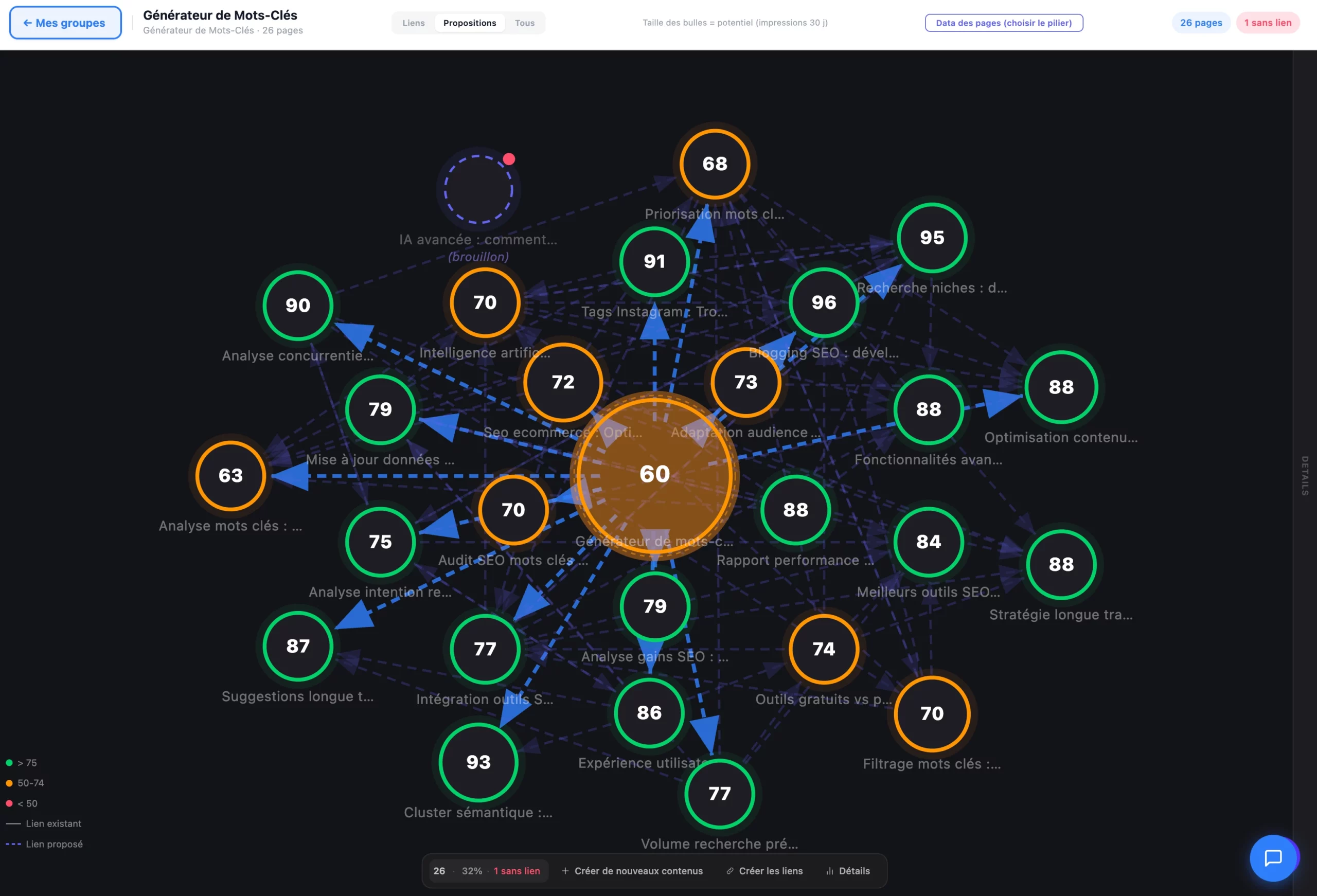
The "Create links" flow
Link proposals are created and shown only after an explicit click on "Create links": nothing appears until you trigger it. The button runs the scan, proposes the links, and shows a clear result: "N links created", "Weekly quota reached (X/Y)" or "No new opportunity — cocoon already linked".
Suggestion
The plugin proposes the links (dotted on the graph) with anchor and placement.
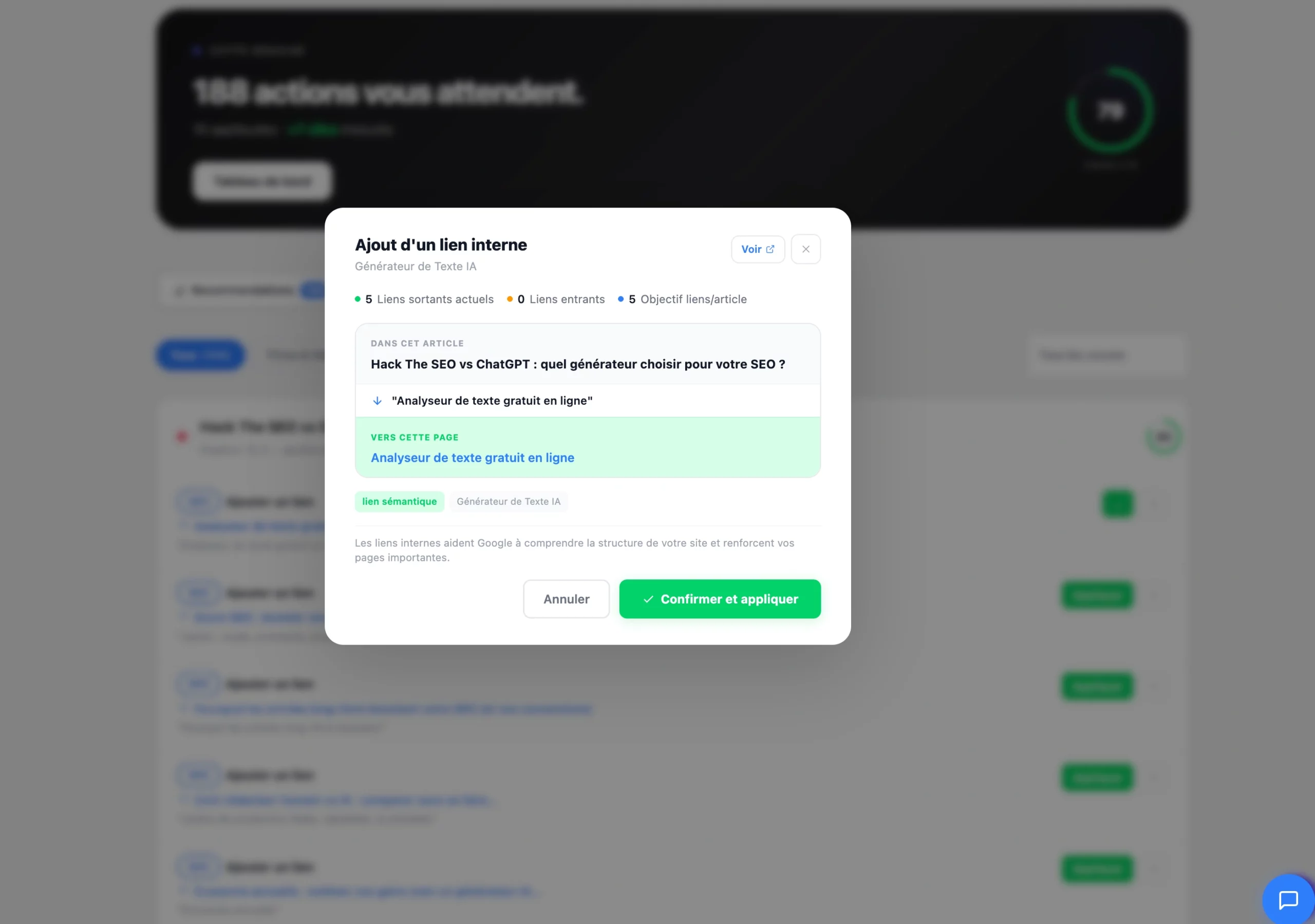
Validation
In the Inbox: preview in context, then Apply or Reject (blacklists the pair). Bulk processing available.
Application (push to WordPress)
The link is inserted into the real content, whatever the builder. Reversible via History.
Guardrails & link budget
- Orphan pages: a healthy target of 2–3 inbound links minimum per page. An "anti-orphan" net catches pages with no link, while respecting exclusions.
- Link budget: a weekly quota per cocoon prevents over-optimization and keeps the linking natural.
- Exclusions respected: a noindex, 301-redirected page, a product, or a manually removed page no longer receives a link (the cache is invalidated immediately).
- Catch-up on old content: on a pre-existing site, the plugin can flag a whole cocoon to add links in batches, without overloading the server.
When driven through AI, the plugin can apply the suggested links, verify the anchors, and keep the link budget under control.
Cannibalization#
Cannibalization is when two of your pages compete for the same keyword on Google — as a result, neither ranks well. It's one of the most common and most invisible SEO problems.
Detect
In Hack The SEO → Competing Pages, you see the pairs of conflicting pages: the shared keyword, each page's positions, and the severity (red = urgent, orange = important, yellow = minor). Always start with the red cases.
Resolve — 4 proposed actions
Merge Ultra
Combines the best of both pages into one, then redirects the old URL.
Differentiate
Adjusts titles and content to target distinct search intents.
Redirect
If one page is clearly inferior, redirect it (301) to the better one.
Canonicalize
Keep both pages accessible, but only one indexed (canonical tag).
AI writing & content freshnessUltra#
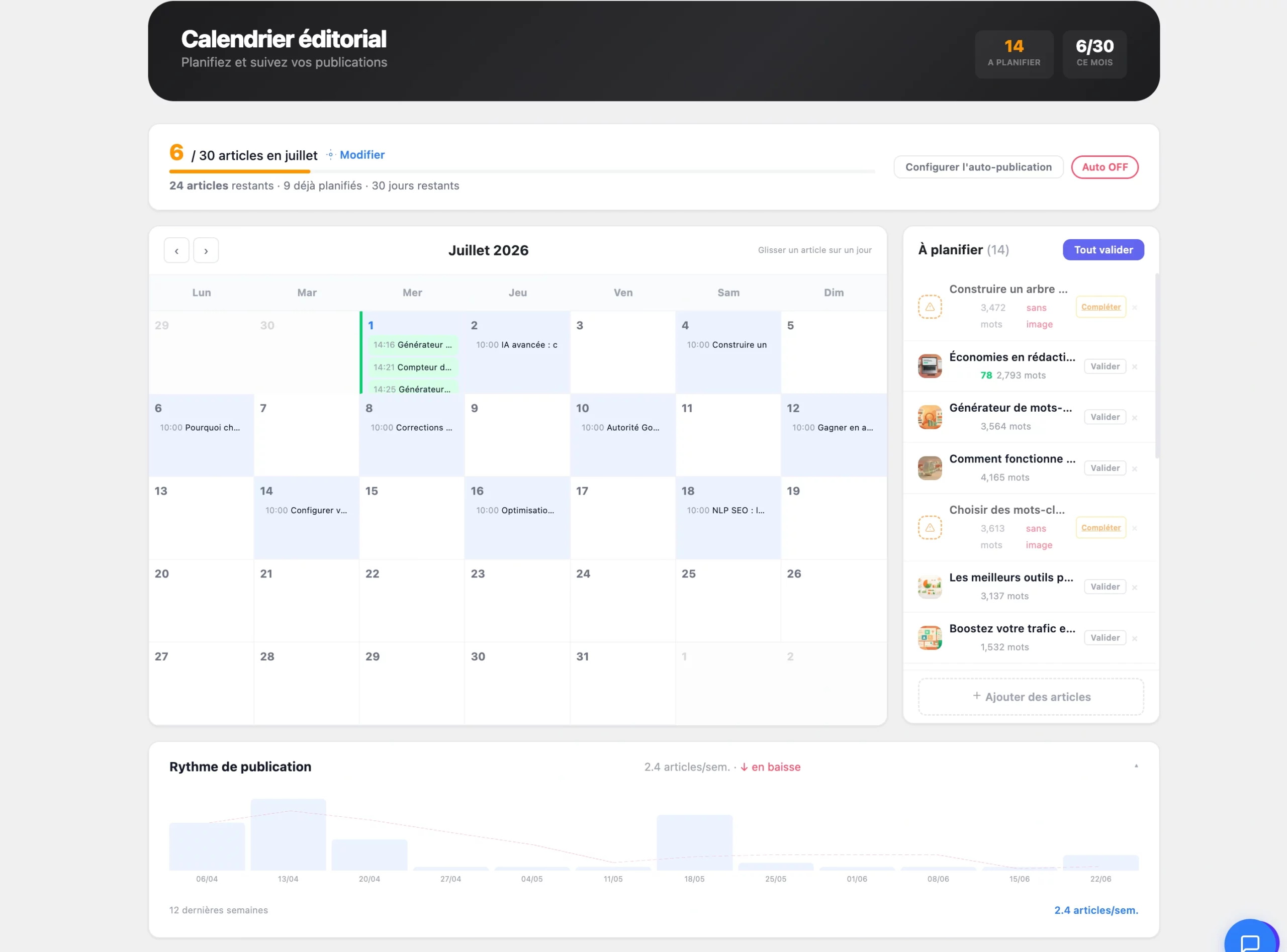
The plugin generates SEO-optimized blog articles from a keyword or a topic, factoring in the cocoon context (pillar + other satellites). The article lands as a draft in the Inbox — never published without your validation.
Generate an article
- In Content Groups, select a cocoon and a missing satellite.
- Click Generate this article. The AI analyzes the topic within the cocoon context.
- The draft lands in the Inbox: review it, enrich it (your expertise, examples, links), then approve.
- On approval, the article is scheduled to the next slot (max 1/day by default to space out publishing).
You can also generate from the SaaS (keyword or competitor URL → semantic clusters → editable outline → content section by section → send to WordPress as draft or publish). Compatible with Gutenberg and Elementor.
Freshness
The freshness module spots aging articles and offers to refresh them (recent content is scored higher by Google and counts toward the GEO Score: content updated in the last 90 days counts as fresh). When driven through AI, the plugin can list the stale articles and schedule a refresh.
Images & ALT attributes#
ALT tags describe your images for Google and accessibility — and count toward the GEO Score (aim for at least 2 images with an ALT containing the keyword).
- ALT generation: the plugin detects images with no alt text and proposes a descriptive ALT containing the page keyword.
- Image cascade & prompt builder: for AI image generation (Ultra), a prompt builder aligns the visual with the article topic.
- Best practice: a descriptive ALT, never keyword stuffing. Example: "Automated semantic cocoon on WordPress" rather than "seo wordpress seo plugin seo".
width and height on your in-content images to avoid CLS (layout shift) measured by Google in the Core Web Vitals.The GEO Score#
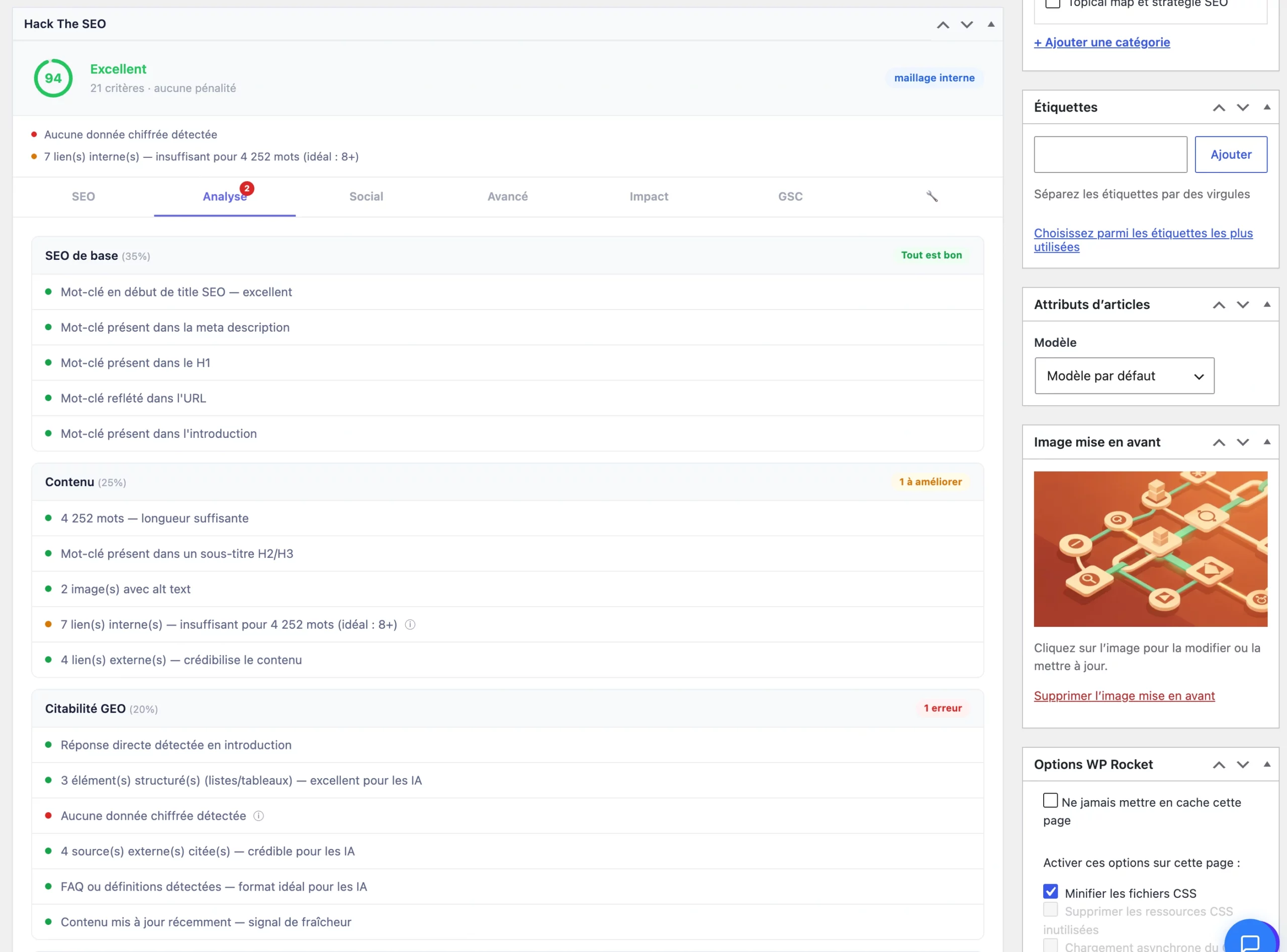
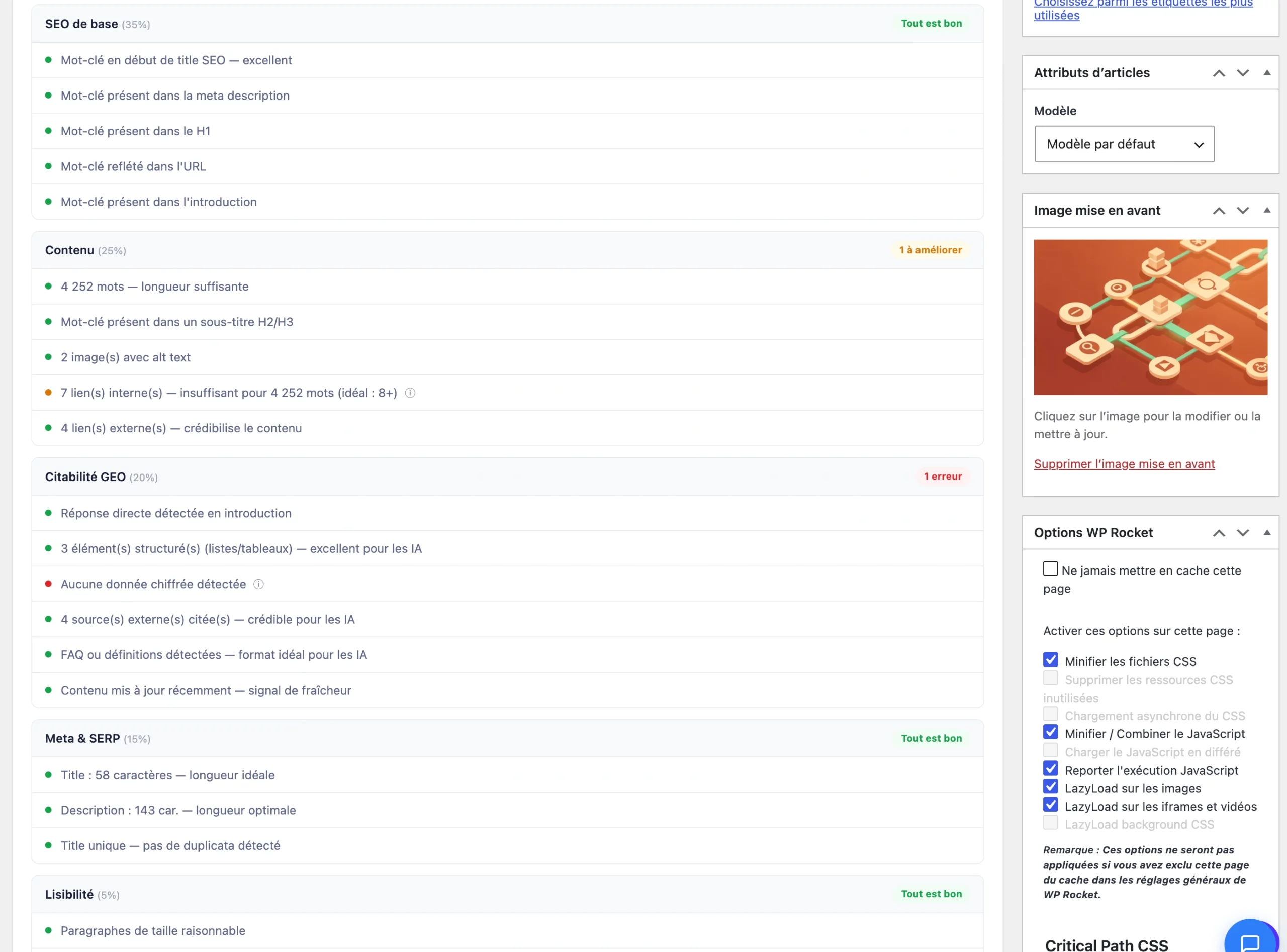
GEO = Generative Engine Optimization: optimizing to be cited by AI (ChatGPT, Claude, Perplexity, Gemini, Google's AI Overviews). The GEO Score is a 0–100 score that measures how "citable" a piece of content is by AI — built from a weighted set of criteria grounded in current research on how AI engines choose their sources.
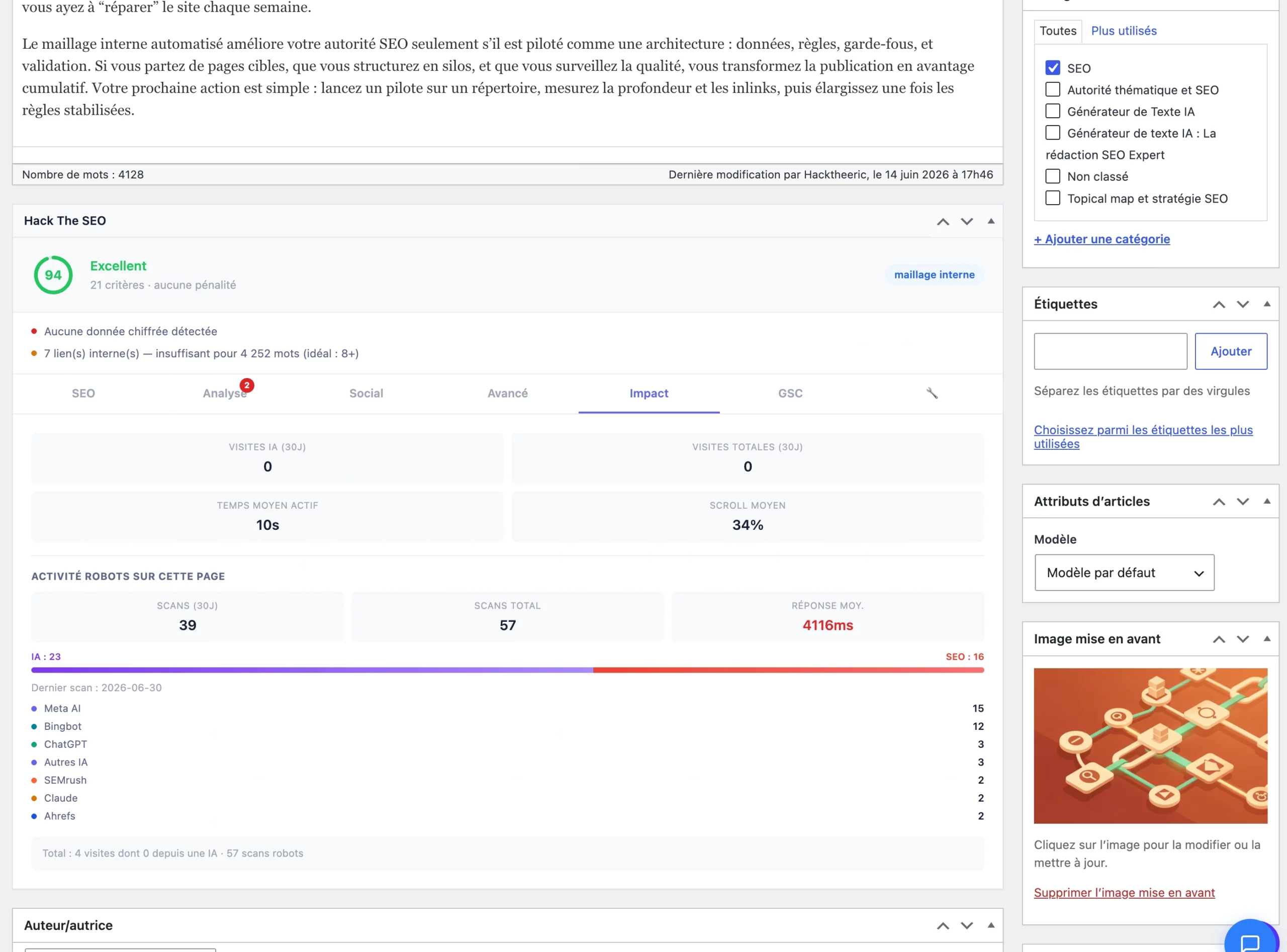
Reading the score
What the GEO Score checks
The score looks at the signals AI engines rely on to quote a page. Each criterion is weighted by how much it moves the needle — below, grouped by impact. For every weak criterion, the plugin gives you a concrete "fix" and surfaces your top priority recommendations.
| Criterion | Impact | What is checked |
|---|---|---|
| FAQ & structured lists | High | FAQ, <ul>/<ol> lists, <details> blocks — AI loves extracting Q/A and lists |
| Direct answer in the intro | High | A short, direct first paragraph with the keyword up front |
| Numbers & stats | High | Figures, %, currency, plus sourcing words ("according to", "study"...) |
| H2/H3 structure | High | A clear heading structure (several H2, a few H3) |
| Cited sources | Medium | Links to authoritative domains (.gov, .edu, Wikipedia, official stats...) |
| Content length | Medium | Enough depth to cover the topic (roughly 1500–2500 words) |
| Internal linking | Medium | A few internal links to related pages |
| Images & SEO ALT | Medium | At least a couple of images with a descriptive ALT |
| Meta title & description | Base | Title and description within the recommended lengths |
| Freshness | Base | Recently updated content (last ~90 days) |
| Schema markup | Base | JSON-LD detected (FAQ, HowTo...) |
| E-E-A-T signals | Base | A real author (not "admin"), author bio, published date |
The 5 highest-impact levers
- Add an FAQ (3–5 questions at the end of the article) — the single biggest lever. AI loves extracting Q/A.
- Answer right in the intro: a short first paragraph (30–60 words) with the keyword in the first words.
- Add numbers: statistics, percentages, sourced data.
- Structure with clear H2/H3 and cite 2–3 authoritative sources.
- Lengthen if too short, add internal links, images with ALT, and keep content fresh.
llms.txt, llms-full.txt & .md pages#
Three files served automatically to give AI a clean, structured version of your site. Think of a robots.txt, but to help LLMs understand what to read on your site.
| File | Content | Role |
|---|---|---|
/llms.txt | Summary: pillars, key pages, recent posts, products/categories, resources (sitemap, RSS) + usage guidance. | The "map" of your site for AI. |
/llms-full.txt | Extended version ("GEO premium"): full content of pillars, longer summaries, structured product catalog. | Gives much more material to cite you precisely. |
/my-article.md | Clean markdown version of each page (add .md to the URL): title, URL, date, author, body converted cleanly. | LLMs read clean text better than HTML. |
.md pages are served noindex so they don't pollute Google. Two modes in SEO Settings → llms.txt: Auto (the plugin picks pillars + key pages + recent posts) or Manual.# Site name
> Short description of your business and expertise.
## Pillars
- [Pillar title](https://yoursite.com/pillar/) : one-sentence summary.
## Key pages
- [Important page](https://yoursite.com/page/) : what it's for.
## Recent posts
- [Latest article](https://yoursite.com/article/) : what it's about.
## Resources
- Sitemap: https://yoursite.com/sitemap.xml
- RSS feed: https://yoursite.com/feed/Reference standard: llmstxt.org. The extended llms-full.txt and per-page .md versions are available on Ultra.
AI bot tracking (your "radar")#
The plugin detects when AI crawlers come to explore your site — proof that AI robots read your content, the first step before being cited. 100% local, no external key.
How it works
On every page load, the plugin recognizes known AI crawlers from the visitor's signature and records the visit (page, time, response code) in your own database, de-duplicated so repeated hits aren't over-counted. It's visible in the dashboard as an "AI Monitoring" feed ("ChatGPT crawled [page]", "Claude crawled...") with a 30-day total and a trend.
AI bots tracked
| Family | Recognized crawlers |
|---|---|
| ChatGPT / OpenAI | GPTBot, ChatGPT-User |
| Claude / Anthropic | ClaudeBot, Claude-Web, anthropic-ai |
| Perplexity | PerplexityBot |
| Google Gemini | Google-Extended, Gemini-Bot |
| Microsoft Copilot | CopilotBot |
| Meta AI | Meta-ExternalAgent, FacebookBot |
| Others | cohere-ai, Applebot-Extended, CCBot, Bytespider, Diffbot |
Classic SEO bots (Googlebot, Bingbot, Semrush, Ahrefs...) are distinguished so they aren't mixed up with AI bots.
Human traffic coming from AI
When a human clicks through to your site from an AI interface (chatgpt.com, claude.ai, perplexity.ai, gemini.google.com...), the plugin detects it via the referrer and reports this real GEO traffic.
Agents & Inbox#
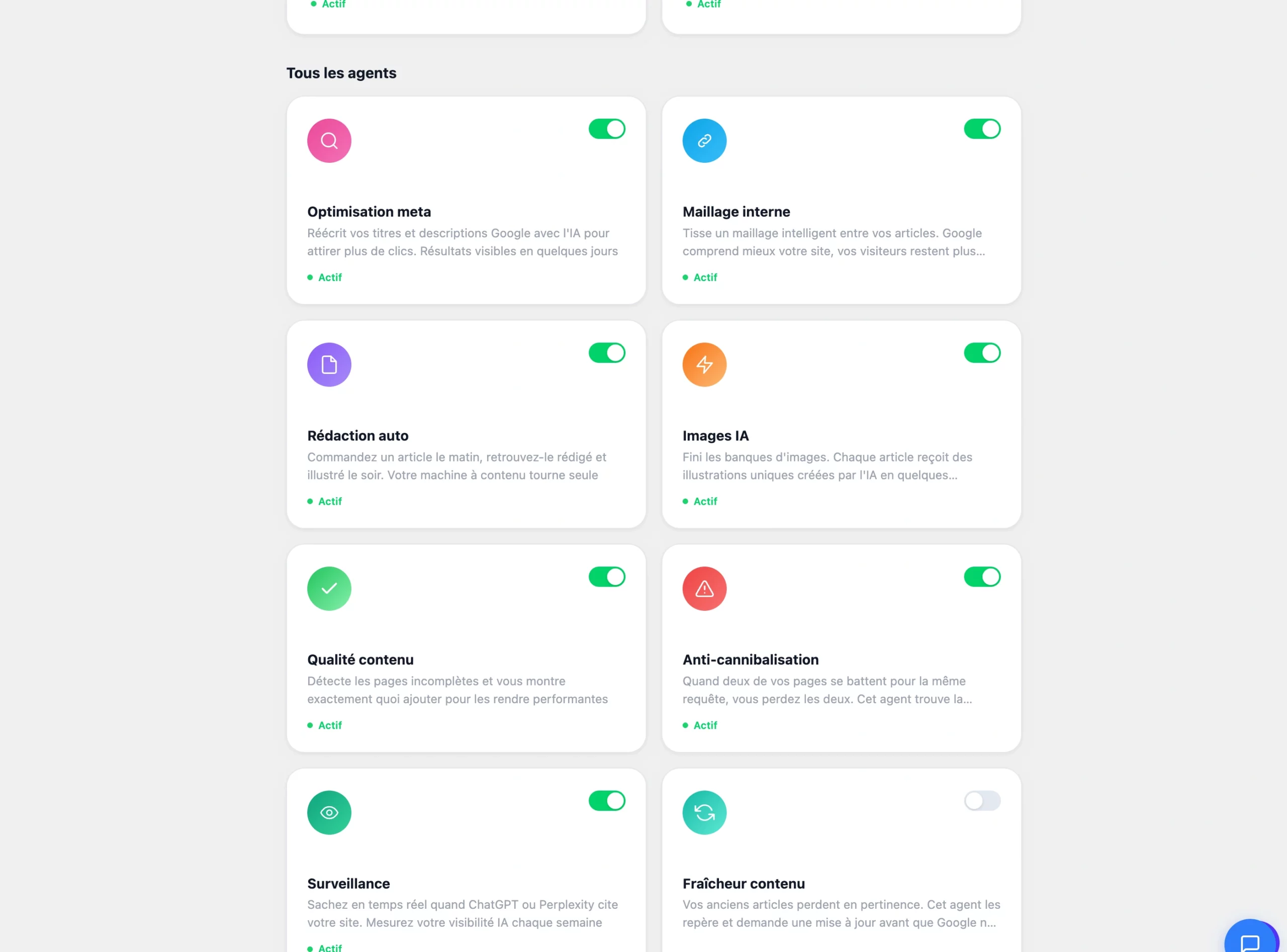
The AI agents analyze your site continuously and drop their recommendations into the Inbox. You stay in control: nothing is applied without your validation (unless autonomous mode is explicitly enabled).
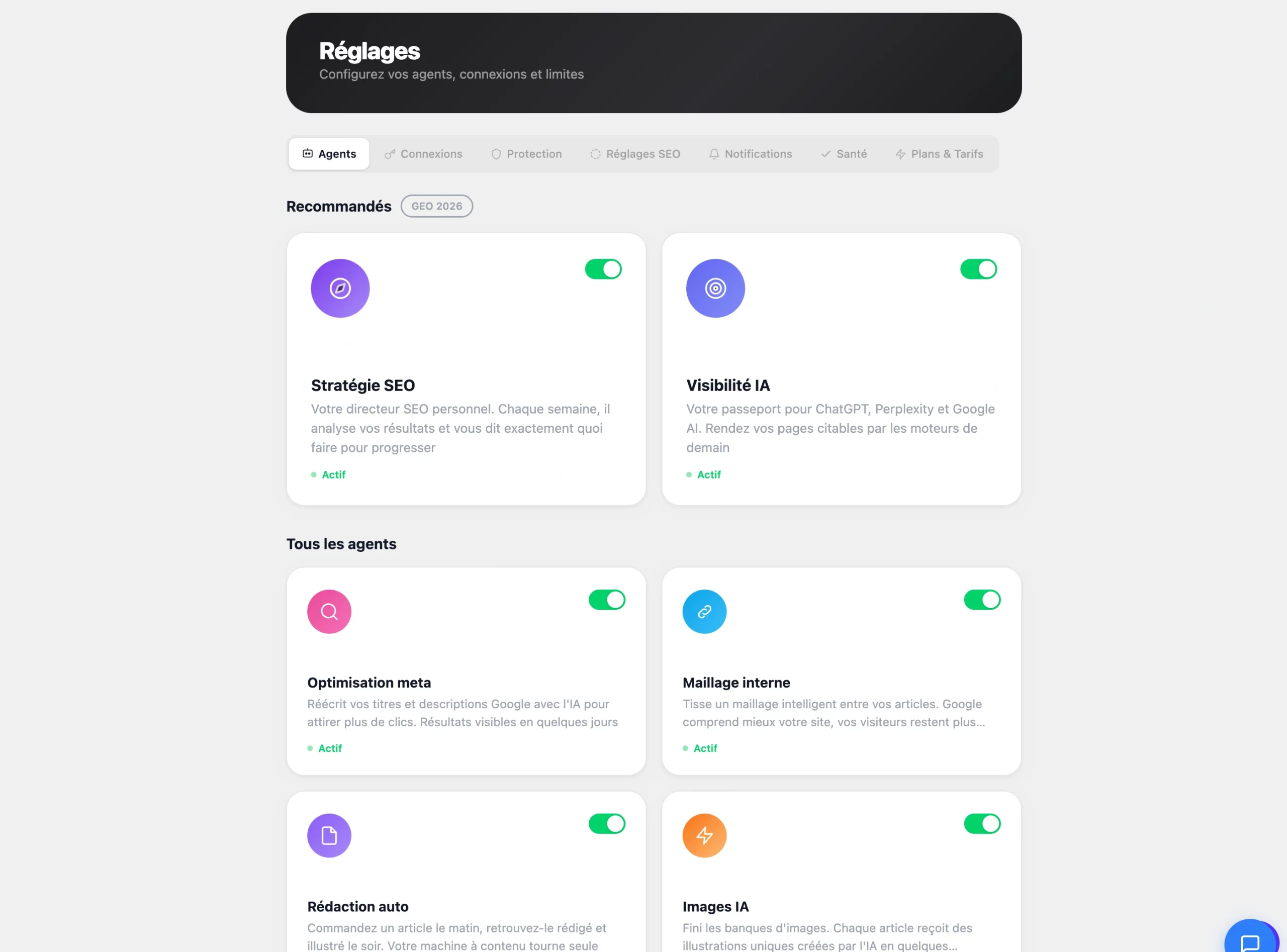
Available agents
Each agent is enabled/disabled in Settings → Agents. Protection (Settings → Protection) frames their activity: monthly budget cap, active hours, pages to exclude.
Handle a recommendation
Open the Inbox
Dashboard → Inbox tab. Recommendations are typed: Meta, Internal links, Content, Technical.
Check the before/after
Click a recommendation to see the detail and preview.
Apply or reject
Apply (instant) or Reject. Bulk processing with multi-select.
AI CoachFree: 5/mo#
An AI assistant connected to your real data: Search Console, linking, meta tags, cocoons, cannibalization. It answers, diagnoses and generates reports — but changes nothing directly: every action goes through the Inbox.
What to ask it
Exportable reports (PDF)
| Report | Content |
|---|---|
| SEO Audit | Score by category, problems by priority, recommendations by impact. |
| Performance | Clicks & impressions trend, pages up/down, keyword trends. |
| Linking | Orphan pages, link distribution. |
| Content | Article quality, length, structure, meta scores. |
| GEO | AI visibility, citations, share of voice, sentiment, competitor comparison. |
Free: 5 questions/month. Pro & Ultra: unlimited, with memory, reports and analytics.
MCP — pilot your SEO with ClaudeUltra#
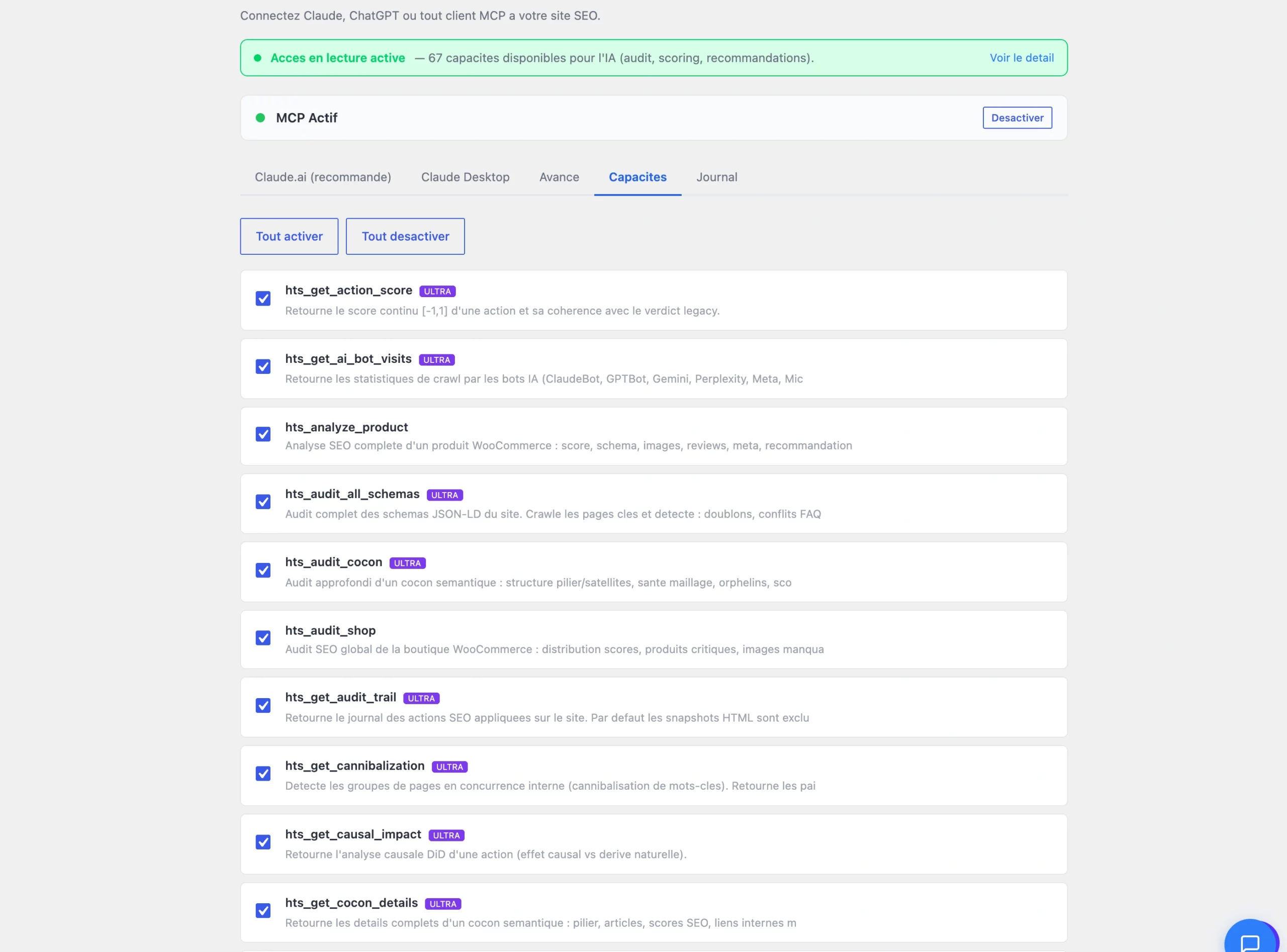
Through MCP (Model Context Protocol), you connect an AI agent — Claude — directly to your site. It reads Hack The SEO, your Search Console and your page content, then delivers diagnostics and actions. A conversational SEO consultant, available 24/7.
How it works
You ask the question
"Why isn't my services page ranking?" — in natural language, inside Claude.
Claude analyzes
It reads your site, your Search Console and your Hack The SEO audit through the plugin's secure capabilities.
You get the plan
A reasoned diagnosis + a prioritized action plan. On Ultra, Claude can also apply the fixes.
Read capabilities (diagnostics)
You can ask Claude to understand the state of your site without changing anything — for example:
- Overall site health and the SEO score out of 100.
- The GEO Score of a given article, and how to lift it.
- An audit of a semantic cocoon and its topical authority.
- The pairs of pages that are cannibalizing each other.
- Search Console opportunities (the keywords worth pushing).
- AI crawler activity on your content.
- The actions ranked by expected impact.
Action capabilities (Ultra)
And you can ask it to execute — every action is tracked and reversible:
- Rewrite and apply a meta title/description in your brand voice.
- Place the internal links suggested for a cocoon.
- Draft a cocoon plan for a topic.
- Create a 301 redirect.
- Add missing schema.
- Roll back any action.
- Ping a page to search engines for faster indexing.
Example prompts
History, rollback & impact measurement#
Every action is logged. You can roll back safely, and measure the real effect of each change on your traffic.
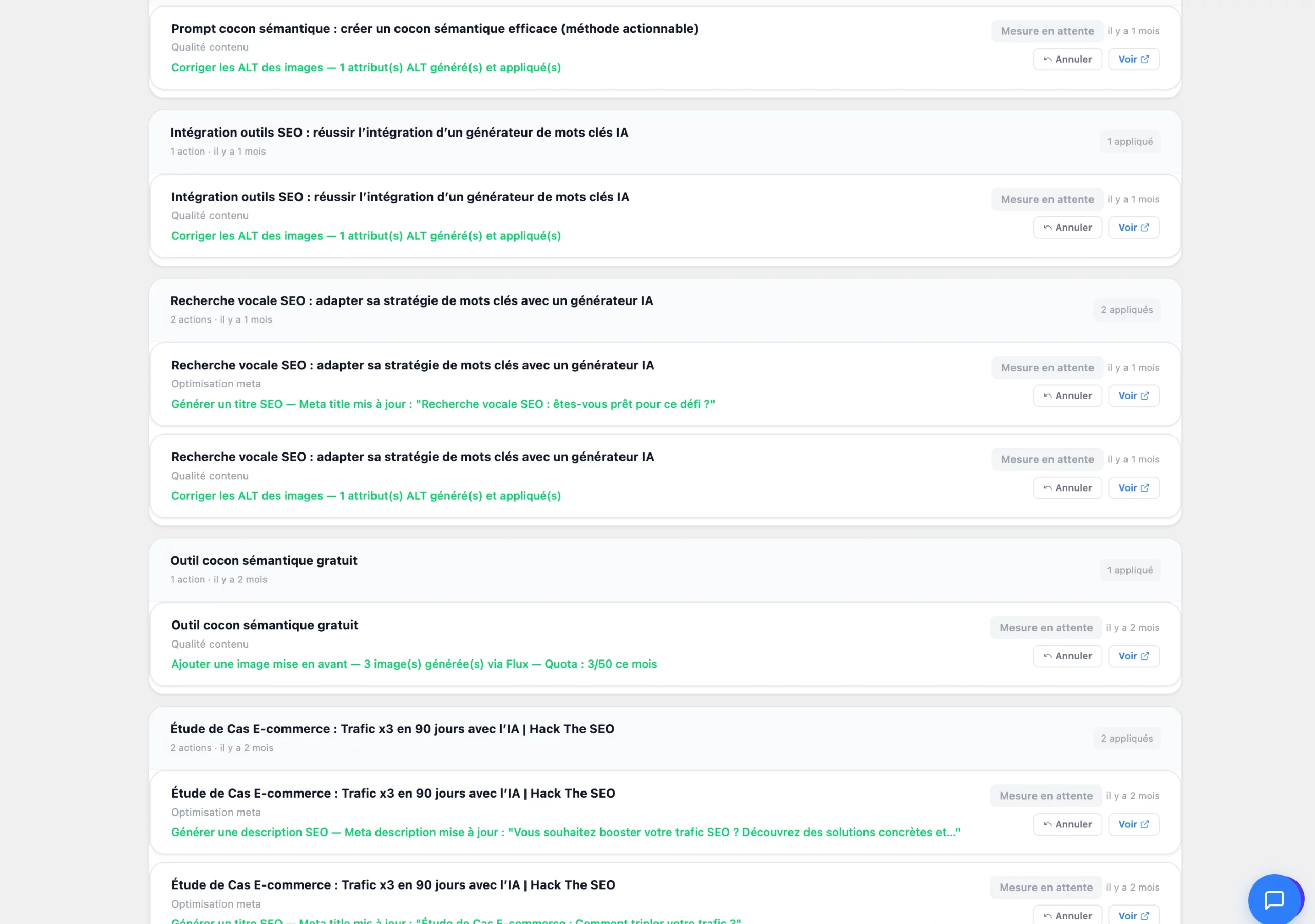
- Rollback: Dashboard → History, find the action, click Undo. Content returns to its previous state. Available for 30 days.
- Audit trail Ultra: a full log of actions (who, what, when) you can review at any time.
- Impact measurement: the plugin isolates the real effect of a change on your traffic — a rigorous before/after that separates the change's impact from normal day-to-day variation.
Google Search Console#
Search Console provides Google's official data: keywords that find you, clicks, impressions, positions. Connected to Hack The SEO, it feeds the scores, the opportunities and the Coach.
- Connection: Settings → Connections → Connect Google Search Console. Authorize Hack The SEO to read your data — the connection is handled for you, with no token to touch.
- Delay: data appears within 24–48 h after the first connection.
- Analytics in WordPress: clicks, impressions, average position and CTR directly in Hack The SEO → Analytics.
- Find opportunities: filter keywords in position 11–20 (page 2), sort by descending impressions — these are your best quick wins.
If no site is detected: check that you're using the right Google account, that the address is exact (www ≠ non-www), and that the site is HTTPS. On shared hosting, data syncs in batches in the background.
WooCommerce e-commerceUltra#
Hack The SEO optimizes WooCommerce stores like editorial sites: product pages, categories, e-commerce cocoons, Product schema and store audit.
- E-commerce cocoons: on a store, the pillar of a cocoon is a product category (never a single product). Products become the leaves attached to the category, with a lower article target.
- Product schema: price, availability, reviews (AggregateRating), return policy — for Google Shopping rich results.
- Category meta & GEO: editable SEO title/description, GEO Score on the archive page (with a "Generate SEO title/desc" button).
- Product linking: link suggestions between products, categories and related editorial articles.
- Attribute pages: generation of landing pages by attribute (color, size, brand...) to capture the long tail.
When driven through AI, the plugin can audit the store, analyze a product, suggest and apply e-commerce links, and generate attribute landing pages.
Compatibility & technical specs#
Hack The SEO installs in minutes, runs on mainstream shared hosting, and requires no third-party API key.
| Item | Compatibility |
|---|---|
| WordPress | 5.9 minimum · tested up to 6.9 |
| PHP | 7.4 to 8.2 (polyfills included for PHP 7.4) |
| Page builders | Gutenberg, Elementor, Divi, Bricks, Avada |
| E-commerce | WooCommerce |
| Multilingual | Polylang, WPML (one language per cocoon) |
| Hosting | Mainstream shared hosting included (auto-recovery for throttled cron) |
| AI API keys | None to supply — AI included in the subscription |
| Data & GDPR | Processing in Europe · bot tracking 100% local · GDPR compliant |
Ultra light
Minimal footprint, instant load, Lighthouse score preserved.
Coexistence
A compatibility module avoids conflicts while you migrate from another SEO plugin.
1-click migration
Imports meta titles/descriptions from Yoast, Rank Math, SEOPress, AIOSEO.
FAQ & troubleshooting#
The most common questions from clients and consultants.
Does Hack The SEO replace Yoast / Rank Math / SEOPress / AIOSEO?
Does it slow down my site?
Do I need an OpenAI / Claude API key?
Is it GDPR compliant?
Does it work with Elementor / Divi / Bricks / WooCommerce?
How long until I see results?
My articles stay "queued", why?
Is AI content penalized by Google?
SEO / GEO glossary#
The key terms of this documentation, in one line.
- Semantic cocoon
- A group of pages on the same topic, linked together around a pillar.
- Pillar
- The main page of a cocoon (the central topic). Only one per cocoon.
- Child / satellite article
- Child = linked directly to the pillar. Satellite = same topic, no direct link to the pillar.
- Orphan page
- A page with no internal link (inbound or outbound) — to fix as a priority.
- Topical authority
- The "topical legitimacy" of a cocoon, scored out of 100.
- Semantic analysis
- Comparing the meaning of two pages (not just their tags) to measure how related they are.
- Clustering
- The operation that automatically groups pages by topic.
- Cannibalization
- Two pages competing for the same keyword — neither ranks well.
- Canonical
- A tag that tells Google the official version of content reachable via several URLs.
- Schema JSON-LD
- Invisible structured data that helps Google (rich results) and AI understand a page.
- E-E-A-T
- Experience, Expertise, Authoritativeness, Trust — credibility signals (author, sources, dates).
- GEO
- Generative Engine Optimization: optimizing to be cited by AI, not just to rank on Google.
- GEO Score
- A 0–100 score of how "citable" content is by AI (a weighted set of criteria).
- llms.txt / llms-full.txt
- Text files that present your site to LLMs; the full version includes the complete content of pillars.
- .md page
- A clean markdown version of a page (add
.mdto the URL), built for LLM reading. - AI crawler
- An AI robot that explores the web to feed its answers (GPTBot, ClaudeBot, PerplexityBot...).
- AI Overviews
- AI-generated answers shown directly by Google at the top of the results.
- MCP
- Model Context Protocol: the standard that connects an AI agent (Claude) to the plugin.