
The MCP that runs your WordPress SEO by talking.
The first WordPress SEO plugin you can run in natural language via MCP (Model Context Protocol). No web averages, no generic advice: when you ask Claude "where am I losing clicks?", the answer comes from YOUR data, read live from your site.
Your WordPress SEO sits asleep in a dashboard. You don't.
A useful number is worthless if it takes five clicks to find. Most SEO plugins stack screens you have to learn: tabs, filters, exports. The MCP flips that logic: you ask the question in plain English, Claude goes and finds the answer inside your WordPress, using your real numbers.
- Clicking through tabs to find a score or a number
- No interface to query the site in natural language
- Audits you have to run, read, and interpret yourself, page by page
- No way to connect an external AI to the site's SEO data
- Ask a question in plain English, get a real number back from your site
- Claude.ai, Claude Desktop, Cowork or Cursor connected in 1 click
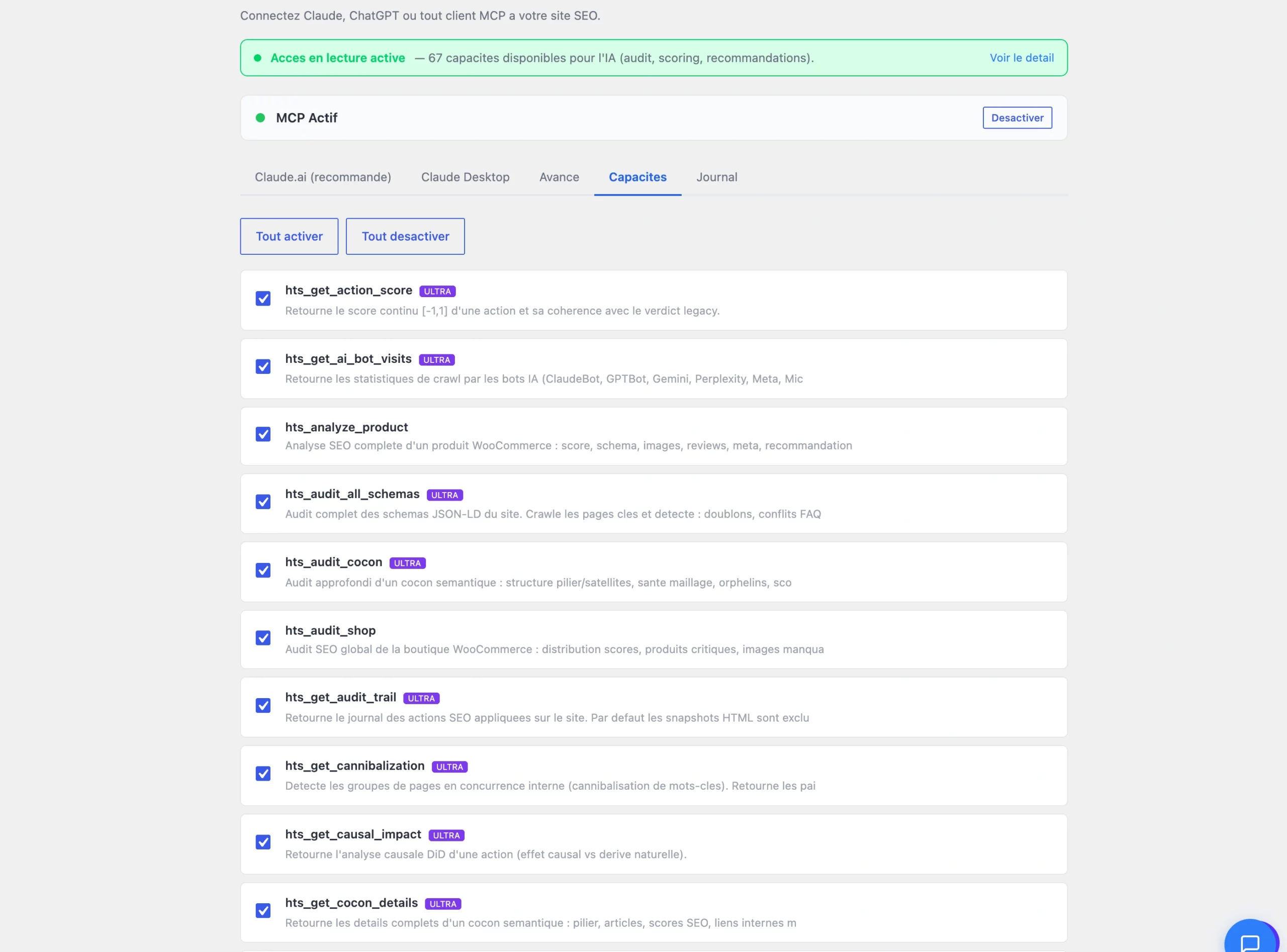
- 67 audit, scoring, and diagnostic capabilities exposed to AI
- Read-only by default, every capability can be toggled, everything is logged
Three steps to run your SEO by talking.
The MCP is part of the Hack The SEO WordPress plugin: no server to install, no command line.
Copy the MCP address
From Settings → MCP, a single field: https://yoursite.com/wp-json/hts/v1/mcp. One Copy button, nothing else to configure on the WordPress side.
Connect your AI app
Paste it into Claude.ai → Settings → Connectors (or Claude Desktop, Cowork, Cursor). Status switches to "MCP Active" within seconds.
Ask your SEO questions
"What's my GEO score?", "Where's my keyword cannibalization?", "Which pages lost traffic?": Claude calls the capabilities it needs and answers with your site's numbers.
Ask the question, get YOUR numbers.
No more digging through dashboards: you ask the question in plain English, and the answer comes from your site's real data, not a web average.
Claude queries the scoring capability and answers with the current score, without leaving the conversation.
The pairs of pages competing on the same keywords come up, with a suggested action.
Queries close to the top 10 and high-potential pages show up directly in the answer.
67 capabilities: audits, scores, diagnostics.
Every MCP capability maps to a real function of the plugin. Grouped by family, they cover the core of running SEO on a WordPress site.
- Site health, GEO score and SEO score, semantic cocoons and internal linking
- Search Console opportunities, keyword cannibalization, schema audits
- E-commerce store audits, insights, and prioritized strategic recommendations
Secure by design.
Giving an AI access to your site raises a real trust question. The Hack The SEO MCP answers it with simple, verifiable guardrails.
- Read-only by default: the MCP reads your data, it changes nothing without confirmation
- Every capability can be toggled individually, plus Enable All / Disable All buttons
- A full call log: which capability, when, with what status
- Nothing gets published or changed without your explicit confirmation
Connected in 1 click, wherever you work.
A single connection address, compatible with the AI apps you already use: Claude, Cowork, Cursor. Onboarding happens right from the plugin, without leaving WordPress.
The same endpoint works everywhere: /wp-json/hts/v1/mcp, pasted once into the settings of whichever AI client you choose.
The Settings → MCP screen walks you through exactly where to copy the endpoint and how to check the connection is active.
No server to deploy, no JSON config to write by hand: copy, paste, connect.
67 capabilities, one conversation.
Global & GEO score on demand
Ask for your SEO or GEO score right now: Claude queries the plugin and returns the current score, no dashboard to open.
AI bot visits
GPTBot, ClaudeBot, PerplexityBot: ask who's visited your site, and since when, in one sentence.
Cannibalization detected
Pages competing with each other on the same queries surface, with the URLs involved.
Cocoon audit
Semantic cocoon health, missing internal links, orphan pages: asked and answered in a single reply.
Search Console opportunities
Queries close to the top 10 and underused pages in Google Search Console come up on request.
Site health & diagnostics
Errors, blocks, technical alerts: a full diagnostic requested from Claude in one sentence.
Internal link verification
Broken or missing internal links between related pages, listed right in the conversation.
WooCommerce store audit
Incomplete product pages, poorly linked categories: the store audit gets asked for just like everything else.
Prioritized strategic recommendations
Claude ranks actions by potential impact, based on the site's real data, not a generic list.
Control by conversation, however you like to work.
Small businesses & freelancers
Ask Claude questions instead of learning an interface: score, priorities, and blockers arrive in one sentence, no training needed.
WooCommerce e-commerce
Audit the store in natural language: product pages, categories, internal linking asked for directly from Claude.
Agencies
Run every client site from Claude or Cowork: one endpoint per site, a single conversation to compare scores.
Bloggers & publishers
Diagnostics in 30 seconds: articles to rework, freshness, cannibalization, without opening a single dashboard.
We run hacktheseo.com on our own MCP.
Real numbers from the last 30 days, measured on July 2, 2026, verifiable in a demo.
"This site is run through its own MCP: cannibalization checked before every new page, AI bots tracked, scores queried straight from Claude."
"Audits run in natural language via the MCP: 130 pages linked after diagnosis, no dashboard for the team to learn."
"Store audited and fixed using the MCP e-commerce capabilities. Semrush traffic up 3.3x in 60 days of targeted work."
"SEO shouldn't require learning a dashboard. You ask 'where am I losing clicks?', the MCP queries your site and answers with the numbers. That's it."
A native MCP server: no one else has it.
| Capability | Yoast | Rank Math | SEOPress | Hack The SEO |
|---|---|---|---|---|
| Native MCP server built into the plugin | ✕ | ✕ | ✕ | ✔ |
| Natural language control via Claude | ✕ | ✕ | ✕ | ✔ |
| 67 audit & scoring capabilities exposed to AI | ✕ | ✕ | ✕ | ✔ |
| Read-only mode + full call log | ✕ | ✕ | ✕ | ✔ |
| 1-click connection (Claude.ai, Desktop, Cowork) | ✕ | ✕ | ✕ | ✔ |
Frequently asked questions about the Hack The SEO MCP.
What is an MCP (Model Context Protocol)?
What can the Hack The SEO MCP actually do?
Which AI apps are compatible?
Can the AI break my site?
Do I need to know how to code?
Where does my data go?
How is this different from a GPT or an SEO chatbot?
Does it slow down my site?
Which plan includes the MCP?
Talk to your WordPress SEO live, right in front of you.
20 minutes on a video call. We connect the MCP to one of your sites, you ask Claude your own questions, and you watch the real numbers come back.
Install for freeOn your site, not a generic demo · free 1.5-hour expert onboarding · traffic up in month one, or refunded