Claude + WordPress tutorial
Connect Claude to your site in 3 minutes
The Hack The SEO extension for Claude lets the Claude app read your site: your SEO scores, AI crawler visits, and the pages competing with each other. Four steps, nothing else to install.
- 3 minutes
- Your usual Claude account
- Claude only reads
First, your case
- You do not have the Claude appDownload it from claude.ai/download (Mac or Windows) and sign in. The extension does not work in Claude opened in a browser.
- You use Claude CodeNo need for the extension: in Hack The SEO, AI connection, pick the Claude Code tab and paste the line in your terminal.
- You have the full versionIt connects in one click from Claude, without this extension: follow the getting started guide.
Claude cannot publish, change or delete anything on your site.
The 4 steps
Keep two windows open: your WordPress admin and the Claude app.
-
1
Create your key in WordPress
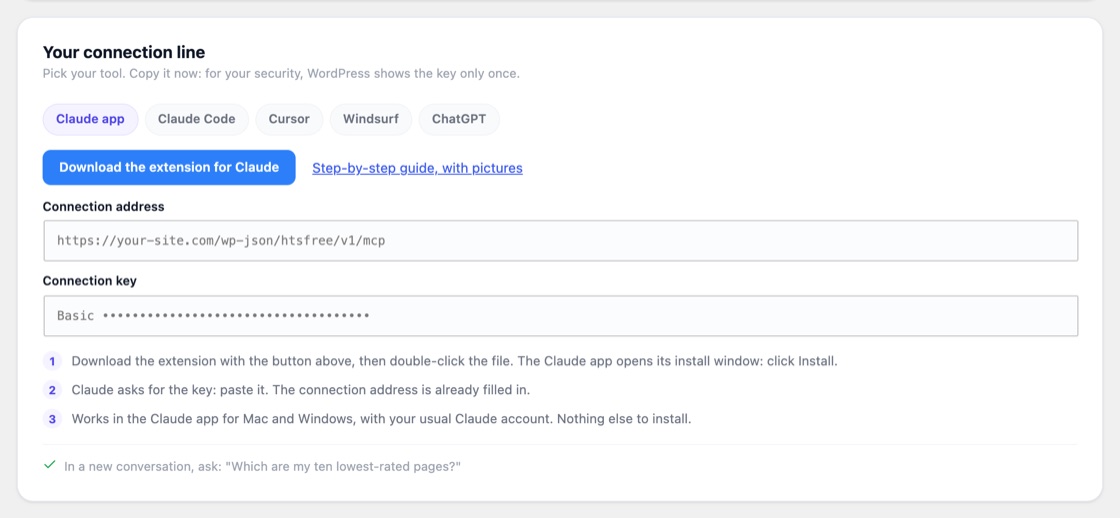
In WordPress, open Hack The SEO, then AI connection, and click Create a connection key. WordPress creates the key itself, and it stays with you.
The key is shown only once.Keep this page open until step 4.
-
2
Download the extension for Claude
Just below, the Claude app tab is open. Click Download the extension for Claude: the file hack-the-seo-claude.mcpb is made for your site, with its address already inside. The Connection key stays on screen: you will paste it at step 4.
You do not see this button?Update the Hack The SEO plugin in WordPress (Plugins, Updates), then come back to AI connection.
-
3
Install the extension in Claude
The file hack-the-seo-claude.mcpb is now in your Downloads folder. Next, hand it to the Claude app:
- Open the Claude app, then its Settings: click your name at the bottom left, then Settings. Shortcut: Cmd + comma on Mac, Ctrl + comma on Windows.
- In the left column, scroll down to This computer and click Extensions. The page says “No extensions installed”.
- Open your Downloads folder (Finder on Mac, File Explorer on Windows), then drag the file hack-the-seo-claude.mcpb onto this Claude page.
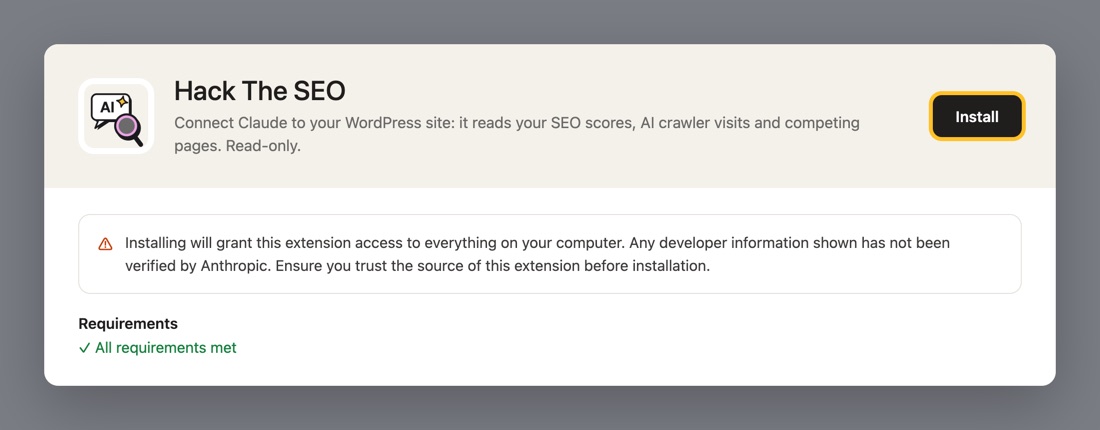
- The extension's page opens: click Install.
Claude shows a warning: that is normal.It shows it for every extension installed from outside its directory. This one does a single thing: read your site's data, with the key you give it.
The file landed in a conversation?It will not install from there: remove it and drag it onto the Extensions page in Settings, as in the diagram.
-
4
Paste the key, then ask
Click Configure: the Connection address is already filled in, Claude only asks for the Connection key. Paste the one from step 2, save, and check that the extension is Enabled. Then open a new conversation and ask: "Which are my ten lowest-rated pages?"
It works when…Claude answers with the real pages of your site. If it says the site rejects the key, create a new one (step 1) and replace it in Settings, Extensions, Hack The SEO.




Connected? Claude tells you what to fix.
With the free version, Claude shows you what to fix and where, and you fix it by hand. The full version makes the fixes for you, with your approval, and lets you go back.
Talk soon, the Hack The SEO team