An internal link tool finds pages on your site that should link to each other, suggests the anchor text, and helps you add those links without opening every post. For a WordPress site, the right pick depends on three things: how many pages you have, whether you want suggestions or full automation, and whether you want to approve each link before it goes live.
Below: 8 options checked on 04/11/2026, a 20-minute test, and what our own internal links taught us.

What is an internal link tool?
An internal link tool is software that reads your content and proposes links between your own pages, so that each important page receives links from related posts without you reopening every article. Some only show reports (orphan pages, link counts). Others suggest links while you write. The most automated ones add the links for you, in bulk.
An internal link is simply a link from one page of your site to another page of the same site. It helps visitors find the next useful page, and it helps Google understand which pages matter and how your topics fit together. A page with no internal link pointing to it is called an orphan page: Google can still find it through the sitemap, but it gets far less attention.
Doing this by hand works on a 20-page site. On a blog with 200 posts, you forget older articles, you repeat the same anchor text, and new posts stay orphaned for weeks. That is the job an internal link tool takes over.
Which internal link tools are worth testing in 2026?
Eight tools come up most often in Google results for “internal link tool” and in WordPress forums, and they fall into three families: WordPress plugins that suggest links, SaaS tools that crawl any site, and all-in-one SEO plugins with a linking module.
| Tool | Type | What it does well | Price checked on 04/11/2026 | Best for |
|---|---|---|---|---|
| Link Whisper | WordPress plugin | Link suggestions inside the editor, inbound link suggestions from older posts, orphan page report | Free version on WordPress.org; paid plans on its site (price not readable on 04/11) | Bloggers who want suggestions they approve one by one |
| Linkilo | WordPress plugin | Suggestions plus anchor text and cannibalization reports | $59/year for 1 site, $149/year for 5 sites (linkilo.co/pricing) | Data-minded site owners |
| Internal Link Juicer | WordPress plugin | Automatic links from keywords you set per post | Free version on WordPress.org; Pro version on its site | Sites with a clear keyword per page |
| LinkBoss | SaaS + WordPress | Bulk contextual links, silos, orphan page fixes; free plan announced on linkboss.io | Free plan, paid plans on its site | Large content sites and agencies |
| LinkStorm | SaaS, any CMS | Crawls the site, AI suggestions, Search Console data to prioritize | From $30/month for 1,000 URLs, unlimited websites (linkstorm.io/pricing) | Non-WordPress sites, agencies |
| InLinks | SaaS | Entity-based linking (links built around topics, not only keywords) | On its site | Topic-driven content strategies |
| Yoast SEO Premium | All-in-one SEO plugin | Related-link suggestions in the editor for Yoast users | On yoast.com | Sites already on Yoast that want a simple start |
| Hack The SEO | WordPress SEO and GEO plugin | Finds missing links across the site, proposes them with anchors, you validate each action, every action can be undone for 30 days | 249 € excl. VAT per month, no commitment | Freelancers and SMEs who want the whole SEO work proposed, not only links |
Prices change often. A popular comparison published in September 2026 still listed Linkilo at $149 per year for one site; its pricing page showed $59 per year for one site when we checked. Always confirm on the vendor page before you buy.
What does each internal link tool do in practice?
In short: the WordPress plugins work inside your editor, the SaaS tools crawl the site from outside, and the all-in-one plugins add linking to a wider SEO job. Here is what to expect from each one before you install it.
Link Whisper
Link Whisper shows a box under the editor with links you can add from the post you are writing, and links older posts could send to it. Its reports list orphan pages and link counts per post. It is the most cited tool in the comparisons we read on 04/11, often as the default choice for bloggers.
Linkilo
Linkilo works like Link Whisper but adds reports on anchor text and on pages competing for the same keyword. Its pricing page shows $59 per year for one site and $149 for five, with no feature tiers. Good if you like to see the numbers before adding links.
Internal Link Juicer
Internal Link Juicer links automatically: you give each post a few keywords, and the plugin turns those words into links across the site. Fast to set up, but watch for the same anchor repeated on many pages.
LinkBoss
LinkBoss is built for volume: its site announces batches of thousands of contextual links, silo building and orphan page fixes, with a free plan. It suits large content sites and agencies more than a 30-post blog.
LinkStorm
LinkStorm crawls any site, whatever the CMS, and uses Search Console data to suggest links toward pages that already get impressions. Plans start at $30 per month for 1,000 URLs, with unlimited websites, which makes sense for agencies.
InLinks
InLinks builds links around topics (entities) rather than exact keywords. It fits a content strategy planned by topic clusters, and asks more setup than a simple plugin.
Yoast SEO Premium
If you already pay for Yoast SEO Premium, its editor suggests related posts to link to. It is basic compared with dedicated tools, but it costs nothing more and is a fair first step.
Hack The SEO
Our plugin looks for missing internal links across the whole site, proposes each one with its anchor, and also proposes titles, descriptions, articles and fixes. You validate every action, and each action can be undone for 30 days with a full log. It is the broadest option here, and also the most expensive if links are all you need.
Should you choose automatic or manual internal linking?
Choose suggestions you approve if you care about context and anchor text, and full automation only if you can review the result every month. Automatic tools save the most time, but they can also add dozens of weak or repetitive links in one click.
Here is how the two approaches compare in practice:
- Suggestions you approve (Link Whisper, Linkilo, Hack The SEO): slower, but each link makes sense in its sentence and you control the anchor.
- Keyword auto-linking (Internal Link Juicer, Link Whisper auto-links): fast, but the same anchor can be repeated on many pages, which looks unnatural.
- Bulk or script-based linking (LinkBoss, some SaaS tools): built for hundreds of pages; check that links are written in the HTML of the page and not only injected by JavaScript.
A simple rule: automate the discovery, keep a human on the decision. That is also the logic of our own plugin, where nothing is published without the site owner’s validation.
How do you test an internal link tool in 20 minutes?
Install it on a copy of your site or on a small section, pick 5 pages that matter for your business, and compare what the tool proposes with what you would do yourself. You will know in 20 minutes if its suggestions are usable.
- List 5 pages that bring leads or sales (your “money pages”).
- Run the tool’s orphan page or link report and note how many internal links each of the 5 pages receives today.
- Ask the tool for suggestions pointing to those 5 pages. Keep only the ones that read naturally in their sentence.
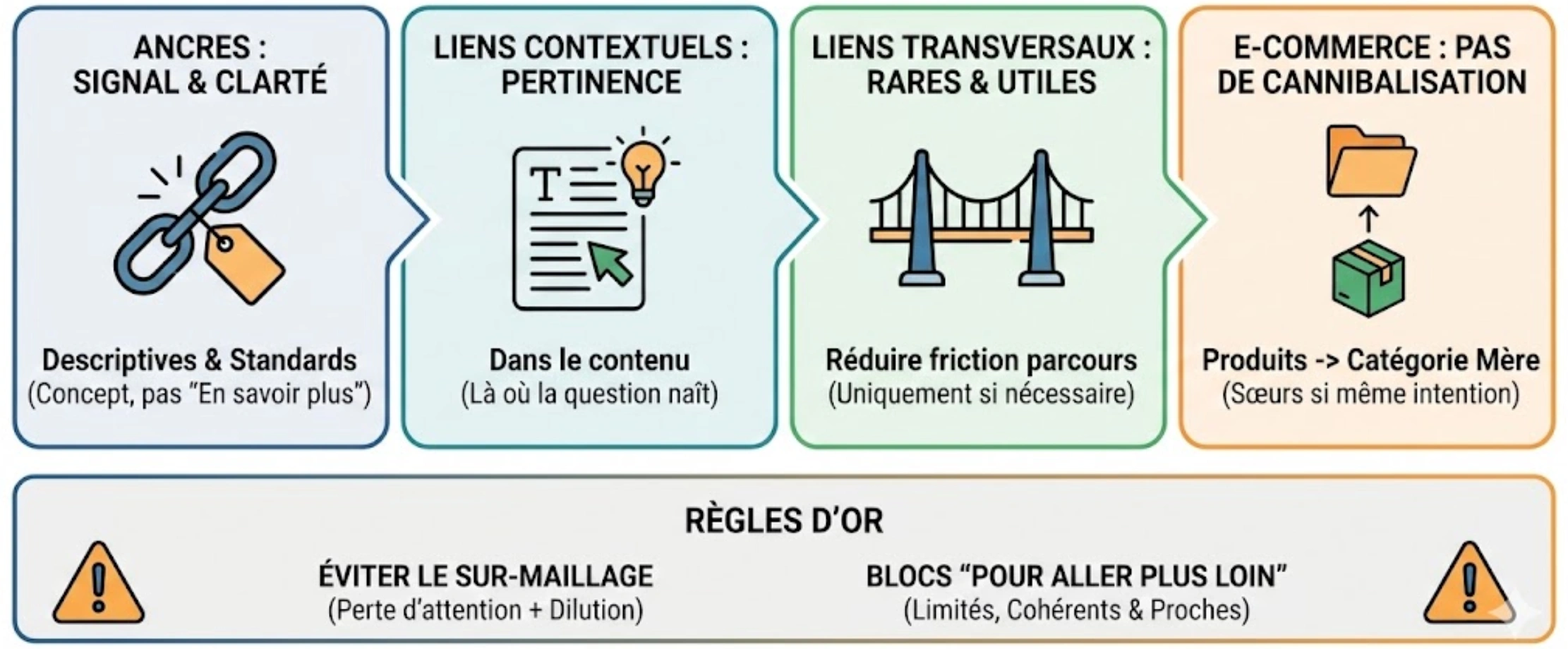
- Check the anchors: descriptive, varied, never the exact same phrase more than twice.
- Look at the page source of one modified post: the link must be a normal <a href> link, visible without JavaScript.
- Check that no suggestion points to a redirected URL or a deleted page.
If fewer than half of the suggestions pass step 3, the tool will cost you more editing time than it saves.
What did our own internal links teach us?
Even a site that sells an SEO plugin has internal linking gaps: when we checked hacktheseo.com in early November 2026, we found an orphan article and links to redirected URLs on several of our own selling pages.
Three findings from our Search Console and our link checks (data from hacktheseo.com, August 4 to November 1, 2026):
- Our French article on internal linking optimization had no link from any other page of its own topic cluster. Over 90 days it received 1 impression in Google.
- Our two pages about automatic internal linking (English and French) collected about 2,700 impressions on queries like “wordpress internal linking plugin”, at positions 10 to 24, and 0 clicks. Page two of Google brings visibility, not visits.
- Our evening checks of 3 November found links to redirected addresses on 5 pages. Each one wastes a little crawl and sends visitors through an extra hop.
The lesson: the tool matters less than the routine. Check orphan pages and redirected links every month, and give every new article at least 3 internal links on the day it goes live.
What should an internal link tool do for SEO and for AI search?
For Google, a good internal link tool helps important pages receive more links than minor ones, with clear anchors. For AI assistants like ChatGPT or Gemini, it helps them follow your topic from page to page and pick the page that answers best.
AI crawlers read your site a lot. On hacktheseo.com we counted 8,767 visits from AI bots in 28 days (August 30 to September 26, 2026), against 3,939 from Google, Bing and other search engines. Those bots follow normal HTML links. A link added only by a script, or hidden behind a click, may not be seen at all.
So when you compare tools, check four points: links written in the HTML, anchors that describe the target page, no link to redirected URLs, and an easy way to undo a batch of links if something goes wrong.
How much does an internal link tool cost?
Expect from free (limited versions on WordPress.org) to around $60 per year for one site with a plugin, and from about $30 per month for SaaS tools that crawl any CMS. Suites that do the whole SEO job cost more because linking is only one part.
Our plugin is in that last group: 249 € excluding VAT per month, without commitment. It proposes internal links along with titles, descriptions, articles and fixes, and you approve each action. If you only want link suggestions on a small blog, a dedicated plugin is cheaper; if you want the full SEO and GEO work proposed for you, a demo will show you whether it fits.
Which internal link tool should you pick?
Pick by your situation, not by the longest feature list. Most WordPress blogs start well with a suggestion plugin; larger or multi-CMS sites need a crawler; teams that want SEO handled end to end need a broader tool.
- Small WordPress blog, tight budget: start with the free version of Link Whisper or Internal Link Juicer.
- You want reports on anchors and cannibalization: Linkilo.
- Site not on WordPress, or many client sites: LinkStorm or LinkBoss.
- Already on Yoast Premium: try its suggestions before buying anything else.
- You want links, content and technical fixes proposed together, with your validation: see how automatic internal linking for WordPress works in Hack The SEO.
Whatever you choose, run the 20-minute test above first. To see how internal links fit into a full site check, read our guide to a WordPress SEO audit with one-click fixes, and for the bigger picture of what can be automated, our comparison of SEO automation tools. If you plan your topics first, content clusters built with a topical map make internal linking much easier.
FAQ
What does an internal link do?
It sends visitors and search engines from one page of your site to another. It helps Google discover pages, understand which ones matter most, and see how your topics connect.
How do you create an internal link in WordPress?
Select a few words in the block editor, click the link icon, then search for the page or post by its title and choose it. Use words that describe the target page.
Is there a free internal link tool?
Yes. Link Whisper and Internal Link Juicer have free versions on WordPress.org, and LinkBoss announces a free plan. Free versions usually limit automation or reports.
How many internal links should a page have?
There is no fixed number. Aim for each important page to receive at least 3 relevant links from related pages, and give each new article at least 3 links on the day it is published.
Can too many automatic internal links hurt SEO?
They can make pages harder to read and repeat the same anchors. Review automatic links regularly and remove those that do not help the reader.
Want to see it on your own site? Talk to an expert: a 20-minute video demo with Bruno.