Pick Rank Math if you want the most features for free and you accept a long settings screen. Pick Yoast if you want a simpler panel and detailed readability checks. Both are free on WordPress.org and both have paid plans.
We based this comparison on each plugin’s public pages and on three comparison articles read on 9 November 2026. It is not a lab test, and we say when we read each price.
Rank Math vs Yoast at a glance
Rank Math puts more modules into its free version, while Yoast keeps the free version lighter and sells the extras. The table sums up the differences that the comparison pages we read agree on.
| Question | Rank Math | Yoast SEO |
|---|---|---|
| Free version | Many modules included (schema, redirections, 404 monitor) | Core on-page checks, extras are paid |
| Interface | Many options, setup wizard | Simpler panel, traffic-light checks |
| Readability analysis | Basic | Detailed, a common reason to choose it |
| AI features | More of them, on credits | Fewer, tied to the paid plans |
| WooCommerce | Included in the plugin | Separate add-on |
| Price | See its pricing page (read 9 Nov 2026) | See its pricing page (read 9 Nov 2026) |
Which plugin gives you more for free?
Rank Math gives you more for free, because its free version already includes modules such as schema markup, a redirection manager and a 404 monitor that other plugins keep behind a paid plan. Yoast’s free version covers titles, descriptions, sitemaps and its content analysis.
More modules is not always better. Each module is one more setting to understand and one more thing to keep up to date. If you only need titles, descriptions and a sitemap, Yoast’s lighter free version can be enough. If you plan to add schema or redirects soon, Rank Math saves you a purchase.
Our rule of thumb: list the features you will really use in the next six months, not the ones in the feature list, and check whether each is free in each plugin today.
Which one is easier to set up and use?
Yoast is easier to start with, and Rank Math is easier to tune once you know what you want. Yoast opens on a short list of tasks, while Rank Math starts with a setup wizard and then shows a long list of modules to switch on or off.
For a beginner with one blog, the short panel means fewer wrong turns. For someone who manages several sites, Rank Math’s options let you set a rule once and reuse it. Neither plugin makes SEO decisions for you: you still choose which pages to improve and what each title should say.
How do the on-page analysis and readability checks compare?
Yoast has the more detailed readability analysis, and Rank Math gives you more SEO checks per page. Yoast scores the SEO of a page and the readability of its text separately, with green, orange and red lights, while Rank Math shows one score and a long checklist.
Be careful with any score. A green light means a checklist was ticked, not that Google will rank the page. The checks catch real mistakes, such as a missing title, a very long sentence or a page with no internal link. They cannot tell whether your page answers the question better than the pages that already rank.
A good habit is to treat the score as a spell checker. Fix the red items, read the orange ones, and then judge the page yourself against what Google shows for your target search.
What about schema, redirects and sitemaps?
Both plugins create an XML sitemap and basic schema markup, and Rank Math goes further on schema types and redirects in its free version. The comparison pages we read list schema generators, redirection and 404 management, breadcrumbs and sitemaps as the main technical differences.
- Schema: Rank Math offers more schema types you can pick per page. Yoast sets sensible defaults and keeps the choices short.
- Redirects: Rank Math includes a redirection manager. With Yoast, check which plan includes it before you count on it.
- Breadcrumbs: both can output breadcrumbs, and your theme has to display them.
- Sitemaps: both generate sitemaps that you submit once in Google Search Console.
Whatever you choose, test your pages with Google’s Rich Results Test after any change, and read Google’s introduction to structured data once. A plugin can output valid markup that describes the wrong thing, for example a product page tagged as an article.
How do they handle internal links?
Both plugins help you spot internal-link problems, but neither decides which pages should receive links. Features vary by plan, so check what your plan includes. In practice they show you link counts or suggestions inside the editor, and you place the links yourself.
Internal links matter because they tell Google which of your pages are important and how they relate. A new article that no other page links to is hard for Google to find and to rate. After you publish, add at least three links to it from related pages, using different wording each time.
If you want to go further, we compared tools built only for this job in our guide to WordPress SEO plugins and what each one automates.
Which plugin has the better AI features?
Rank Math has more AI features, but they run on credits and cost extra, while Yoast has fewer AI features tied to its paid plans. In both cases the AI helps you write a title, a description or a draft. It does not choose what to write and it does not fix your site by itself.
There is a second AI question that most comparisons skip: how AI crawlers see your site. On hacktheseo.com, from 30 August to 26 September 2026, AI robots made 8,767 visits to our pages, against 3,939 for Google, Bing and the other search engines. That is our own site, counted by our own plugin, so it proves nothing for yours. It does show why you should look at your crawler logs and not only at an SEO score.
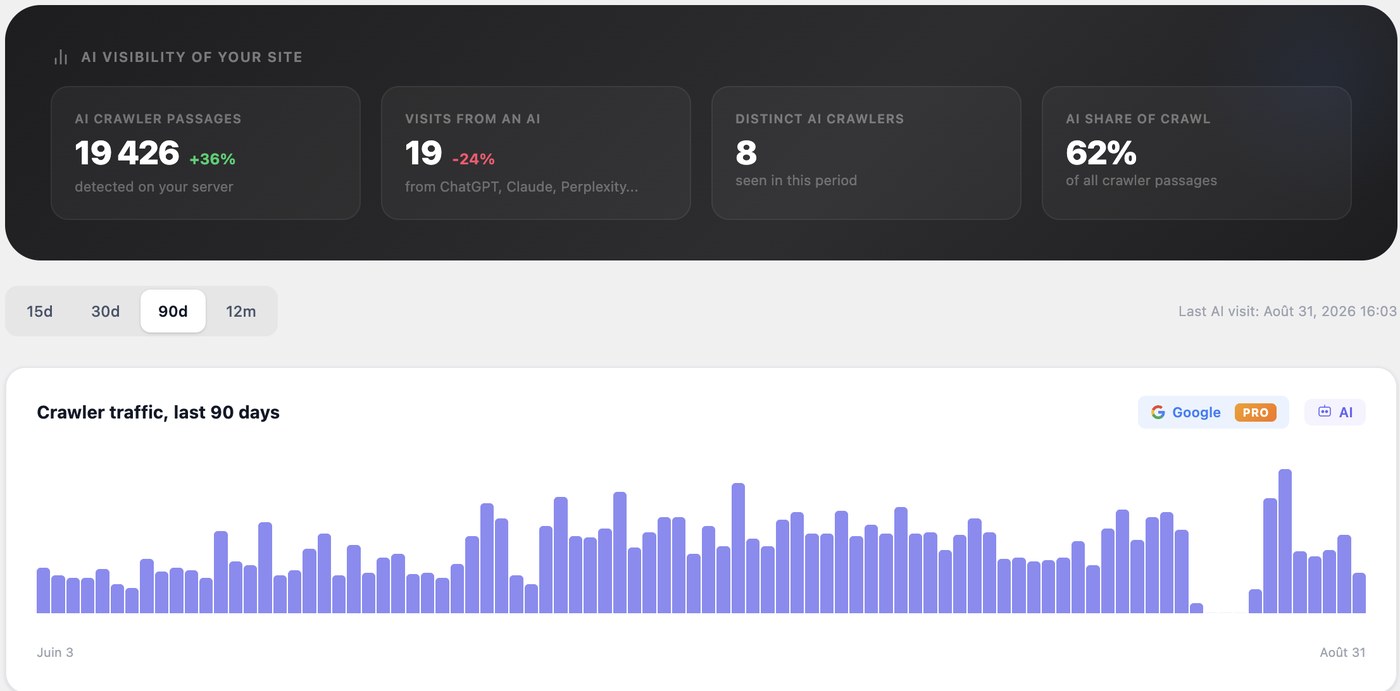
Neither Rank Math nor Yoast promises that an AI assistant will quote your page, and nobody can promise that. What you can do is answer the question in the first sentence of each section, keep your pages open to robots, and measure what happens.
Which one is better for WooCommerce?
Rank Math includes WooCommerce support in the plugin, while Yoast sells it as a separate add-on, so for a small shop the choice changes the total cost. For a larger shop, the real work is on product titles, category pages and structured data, and both tools help with the first step only.
Before you pay for any WooCommerce add-on, check three things on a few product pages: the title tag, the product schema (price and availability) and the canonical URL of variations. These three cause most shop-level SEO problems, and both plugins let you inspect them.
Do SEO plugins slow down your site?
Any plugin adds some work for your server, and the difference between Rank Math and Yoast depends on how many modules you switch on and on your hosting. We did not run a speed test, so we give no figure. The honest answer is to measure your own site.
Test two or three important pages in PageSpeed Insights before and after installing or switching. Keep only the modules you use, and repeat the test after a week, because caching changes the first results.
How much do Rank Math and Yoast cost?
Both have a free version and paid plans, and both were changing when we checked on 9 November 2026: Rank Math was running a sale on its yearly plans, and Yoast was announcing a simpler plan lineup on its pricing page. We do not quote a price because it would be out of date within weeks.
Check three things on each pricing page: the yearly price for the number of sites you have, the renewal price (it can differ from the first-year price), and what the AI and WooCommerce features cost on top. Multiply by the number of years you expect to keep the plugin, not by one.
What does each plugin do on its own, and what stays manual?
Both plugins mostly give you settings and checks, and you do the work. They tell you a page is missing a description, but they do not choose which pages matter, write the links between them, or check whether the change worked. Most comparisons leave this part out.
| SEO job | A settings plugin (Rank Math or Yoast) | What stays with you |
|---|---|---|
| Titles and descriptions | Fields, previews, optional AI draft | Choosing the pages and writing each one |
| Schema and sitemap | Generated from your settings | Checking the output is correct |
| Redirects | A manager to enter them | Finding the broken URLs and the right target |
| Internal links | Suggestions in the editor (varies by plan) | Deciding which pages should receive links |
| Content decisions | A checklist per page | Choosing topics, reading Google, updating old pages |
| Measuring | Search Console connection or reports | Reading the results and acting on them |
If you enjoy that work, or you have the time for it, a settings plugin is a good tool. If you do not, the plugin is not the problem: the missing piece is someone, or something, that does the work and asks for your approval.
Should you choose Rank Math or Yoast?
Choose by the situation you are in, not by the feature count. The two lists below are our reading of the public comparisons, and a plugin you already use and trust is often the right answer.
Choose Rank Math if
- You want schema, redirects and a 404 monitor without paying.
- You run WooCommerce and want shop support inside the plugin.
- You like having many options and you will take the time to set them.
Choose Yoast if
- You write a lot and want the detailed readability feedback.
- You prefer a short panel that does not ask for many decisions.
- You already use it and nothing is broken: switching has a cost and a risk.
How do you switch from one to the other safely?
Both plugins can import settings from the other, so you can switch safely if you follow a few steps and check the result on your most important pages. A migration that silently drops custom titles costs you clicks.
- Make a full backup of the site and the database.
- Write down the titles and descriptions of your ten most visited pages.
- Install the new plugin and run its import, but do not delete the old one yet.
- Compare the ten pages: titles, descriptions, schema and canonical tags.
- Deactivate the old plugin, check the sitemap in Search Console, and watch your clicks for two weeks.
When neither plugin is the answer
If your real problem is the time the work takes, a settings plugin will not solve it. This is the problem we built a WordPress SEO plugin that proposes the actions for you to solve. It finds the topics worth writing, drafts the articles, links your pages together and fixes what blocks them, and it works on WordPress sites only.
You stay in control: nothing is published without your approval, every applied action can be undone for 30 days, and the full history is logged. Our MCP server, which lets an AI assistant work on your site, is read-only by default and every call is traced. The plugin costs €249 excl. VAT per month with no commitment, and it is sold after a 20-minute demo.
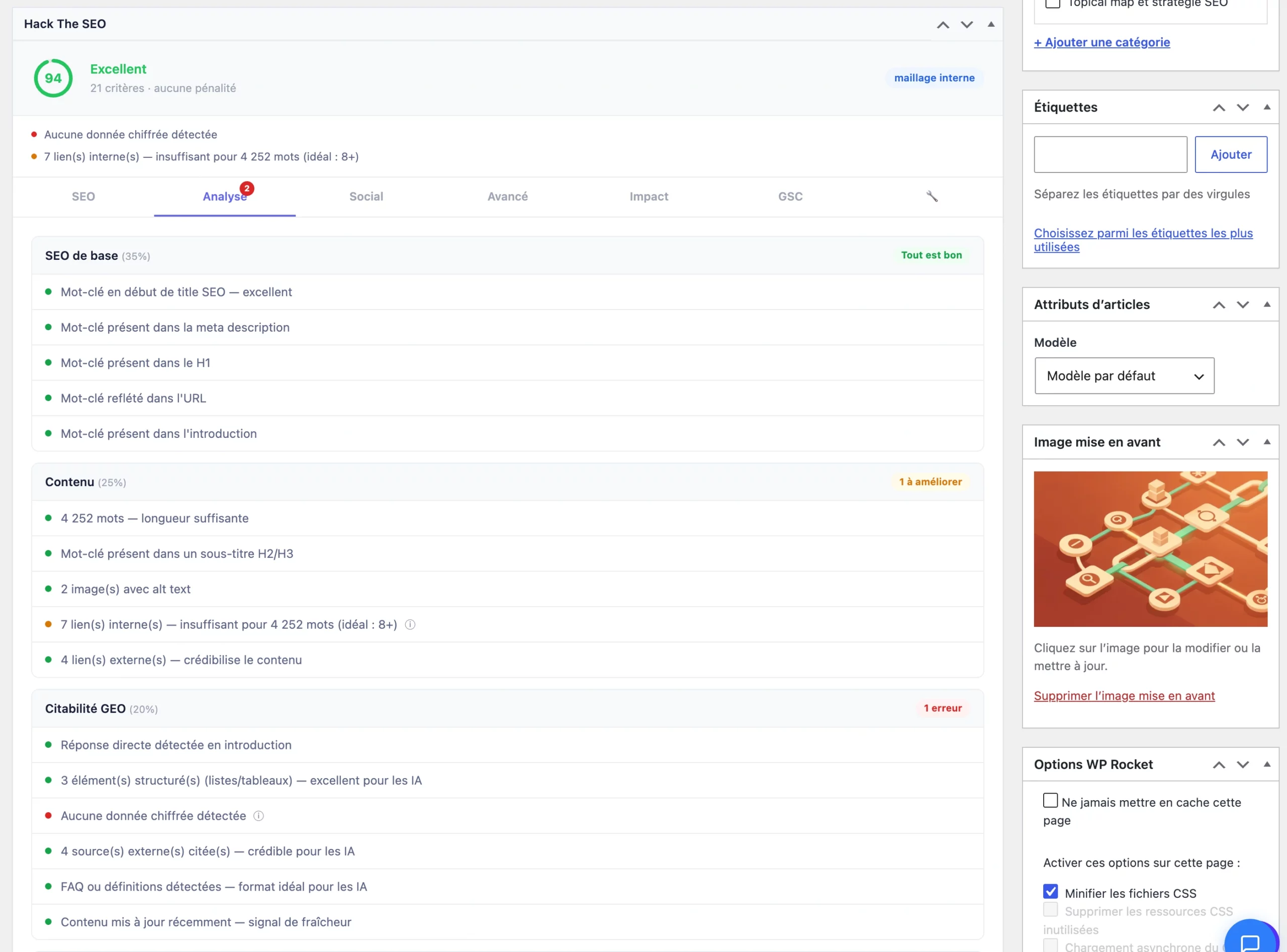
It does not replace your judgment about your site. It replaces hours of manual work. If you want to see how it would handle your site, talk to an expert in a 20-minute demo.
Rank Math vs Yoast: frequently asked questions
How does Rank Math work?
Rank Math is a WordPress plugin that adds an SEO panel to every page and post, and a settings area with modules you can turn on or off. You choose the modules you need (schema, redirections, sitemaps), fill in titles and descriptions, and follow its checklist for each page.
Is Yoast still good?
Yes, Yoast is still a solid choice for titles, descriptions, sitemaps and readability feedback, and many sites run it without problems. It has fewer free extras than Rank Math, so check that the features you need are in the free version before you decide.
Is AIOSEO any good?
All in One SEO is the third big option and many sites use it. We have not tested it enough to rank it against the other two. Its publisher also writes comparison pages, as the other vendors do, so read any vendor comparison with that in mind.
Do I need an SEO plugin at all?
Most WordPress sites benefit from one, because it handles titles, descriptions, sitemaps and schema in one place. A plugin is a set of tools, though. It does not choose your topics or write your pages, so plan time for that or use a tool that does it with your approval.
Last updated on 9 November 2026. Prices and features of third-party plugins were read on their public pages on that date and can change.